At a Glance
- •401 Unauthorized means the server needs valid credentials and did not get them. Despite the name it is about authentication, not permission. If the server already knows who you are and still refuses, the correct code is 403 Forbidden.
- •As a visitor: retype the password by hand instead of pasting, sign out and back in to get a fresh session, clear the cookies for that one site, and open the page in a private window to escape cached credentials and extensions.
- •Every real 401 must include a WWW-Authenticate header. Run curl -i and read it. Basic realm="..." means a web server password prompt, while Bearer error="invalid_token" means your API token expired or was revoked.
- •On a site you own, the most common cause is a credential that expired or was rotated. The second is an Authorization header stripped in transit, usually by Apache running PHP as CGI or by an HTTP client dropping it on a redirect to another hostname.
- •The costliest 401 is a staging password left on after launch: the whole site prompts strangers for a login, Googlebot deindexes the pages, and nothing in your application logs looks wrong. Notifier is free for 10 monitors with SSL and DNS monitoring included, and paid plans start at $4/month for 1-minute checks.
401 Unauthorized is the most badly named status code in HTTP. It does not mean you lack permission. It means the server does not know who you are yet, or no longer believes the credentials you sent. The resource might be sitting there waiting for you, and the only thing between you and it is proof of identity that never arrived or stopped being valid.
That distinction matters because it splits the problem cleanly in two. Either the credential is wrong, expired, or revoked, or the credential is perfectly valid and something between your client and the application threw it away in transit. Those have completely different fixes, and guessing between them is why 401s eat entire afternoons.
This guide covers what a 401 really means, the visitor fixes that actually work, a one command diagnosis that tells you which layer is asking for credentials, the three causes behind nearly every unexpected 401 on a site you run, how API clients should handle one, and the one 401 scenario that quietly destroys search traffic. If you do not run the site, skip to the visitor section.
What 401 Unauthorized Actually Means
The HTTP specification is explicit about this one. A 401 response means the request lacks valid authentication credentials for the target resource, and the server is inviting the client to try again with credentials. The code should really have been called "Unauthenticated." Authorization, in the sense of "you are known and still not allowed," is what 403 Forbidden is for.
There is one rule that makes 401 easier to debug than almost any other error: a 401 response must include a WWW-Authenticate header. That header names the authentication scheme the server expects, and often the reason it rejected what you sent. It is the single most useful thing in the response, and almost nobody looks at it.
HTTP/1.1 401 Unauthorized
WWW-Authenticate: Basic realm="Staging Site"

HTTP/1.1 401 Unauthorized
WWW-Authenticate: Bearer error="invalid_token", error_description="The access token expired"
The first one is a web server asking for a username and password, which is why your browser shows a popup. The second one is an application telling you your token expired, in a machine readable way that most client libraries ignore. Read that header before you change anything.
Every 401 comes from one of two layers, and the WWW-Authenticate header tells you which:
- A web server 401. Nginx, Apache, IIS, or a CDN is enforcing HTTP Basic authentication before your application runs. This is the browser password popup. Your application logs will show nothing at all, because the request never reached it.
- An application 401. Your code received the request, examined a session cookie, API key, or bearer token, and rejected it. The response body usually contains JSON with a message, and your application logs will have an entry.
A third case looks like a 401 and is not: many web applications do not return 401 at all for a logged out user. They return a 302 redirect to a login page instead. If you expected a login screen and got a raw 401, you are almost certainly dealing with an API or a web server level password, not a normal session timeout.
401 Compared to the Errors It Gets Confused With
Half the confusion around 401 comes from servers that send the wrong code, and the other half from codes that sound similar. This table is the fastest way to confirm you are debugging the right thing:
| Code | What It Means | How It Differs From 401 |
|---|---|---|
| 401 | Credentials missing, expired, or invalid | The server does not know who you are. Sending valid credentials would fix it |
| 403 | Known and refused | The server knows exactly who you are and you still cannot have it. Retrying with credentials changes nothing |
| 400 | The request was malformed | The server could not parse what arrived, so identity never came up |
| 404 | Nothing lives at this URL | Sometimes returned deliberately instead of 401 so attackers cannot confirm a resource exists |
| 407 | Proxy authentication required | Identical idea, but the proxy wants credentials, not the destination server. Uses Proxy-Authenticate |
| 419 | Laravel CSRF token mismatch | Not a real HTTP code. Your session is fine, the form token expired |
| 440 | IIS login timeout | Microsoft specific. Effectively a 401 after a session expires |
| 302 | Redirect to a login page | What most web applications send instead of a 401 for a logged out browser |
The 401 and 403 rule of thumb:
If sending different credentials could plausibly succeed, the correct code is 401. If no credential in the world would help, the correct code is 403. A great many APIs get this backwards and return 403 for an expired token, which breaks client libraries that are written to refresh on 401 and give up on 403. If you build APIs, getting this right saves your users hours.
If You Are Just Trying to Visit the Site
You do not run the site and you want the page. These are ordered by how often they actually work, so start at the top and stop when the page loads.
1. Retype the Username and Password
Obvious, and still the most common fix. HTTP Basic authentication gives you no feedback beyond "wrong," so a trailing space copied from an email, a capital letter from autocorrect on a phone, or Caps Lock is enough. Type it by hand rather than pasting, and watch for a password manager silently filling a saved credential for a different environment of the same site.
2. Sign Out and Sign Back In
If the site has a normal login and parts of it started returning 401, your session token expired mid visit. A full sign out and sign in issues a fresh one. Just reloading the page reuses the dead token and produces the same error.
3. Clear the Cookies for That One Site
A stale or corrupted session cookie will get rejected on every request. Clear the cookies for that single domain rather than wiping everything:
- Chrome and Edge: click the icon to the left of the address bar, then "Cookies and site data," then "Manage on-device site data," then delete. Or search for the domain at
chrome://settings/content/all. - Firefox: click the padlock, then "Clear cookies and site data."
- Safari: Settings, Privacy, "Manage Website Data," search the domain, remove.
4. Open the Page in a Private Window
A private or Incognito window starts with no cookies and no extensions. If the page loads there, the problem is a stored credential or an extension on your normal profile, not the site. This is also the fastest way to escape cached HTTP Basic credentials, because browsers hold onto those for the rest of the browsing session and will keep resending the wrong username without asking you again.
5. Check Your System Clock
Token based logins are time sensitive. If your computer's clock is off by more than a few minutes, a freshly issued token can look already expired or not yet valid, and every request comes back 401. Turn on automatic time synchronization and reload. The same clock problem causes NET::ERR_CERT_DATE_INVALID, so if you have seen certificate warnings recently, this is very likely your cause.
6. Turn Off a VPN or Corporate Proxy
Some corporate proxies strip or rewrite the Authorization header, and some services invalidate a session when the IP address behind it suddenly changes country. If you are on a VPN, switch it off and retry. If the error specifically says 407 Proxy Authentication Required, the proxy itself wants credentials and your network administrator has to supply them.
What will not help:
Restarting your router, flushing DNS, reinstalling your browser, or disabling your antivirus. A 401 is a completed, successful round trip to the server: it reached the site, the site answered, and the answer was "who are you?" Nothing about your local network is involved. If the page still fails in a private window on a different network, the credential or the site configuration is the problem and only the site owner can fix it.
Diagnose It in One Command
If you run the site, do not start editing configuration. Start by reading the headers, because the 401 tells you which layer produced it:
curl -i https://example.com/api/account
Look at the WWW-Authenticate header and the Server header together. This table routes what you see to the thing that needs changing:
| What You See | Who Sent It | Where to Look |
|---|---|---|
| Basic realm="..." | Nginx, Apache, or IIS | auth_basic in your Nginx config, or AuthType Basic in .htaccess. The realm string is usually the name you typed when you set it up |
| Bearer error="invalid_token" | Your application or API gateway | The token expired, was revoked, or was signed with a key the server no longer trusts |
| Bearer error="insufficient_scope" | Your application | The token is valid but missing a scope. This should really be a 403 |
| JSON body with a message, no popup | Your application | Application logs will have the matching entry. Read the message field |
| A Cloudflare branded page | Cloudflare Access or a Worker | Zero Trust application policies, or an API token used against the wrong account |
| 401 with no WWW-Authenticate at all | A non compliant application | Almost always hand written middleware. Treat it as an application 401 and read the code |
Confirm the Credential Is Actually Being Sent
Before blaming the credential, prove it left your machine and arrived intact. The -v flag prints the request headers curl sent:
# Bearer token
curl -v -H "Authorization: Bearer YOUR_TOKEN" https://example.com/api/account

# HTTP Basic, with curl building the header for you
curl -v -u username:password https://example.com/staging/

# Build the Basic header by hand to check exactly what gets encoded
printf 'username:password' | base64
Lines starting with > are what curl sent, lines starting with < are what the server replied. If you see the Authorization header on a > line and the server still says 401, the credential is either wrong or it was dropped somewhere between curl and your application. The stripped header section covers the second case.
Count the 401s in Your Access Log
A handful of 401s per day is normal on any site with a login. A sudden wall of them means a credential rotated or a deploy changed something. These one liners give you the shape of it:
# Which URLs are returning 401, most frequent first
awk '$9 == 401 {print $7}' /var/log/nginx/access.log | sort | uniq -c | sort -rn | head -20

# When did they start? 401 count by hour
awk '$9 == 401 {print substr($4, 2, 14)}' /var/log/nginx/access.log | uniq -c

# How many distinct clients are affected (one client means one broken integration)
awk '$9 == 401 {print $1}' /var/log/nginx/access.log | sort -u | wc -l
That last number is the one that decides your next hour. One IP address means a single integration broke and the site is fine. Hundreds of distinct IP addresses means authentication is broken for everyone, and you should be looking at your most recent deploy or certificate rotation.
Cause 1: The Credential Expired, Rotated, or Was Revoked
In production, this is the cause. Credentials have finite lives and nothing warns you when one ends. The code that worked for eight months keeps running, the credential quietly dies, and the first symptom is a 401 that nobody connects to a change, because there was no change.
Expired Access Tokens
Most OAuth access tokens live between 15 minutes and an hour. Long running scripts that fetch a token once at startup will work perfectly in testing and fail the next morning. A JWT carries its own expiry in the payload, and you can read it without any library:
# Decode the payload of a JWT (the middle section between the dots)
echo "$TOKEN" | cut -d. -f2 | base64 -d 2>/dev/null | python3 -m json.tool

# Convert the exp claim to a readable date
date -d @1789123456
If exp is in the past, you found it. The fix is not a longer expiry. It is refreshing the token before every batch of work, or catching the 401 and refreshing once before retrying. See the API client section for the pattern.
Clock Skew on the Server
A token that says it is valid from 09:00 to 10:00 is rejected by a server whose clock reads 08:55. Containers and virtual machines drift, and a host that has been suspended and resumed can be minutes out. Check it:
timedatectl status
# Look for "System clock synchronized: yes" and "NTP service: active"

# Inside a container, compare against the host
date -u
If synchronization is off, enable it with timedatectl set-ntp true. Intermittent 401s that resolve themselves and come back are very often clock drift rather than anything in your code.
Rotated API Keys and Signing Secrets
Someone rotated a key in a provider dashboard and updated it in three of the four places it lives. Or a colleague left the company and their personal access token was revoked along with their account, taking a production integration with it. Both are extremely common.
-
Never use a personal token for a service. Create a dedicated service account or machine token with a clear name like
prod-billing-syncso nobody revokes it by accident and everyone knows what breaks if they do. - Grep for the old key before you rotate. Keys hide in environment files, CI secrets, cron scripts, a Lambda's configuration, and somebody's local machine. Finding all four copies before rotating is much cheaper than debugging the one you missed.
-
Watch for test and live key mixups. Payment providers in particular issue separate test and live keys, and a live endpoint given a test key returns 401. Check the prefix: Stripe uses
sk_test_andsk_live_, and the mistake is easy to make when environments share a deploy pipeline.
Session Configuration Changes
If every logged in user gets a 401 at the same moment, you changed the thing that signs sessions. A regenerated Django SECRET_KEY, a new Laravel APP_KEY, or a new Rails secret_key_base invalidates every existing session cookie instantly. The same thing happens when you scale to a second application server and sessions live in local memory instead of a shared store, so requests randomly land on the server that has never seen the session.
Cause 2: The Authorization Header Never Reached Your Application
This is the 401 that makes people question their sanity. The credential is correct. curl shows it being sent. The application insists no credential arrived. Something in between removed it, and there are four usual suspects.
Apache Running PHP as CGI or FastCGI
The classic. When PHP runs through CGI or FastCGI, Apache does not pass the Authorization header through to the script, for historical security reasons. Every bearer token and Basic credential silently disappears. This is why WordPress Application Passwords and countless REST APIs return 401 on shared hosting while working perfectly on a local machine.
On Apache 2.4.13 and later, the direct fix is one line in your virtual host or .htaccess:
CGIPassAuth OnIf your host runs an older Apache or will not allow that directive, the mod_rewrite workaround puts the header back into the environment where PHP can read it:
<IfModule mod_rewrite.c>
    RewriteEngine On
    RewriteCond %{HTTP:Authorization} ^(.*)$
    RewriteRule .* - [E=HTTP_AUTHORIZATION:%{HTTP:Authorization}]
</IfModule>
To confirm this is your problem, print what PHP actually received:
<?php
// Put this in a temporary file, request it with an Authorization header, then delete it
var_dump(getallheaders());
var_dump($_SERVER['HTTP_AUTHORIZATION'] ?? 'MISSING');
If curl sent the header and PHP prints MISSING, the header was stripped in transit and no amount of fixing your credentials will help.
Redirects That Drop the Credential
Since version 7.58, curl deliberately drops the Authorization header when following a redirect to a different host, so your secret is not handed to a third party. Most HTTP libraries do the same. So a request to http://example.com/api that redirects to https://api.example.com/ arrives with no credential and returns 401.
# See every hop and which headers survive each one
curl -v -L -H "Authorization: Bearer $TOKEN" http://example.com/api
The fix is to call the final URL directly rather than relying on a redirect. Use the canonical HTTPS hostname in your client configuration and the redirect never happens. Do not reach for --location-trusted unless you fully control every host in the chain, because it forwards your credential to wherever the redirect points. If a redirect loop is involved as well, our guide to fixing ERR_TOO_MANY_REDIRECTS covers the underlying configuration.
Nginx, Proxies, and Underscores
Nginx discards incoming headers whose names contain underscores by default. Authorization is safe, but a custom header like X_API_KEY vanishes before your application sees it while X-API-Key passes fine. The simplest fix is renaming the header to use hyphens, which is what the specification prefers anyway. If you cannot change the client, enable it explicitly:
http {
    underscores_in_headers on;
}
Also check your proxy block for an Authorization header being cleared or overwritten. A line like proxy_set_header Authorization ""; added during some past debugging session will do exactly this, forever, silently.
CORS Preflight Requests
When a browser makes a cross origin request with an Authorization header, it first sends an OPTIONS request to ask permission. That preflight carries no credentials by design. If your authentication middleware runs before your CORS handling, the preflight gets a 401, and the browser never sends the real request. The console reports a CORS failure rather than a 401, which sends people off debugging entirely the wrong thing.
# Reproduce the preflight exactly as the browser sends it
curl -i -X OPTIONS https://api.example.com/v1/account \
  -H "Origin: https://app.example.com" \
  -H "Access-Control-Request-Method: GET" \
  -H "Access-Control-Request-Headers: authorization"
A correct response is a 204 or 200 with Access-Control-Allow-Headers including authorization. If you get a 401 here, move your CORS middleware ahead of your authentication middleware and exempt OPTIONS from authentication.
Cause 3: A Password Left On Something That Should Be Public
This is the cheapest 401 to fix and by far the most expensive to miss. A staging site gets HTTP Basic authentication so the client can preview it privately. Months later the site launches, the configuration gets copied to production, and part or all of the live site now asks the entire internet for a password.
What makes it brutal is that it is invisible to the people who built it. Their browser cached the credentials during development, so the site loads perfectly for them. Every visitor without those cached credentials sees a password popup or a blank 401 page. Nothing in the application logs looks wrong, because the application is never reached.
This one costs search traffic fast. Googlebot does not authenticate. A page that returns 401 is treated as inaccessible, and if it keeps returning 401, Google drops it from the index. Unlike a 503, which Google reads as temporary and waits out patiently, a 401 gets no such benefit. A staging password left on production for two weeks can remove a site from search results, and recovering the rankings takes far longer than the outage did.
Finding and Removing the Password
On Nginx, search your configuration for the directives that switch it on:
grep -rn "auth_basic" /etc/nginx/
# Remove or comment out both lines, then:
nginx -t && systemctl reload nginx
On Apache, it lives in a virtual host or .htaccess file:
grep -rn "AuthType\|Require valid-user" /etc/apache2/ /var/www/
# Remove the AuthType, AuthName, AuthUserFile and Require valid-user lines, then:
apachectl configtest && systemctl reload apache2
Also check the layers above your server. Cloudflare Access policies, a hosting control panel's "password protect directory" toggle, a WordPress maintenance mode plugin, and Shopify's storefront password page all produce the same visitor experience from somewhere other than your server configuration.
WordPress REST API 401s
WordPress has its own well known 401, usually reported as rest_not_logged_in or "You are not currently logged in." It has three common triggers:
- The Authorization header was stripped. The Apache CGI problem above. This breaks Application Passwords specifically, and it is the first thing to test.
- Application Passwords are disabled. They require HTTPS, and some security plugins and hosts turn the feature off entirely. Check Users, then your profile, for the Application Passwords section. If it is missing, something disabled it.
- A security plugin is blocking REST access. Wordfence, iThemes Security, and several others offer an option to restrict the REST API to logged in users. Temporarily disable the plugin to confirm before changing anything else.
If you run WordPress sites for clients, our guide to WordPress uptime monitoring covers the wider set of failures worth watching for.
If You Are Calling an API and Getting 401
A 401 from an API is a different situation from a 401 in a browser, and it demands a very specific retry behavior.
Never retry a 401 with the same credential:
Unlike a 429 or a 503, waiting does not help a 401. The credential that just failed will fail identically in ten seconds and in ten minutes. A retry loop on a 401 does nothing but burn rate limit and, on many providers, trigger a temporary account lock for repeated failed authentication. Refresh the credential once, retry once, then stop and raise an alert.
The Correct Refresh Pattern
import requests

def call_api(url, token_store):
    headers = {"Authorization": f"Bearer {token_store.access_token}"}
    response = requests.get(url, headers=headers, timeout=10)

    if response.status_code == 401:
        # Refresh exactly once, then retry exactly once
        token_store.refresh()
        headers = {"Authorization": f"Bearer {token_store.access_token}"}
        response = requests.get(url, headers=headers, timeout=10)

        if response.status_code == 401:
            # The refresh token is dead too. A human has to authorize it again.
            raise PermissionError(
                f"Authentication failed after refresh: "
                f"{response.headers.get('WWW-Authenticate', 'no header')}"
            )

    response.raise_for_status()
    return response.json()
Two details matter here. Refresh once, not in a loop, because a dead refresh token cannot fix itself. And put the WWW-Authenticate header into your exception message, because when this fires at 2 AM, that header is the difference between "the token expired" and "the token was revoked" without any further investigation.
Common Client Side Mistakes
- The word Bearer is missing.
Authorization: abc123is not the same asAuthorization: Bearer abc123. The scheme name and the single space are both required. - A newline in the token. Reading a key from a file with
cator piping throughbase64without-w 0leaves a trailing newline inside the header value. Useprintfrather thanechoand strip whitespace when loading from a file. - The key is for the wrong environment or region. Test key against live endpoint, or an EU account key sent to a US API host. Both return 401 with no hint about which mismatch you hit.
- The header name was lowercased or rewritten by a framework. HTTP header names are case insensitive, but some middleware normalizes them in ways a strict server rejects. Check with
curl -vrather than trusting your library.
For the full set of checks worth running against an API beyond authentication, see how to monitor an API endpoint.
Catching a 401 Before Your Visitors Do
A 401 is the error most likely to go unreported. A 500 fills your error tracker. A 502 takes the whole site down loudly. A 401 shows a password popup or a plain page to people who assume they did something wrong, close the tab, and never tell you. Meanwhile your dashboards look completely healthy, because from the server's point of view it answered every request successfully.
The answer is to check your public URLs from outside, on a schedule, the way a stranger would. An uptime monitor requests your pages with no cookies and no cached credentials, which is exactly the visitor whose experience you cannot see.
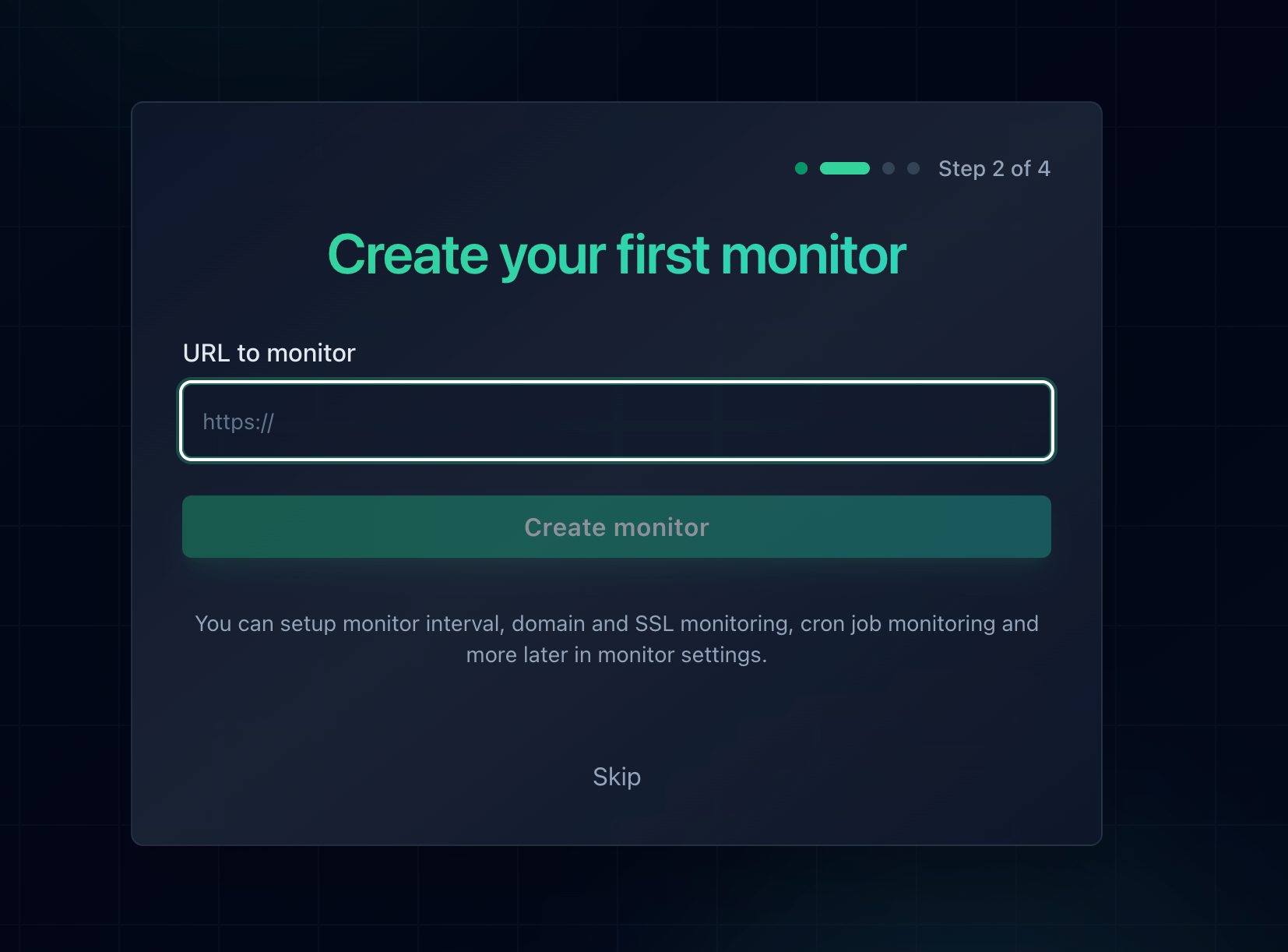
Add the URL and every check arrives with no cookies and no cached credentials, the same as a first time visitor.
What to Monitor for Authentication Problems
- Your production homepage and top landing pages. This catches a staging password copied to production within one check interval, which is the single highest value thing on this list.
- A public health endpoint that sits outside authentication. Expose something like
/healththat requires no credentials and returns 200 only when your database and cache are reachable. This is the standard way to monitor an authenticated service without handing your monitoring tool a production key. - Your login page itself. If the page users sign in on starts returning 401 or 403, nobody can get into the product at all, even though the marketing site is fine.
- Every hostname you own. Apex and www, the app subdomain, the API subdomain, and the docs. Authentication configuration is per virtual host, so one can break while the others look perfect.
- Your SSL certificates. An expiring certificate produces a different failure, but it breaks logins just as completely. SSL monitoring is free on every Notifier plan, including the free one.
Where monitoring has a blind spot, and what to do about it:
A monitor sends no credentials, so anything genuinely behind a login will always answer it with a 401. That is correct behavior, not a fault, but it means you cannot simply point a monitor at /dashboard and expect a green check. Point it at a public health endpoint instead, and keep reviewing the 401 counts in your access log for the failures that only affect authenticated users. Monitoring covers the "broken for everyone" case; your logs cover the rest.
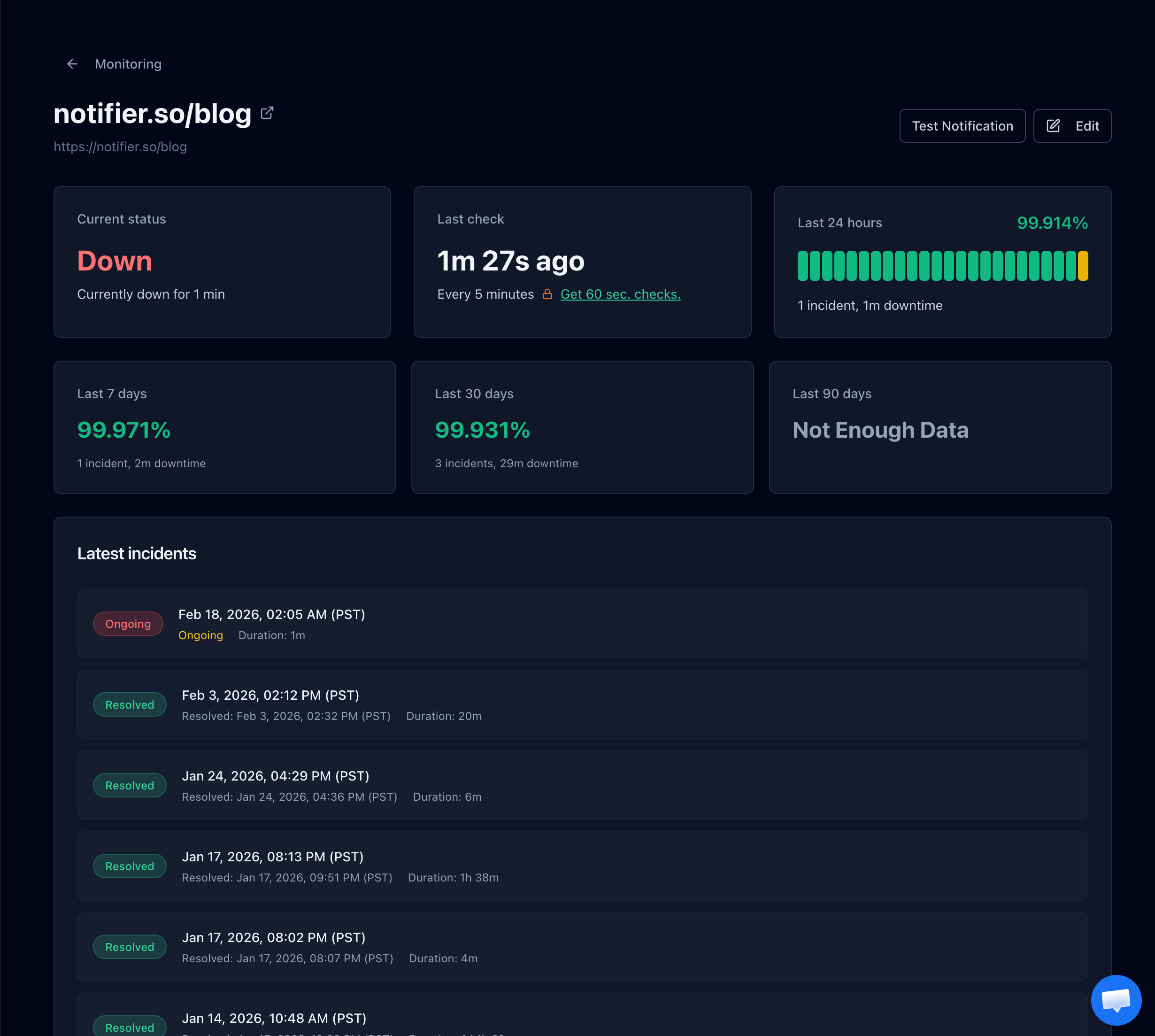
The incident history gives you the exact minute checks started failing, which is the deploy you need to look at.
Get the Alert Where You Will Actually See It
An alert that lands in an inbox you check twice a day is not much better than a customer email. For an authentication failure, which locks out everyone at once, you want the notification to reach you immediately. Notifier sends alerts by email, SMS, phone call, and Slack on every plan, including the free one, so a site wide 401 wakes somebody up rather than waiting until morning.
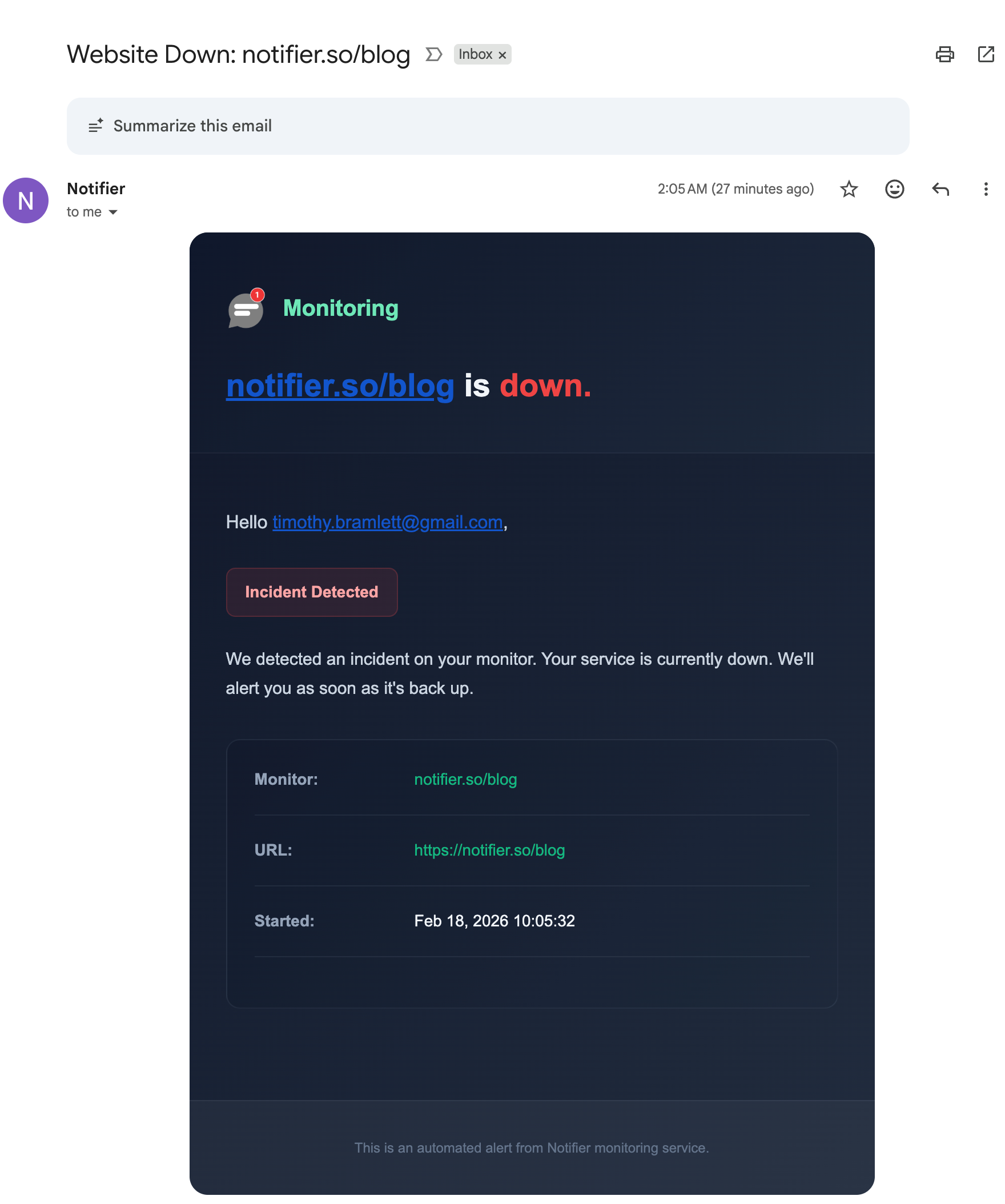
The alert names the monitor and the minute the incident started, so you know which deploy to look at.
Free Monitoring Tiers Compared
You do not need to pay anything to catch a 401 on a public page. Here is what the main free tiers give you:
| Tool | Free Tier | SSL Monitoring | Notes |
|---|---|---|---|
| Notifier | 10 monitors, 5 min checks, 5 status pages | Free on every plan | Email, SMS, phone, and Slack alerts on free. Commercial use allowed. Solo is $4/month for 20 monitors at 1 minute. |
| UptimeRobot | 50 monitors, 5 min checks, 1 status page | Included | Free plan is non-commercial only. SMS and voice sold as credits. |
| Better Stack | 10 monitors, 3 min checks, 1 status page | Included | Strong incident management, but pricing is per responder and adds up quickly for a team. |
| StatusCake | 10 monitors, 5 min checks | 1 SSL monitor on free | Status pages are a separate paid product, and SMS uses paid credits. |
| Uptime Kuma | Unlimited, self-hosted | Included | Free and flexible, but you have to host and maintain it, and it cannot tell you your server is unreachable if it runs on that server. |
Important: UptimeRobot restricted its free plan to non-commercial use only in October 2024. If the site belongs to a business or a client, that free tier is not an option. Notifier's free tier has no such restriction.
Pricing changes, so verify before committing. Our comparison of free website monitoring tools covers each free tier in detail, and how to set up website monitoring walks through setup in about five minutes. If authentication is one of several things that keep breaking, why your website keeps going down covers the patterns behind recurring failures.
Frequently Asked Questions
What does 401 Unauthorized mean?
It means the server requires valid authentication credentials for that resource and did not receive any, or received ones it rejected. Despite the name, it is about authentication rather than permission: the server does not know who you are. If the server does know who you are and still refuses, the correct code is 403 Forbidden. Every genuine 401 response must include a WWW-Authenticate header naming the scheme the server expects.
What is the difference between a 401 and a 403 error?
A 401 means you have not proven who you are, so sending valid credentials could fix it. A 403 means the server knows exactly who you are and is refusing anyway, so no credential will help. The practical rule: if retrying with different credentials could plausibly succeed, it should be a 401. If nothing would help, it should be a 403. Many APIs get this backwards and return 403 for an expired token, which breaks client libraries written to refresh on a 401.
How do I fix a 401 error in Chrome?
Retype the username and password by hand rather than pasting, in case a password manager is filling a saved credential from a different environment. If the site has a normal login, sign out and sign back in to get a fresh session. Then clear the cookies for that one domain via the icon to the left of the address bar. Finally, open the page in an Incognito window, which both clears cached HTTP Basic credentials and rules out extensions. Restarting your router or reinstalling the browser will not help, because a 401 is a successful reply from the server.
Why does my API return 401 even though my token is correct?
Usually because the Authorization header never reached your application. The most common cause is Apache running PHP as CGI or FastCGI, which strips the header unless CGIPassAuth is on. The second is a redirect to a different hostname, since curl and most HTTP libraries drop the Authorization header on a cross host redirect for security. Run curl -v and compare the headers you sent against what the application received. If curl shows the header and the application says it is missing, something in between removed it.
Should I retry a request that returns 401?
Not with the same credential. Unlike a 429 or a 503, waiting changes nothing, because the credential that just failed will fail identically later. Refresh the token once, retry once, and if that also returns 401, stop and raise an alert so a human can authorize it again. Retry loops on a 401 waste rate limit and can trigger a temporary account lock for repeated failed authentication attempts.
Why is my whole website asking for a password?
HTTP Basic authentication is still enabled, almost always because a staging configuration was copied to production. Search your Nginx config for auth_basic or your Apache config and .htaccess files for AuthType and Require valid-user, remove those lines, test the configuration, and reload. Also check Cloudflare Access policies, your hosting control panel's directory protection setting, and any maintenance mode plugin, since each produces the same result from a different layer.
Does a 401 error hurt SEO?
Yes, and quickly. Googlebot does not authenticate, so a URL returning 401 is treated as inaccessible, and a URL that keeps returning 401 gets dropped from the index. Google does not extend a 401 the patience it extends a 503, which it reads as temporary. A staging password accidentally left on production for a couple of weeks can remove pages from search results, and rankings take considerably longer to recover than the mistake took to make.
Why do all my users suddenly get a 401 at the same time?
Something that signs sessions changed. Regenerating a Django SECRET_KEY, a Laravel APP_KEY, or a Rails secret_key_base invalidates every existing session cookie at once. The other common trigger is scaling to a second application server while sessions are stored in local memory, so requests that land on the new server have no matching session. Move sessions to a shared store such as Redis or your database and the problem disappears.
Will uptime monitoring catch 401 errors?
It catches the ones that break the site for everyone, such as a staging password left on production or a misconfigured virtual host, because a 401 counts as a failed check and triggers an alert within one check interval. It will not catch a 401 that only affects logged in users, since monitors send no credentials, so expose a public health endpoint for those and review your access log's 401 counts as well. Notifier checks every 5 minutes on the free plan and every minute on the $4/month Solo plan, with email, SMS, phone call, and Slack alerts and free SSL monitoring.