At a Glance
- •ERR_SSL_PROTOCOL_ERROR means the browser and the server could not complete the TLS handshake. This is a connection problem, not a certificate content problem, which is what makes it different from NET::ERR_CERT_DATE_INVALID.
- •The three fastest visitor-side fixes: correct your system clock, turn off HTTPS or SSL scanning in your antivirus, and disable QUIC at chrome://flags/#enable-quic. One of those three resolves most cases where the site works for everyone else.
- •If you own the site, the most common causes are a server still offering only TLS 1.0 or 1.1 (browsers dropped both), a missing ssl keyword on the listen 443 directive in Nginx, or a Cloudflare minimum TLS version set higher than your visitors support.
- •Run openssl s_client -connect example.com:443 -servername example.com to see exactly which TLS versions and ciphers your server offers. The handshake output names the failure in one line.
- •Notifier monitors SSL certificates and uptime free on up to 10 URLs, with email, SMS, and phone alerts. Paid plans start at $4/month and SSL monitoring is included on every plan, including free.
ERR_SSL_PROTOCOL_ERROR is the message Chrome shows when the secure connection fails before any page content is ever requested. The browser opened a socket, started a TLS handshake, and the conversation broke down. No certificate was rejected, no page was found or missing. The two sides simply could not agree on how to talk securely.
That distinction matters, because it changes where you look. This guide covers what the error actually means, the fastest visitor fixes ranked by how often they work, the OS specific steps for Windows and Mac, and the server side fixes for Nginx, Apache, and Cloudflare. Every fix includes the exact command or config line.
What ERR_SSL_PROTOCOL_ERROR Actually Means
Every HTTPS request starts with a TLS handshake. Your browser says which TLS versions and cipher suites it supports. The server picks one, presents its certificate, and both sides derive a shared key. Only after that does a single byte of the actual web page move.
ERR_SSL_PROTOCOL_ERROR means that handshake failed. Chrome words it like this:
This site can't provide a secure connection
example.com sent an invalid response.
ERR_SSL_PROTOCOL_ERROR
Other browsers describe the same failure differently, which is why people searching for this problem land on wildly different pages:
- Chrome and Edge: ERR_SSL_PROTOCOL_ERROR, or "sent an invalid response"
- Firefox: "Secure Connection Failed" with SSL_ERROR_NO_CYPHER_OVERLAP or SSL_ERROR_PROTOCOL_VERSION_ALERT
- Safari: "Safari can't establish a secure connection to the server"
- curl: "error:0A000102:SSL routines::unsupported protocol" or "sslv3 alert handshake failure"
How this differs from certificate errors
NET::ERR_CERT_DATE_INVALID and ERR_CERT_AUTHORITY_INVALID mean the handshake worked and the browser then rejected the certificate it received. ERR_SSL_PROTOCOL_ERROR means the handshake itself never completed, so the browser usually never got a usable certificate at all. If you are chasing an expired certificate, you are in the wrong guide. If the connection dies before that point, keep reading.
Quick Fixes to Try First (Visitor Side)
Before assuming the site is broken, rule out your own machine. A surprising share of ERR_SSL_PROTOCOL_ERROR reports come from one browser on one computer while the site works fine for everyone else. These are ordered by how often they actually fix the problem.
1. Check Your System Clock
TLS validation is time sensitive. A badly wrong clock usually produces a certificate date error, but depending on the browser build and how the connection fails it can surface as a generic protocol error instead. It costs ten seconds to rule out, so do it first. Set your clock to sync automatically:
# Windows: Settings > Time & language > Date & time
#   Turn on "Set time automatically" then click "Sync now"

# macOS: System Settings > General > Date & Time
#   Turn on "Set time and date automatically"

# Linux
sudo timedatectl set-ntp true
timedatectl status
This is the single most common cause on a machine that has been powered off for a long time, has a dead CMOS battery, or was restored from an old image.
2. Turn Off HTTPS Scanning in Your Antivirus
Avast, AVG, ESET, Kaspersky, and Bitdefender all ship a feature that intercepts HTTPS traffic to scan it. To do that, they act as a man in the middle, terminating the real TLS connection and re-encrypting it with their own certificate. When that layer misbehaves, Chrome sees a broken handshake and shows ERR_SSL_PROTOCOL_ERROR.
Look for a setting named "HTTPS scanning", "SSL/TLS scanning", "Encrypted connections scanning", or "Web shield" and turn it off temporarily. If the site loads, that was your culprit. Add the site to the antivirus exclusion list rather than leaving scanning off permanently.
3. Disable QUIC in Chrome
Chrome tries QUIC (HTTP/3 over UDP) before falling back to TCP and TLS. On some networks, middleboxes mangle QUIC traffic and Chrome reports a protocol error instead of falling back cleanly. Paste this into your address bar:
chrome://flags/#enable-quic
Set "Experimental QUIC protocol" to Disabled, relaunch Chrome, and try again. If the site loads, the problem is QUIC on your network path, not the site. Edge uses the same flag at edge://flags/#enable-quic.
4. Clear the Browser Cache and Test in Incognito
Open an incognito window and load the site. Incognito starts with no extensions and no cached state, so if it works there, the cause is local. Then clear cached images and files plus cookies for that site through chrome://settings/clearBrowserData.
5. Disable Extensions, VPNs, and Proxies
Corporate VPNs and proxy clients frequently perform TLS inspection with the same technique your antivirus uses, and with the same failure mode. Disconnect the VPN, turn off any proxy under your OS network settings, and disable extensions one at a time. Ad blockers and privacy extensions that rewrite requests are the usual suspects.
6. Try a Different Browser and a Different Network
Load the site in Firefox and on your phone over mobile data. This one test splits the problem cleanly. Broken on every browser and every network means the server is misconfigured. Broken only on your machine means it is local. Broken only on your office Wi-Fi means a network middlebox is inspecting TLS. Our guide on checking whether a site is down for everyone or just you walks through confirming this properly.
If the site fails for everyone, no amount of browser tweaking will help. The rest of this guide is for the person who owns the server.
The 8 Most Common Causes of ERR_SSL_PROTOCOL_ERROR
Roughly in order of how often each one turns out to be the answer:
| Cause | Who It Affects | Typical Fix |
|---|---|---|
| Wrong system clock | One visitor | Enable automatic time sync |
| Antivirus or VPN TLS inspection | One visitor | Disable HTTPS scanning or add an exclusion |
| QUIC or HTTP/3 interference | One network | Disable QUIC in chrome://flags |
| Server offers only TLS 1.0 or 1.1 | Everyone | Enable TLS 1.2 and 1.3 in the server config |
| No cipher suite overlap | Everyone | Replace a hand written cipher list with a modern one |
| Plain HTTP served on port 443 | Everyone | Add the ssl keyword to listen 443 in Nginx |
| Cloudflare minimum TLS version too high | Older clients | Lower minimum TLS to 1.2 in the dashboard |
| Universal SSL still provisioning | Everyone, temporarily | Wait for the certificate to issue, then retest |
Notice the split. The first three affect a single person or a single network. The rest break the site for every visitor. Establishing which group you are in takes thirty seconds and saves you from editing server configs to fix a stale antivirus setting.
Windows and Mac Specific Fixes
Windows: Clear the SSL State
Windows maintains an SSL state cache, including cached client certificates, alongside the certificate store that Chrome and Edge both rely on. Clearing it resets stale TLS state that a normal browser cache clear does not touch.
- 1. Press Windows key + R, type
inetcpl.cpl, press Enter - 2. Open the Content tab
- 3. Click "Clear SSL state"
- 4. Restart your browser
Windows: Confirm TLS 1.2 and 1.3 Are Enabled
In the same Internet Properties window, open the Advanced tab and scroll to the bottom. Make sure "Use TLS 1.2" is checked, and uncheck the deprecated "Use SSL 3.0", "Use TLS 1.0", and "Use TLS 1.1" boxes. A "Use TLS 1.3" checkbox appears on recent Windows 11 builds and should be checked too, but it is absent on Windows 10, which is normal. A machine locked to old protocols by group policy cannot negotiate with any modern server.
Windows: Reset the Network Stack
If a proxy or a removed VPN left broken settings behind, reset the stack from an administrator command prompt:
ipconfig /flushdns
netsh winsock reset
netsh int ip reset
netsh winhttp reset proxy
Reboot afterward. These are the same commands that resolve a stubborn ERR_CONNECTION_TIMED_OUT, because both errors can trace back to a corrupted Winsock catalog.
macOS: Flush Caches and Check Keychain
sudo dscacheutil -flushcache
sudo killall -HUP mDNSResponder
Then open Keychain Access, search for the site's domain, and delete any old certificate entries you find under the login or System keychain. A leftover certificate from a previous VPN or antivirus install is a common Mac cause. Also check System Settings, then Network, then your active connection, and confirm no proxy is enabled under Details.
How to Diagnose the Server Side (If You Own the Site)
Do not guess. The TLS handshake tells you exactly what went wrong if you ask it directly. Start here before touching any config file.
Step 1: Inspect the Handshake With openssl
openssl s_client -connect example.com:443 -servername example.com
A healthy connection prints the certificate chain and ends with a line like Protocol : TLSv1.3 and a negotiated cipher. A broken one fails fast with something like sslv3 alert handshake failure or no protocols available. The -servername flag sends SNI, which matters on any host serving multiple sites from one IP.
Step 2: Test Each TLS Version Individually
This tells you precisely which versions your server will accept:
openssl s_client -connect example.com:443 -servername example.com -tls1_3 </dev/null
openssl s_client -connect example.com:443 -servername example.com -tls1_2 </dev/null
openssl s_client -connect example.com:443 -servername example.com -tls1_1 </dev/null
If TLS 1.2 and 1.3 both fail while 1.1 succeeds, you found the problem. Chrome removed TLS 1.0 and 1.1 support in 2020, and every current browser followed. A server that only speaks those versions is invisible to modern browsers even though the certificate is perfectly valid.
Step 3: List the Ciphers Your Server Offers
nmap --script ssl-enum-ciphers -p 443 example.comThis prints every protocol version and cipher suite the server accepts, with a letter grade per version. If the TLS 1.2 section is empty or lists only ciphers marked as weak, browsers have nothing acceptable to negotiate with and the handshake dies. That is the "no cipher overlap" case that Firefox names explicitly as SSL_ERROR_NO_CYPHER_OVERLAP.
Step 4: Confirm With curl
curl -Iv https://example.comThe verbose output shows the full handshake, including the ALPN negotiation and the certificate subject. If curl succeeds and the browser does not, the difference is almost always something local to the browser or the machine, which sends you back to the quick fixes above.
How to Fix ERR_SSL_PROTOCOL_ERROR in Nginx and Apache
Nginx: The Missing ssl Keyword
This is the classic Nginx cause and it produces ERR_SSL_PROTOCOL_ERROR every single time. If your server block says listen 443; without ssl, Nginx serves plain HTTP on the HTTPS port. The browser sends a TLS ClientHello, gets back an HTTP response in cleartext, and reports an invalid response.
# Wrong: plain HTTP on port 443
server {
    listen 443;
    server_name example.com;
}

# Correct
server {
    listen 443 ssl;
    listen [::]:443 ssl;
    http2 on;
    server_name example.com;

    ssl_certificate     /etc/letsencrypt/live/example.com/fullchain.pem;
    ssl_certificate_key /etc/letsencrypt/live/example.com/privkey.pem;
}
The standalone http2 on; directive requires Nginx 1.25.1 or newer. On older versions, write listen 443 ssl http2; instead and drop the separate line. Check your version with nginx -v.
Nginx: Modern Protocols and Ciphers
Replace any hand written protocol or cipher list with this. It supports every current browser and drops the versions that no longer work anywhere:
ssl_protocols TLSv1.2 TLSv1.3;
ssl_ciphers ECDHE-ECDSA-AES128-GCM-SHA256:ECDHE-RSA-AES128-GCM-SHA256:ECDHE-ECDSA-AES256-GCM-SHA384:ECDHE-RSA-AES256-GCM-SHA384:ECDHE-ECDSA-CHACHA20-POLY1305:ECDHE-RSA-CHACHA20-POLY1305;
ssl_prefer_server_ciphers off;
ssl_session_cache shared:SSL:10m;
ssl_session_timeout 1d;
Always validate before reloading so a typo does not take the site offline:
sudo nginx -t
sudo systemctl reload nginx
Nginx: Point at the Full Chain
Use fullchain.pem, never cert.pem. Serving the leaf certificate alone leaves out the intermediate, and while desktop Chrome often recovers by fetching it, mobile browsers and API clients usually do not. It fails inconsistently, which makes it one of the more frustrating bugs to track down.
Apache: Protocols, Ciphers, and Chain
<VirtualHost *:443>
    ServerName example.com

    SSLEngine on
    SSLProtocol -all +TLSv1.2 +TLSv1.3
    SSLCipherSuite ECDHE-ECDSA-AES128-GCM-SHA256:ECDHE-RSA-AES128-GCM-SHA256:ECDHE-ECDSA-AES256-GCM-SHA384:ECDHE-RSA-AES256-GCM-SHA384
    SSLHonorCipherOrder off

    SSLCertificateFile      /etc/letsencrypt/live/example.com/fullchain.pem
    SSLCertificateKeyFile   /etc/letsencrypt/live/example.com/privkey.pem
</VirtualHost>
sudo apachectl configtest
sudo systemctl reload apache2
Two Apache gotchas worth checking. First, confirm the SSL module is loaded with sudo a2enmod ssl. Second, if you run several HTTPS vhosts on one IP address, every one of them needs SSLEngine on and its own certificate. A vhost missing those falls through to the first matching block, which serves the wrong certificate or refuses the handshake entirely.
Verify With SSL Labs
After reloading, run your domain through the free Qualys SSL Labs server test. It grades your configuration and lists the handshake result for dozens of real browser and OS combinations, so you can see at a glance which clients still fail. Aim for an A. Anything below a B usually means a protocol or cipher problem that will surface as ERR_SSL_PROTOCOL_ERROR for some slice of your visitors.
How to Fix ERR_SSL_PROTOCOL_ERROR on Cloudflare
Cloudflare terminates TLS at its edge, so the handshake your visitors see is Cloudflare's, not your server's. That means the fix is in the dashboard, not on your origin.
1. Check Whether Universal SSL Has Finished Issuing
When you add a domain to Cloudflare, Universal SSL takes anywhere from a few minutes to 24 hours to provision. During that window HTTPS requests fail with a protocol error because there is no edge certificate yet. Go to SSL/TLS, then Edge Certificates, and confirm the status reads Active. If it says Pending Validation, wait, then retest.
2. Lower the Minimum TLS Version
Under SSL/TLS, then Edge Certificates, find Minimum TLS Version. If someone set it to 1.3, every client that does not support TLS 1.3 gets a handshake failure. Set it to TLS 1.2, which is the right balance: secure, and supported by every browser released in the last decade.
3. Review the SSL/TLS Encryption Mode
Check the encryption mode under SSL/TLS, then Overview. Full (strict) is the correct setting for most sites and requires a valid certificate on your origin. Full works with a self signed origin certificate. Flexible sends unencrypted traffic to your origin and is a frequent cause of ERR_TOO_MANY_REDIRECTS when the origin also forces HTTPS. Off disables edge HTTPS entirely, which produces exactly the protocol error you are troubleshooting.
4. Check for a Certificate and Hostname Mismatch
Universal SSL covers your root domain and one level of subdomain, so example.com and www.example.com are fine, but api.staging.example.com is not. Deeper subdomains need Advanced Certificate Manager or a custom uploaded certificate. This one catches people out constantly, because the main site works while one subdomain fails.
Managed host shortcut
On WP Engine, Kinsta, SiteGround, or Cloudways you do not edit the TLS config directly. Instead, look for the SSL section in your host's dashboard, remove and re-issue the certificate, and make sure the site's primary domain in the panel matches the domain visitors actually use. Most of these hosts fully reprovision TLS in under five minutes.
How to Catch TLS Failures Before Your Visitors Do
A TLS failure is the worst kind of outage. Your server is running, your application is healthy, your logs look clean, and every uptime check you run from inside your own network passes. Meanwhile nobody outside can load a single page. Server side dashboards cannot see this, because the connection dies before it reaches your application.
The only thing that catches it is an external check that performs a real TLS handshake against your public URL, exactly like a browser would.
Monitor the Handshake, Not Just the Certificate Date
Certificate expiry monitoring is necessary but not sufficient. A certificate with 60 valid days left is useless if your server stops offering a cipher browsers accept, or if a config change drops the ssl keyword during a deploy. You want a check that actually connects over HTTPS and fails when the connection cannot be established.
Notifier checks your URLs over HTTPS from outside your infrastructure, so a failed handshake registers as an incident within one check cycle. SSL certificate monitoring is included free on every plan, including the free tier, and it warns you well before expiry rather than after. Our SSL certificate monitoring guide covers the expiry side in depth.
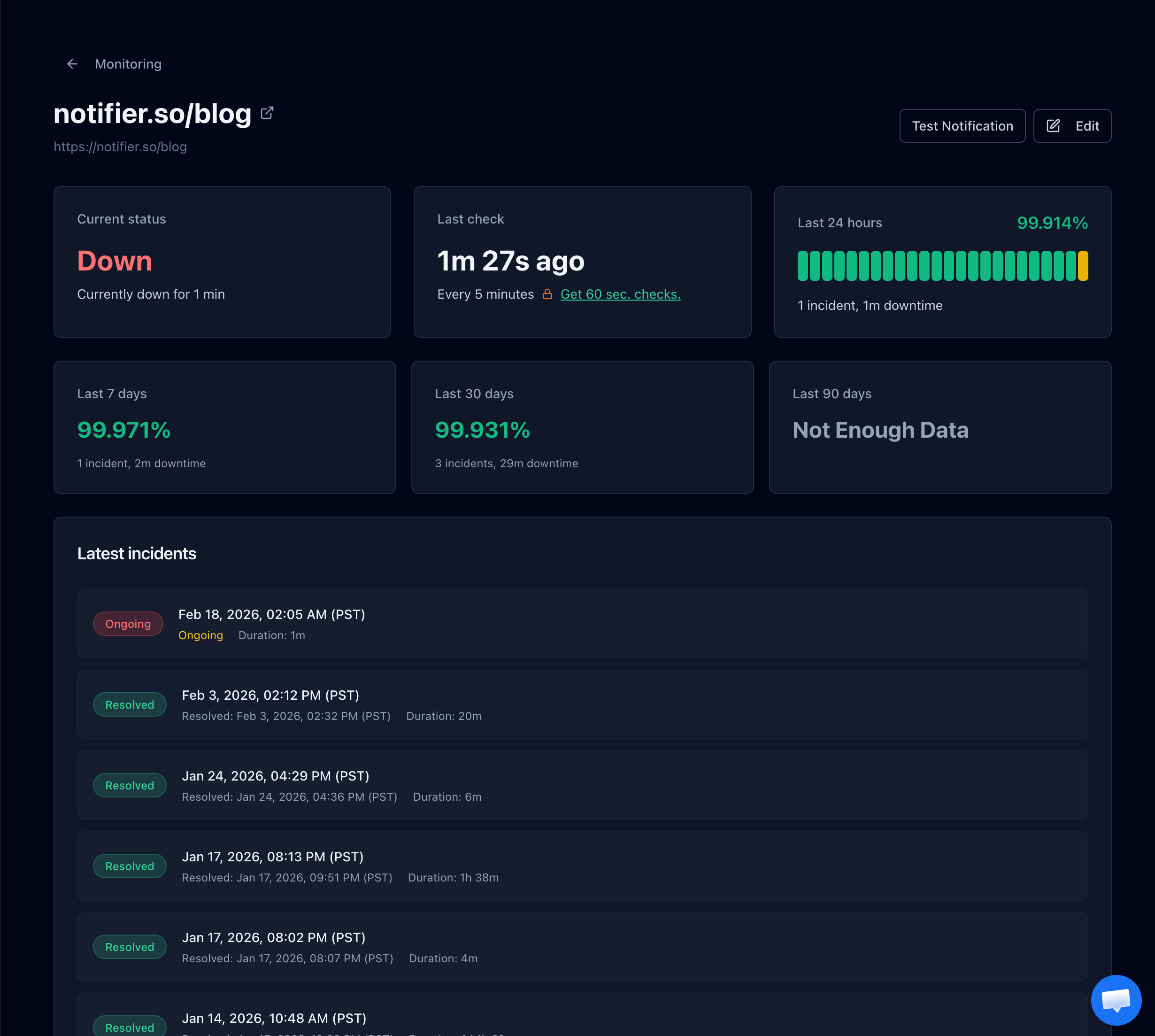
A failed TLS handshake shows up in Notifier as a normal incident, with the exact time it started and how long it lasted.
Monitor Every Hostname Separately
TLS problems are often scoped to a single hostname. A Cloudflare certificate that covers the root domain but not a deep subdomain, or an Apache vhost missing SSLEngine on, breaks one hostname while the rest of the site is fine. Add a monitor for each public hostname you serve: the apex domain, www, your API, your app subdomain, and any client facing staging URL.
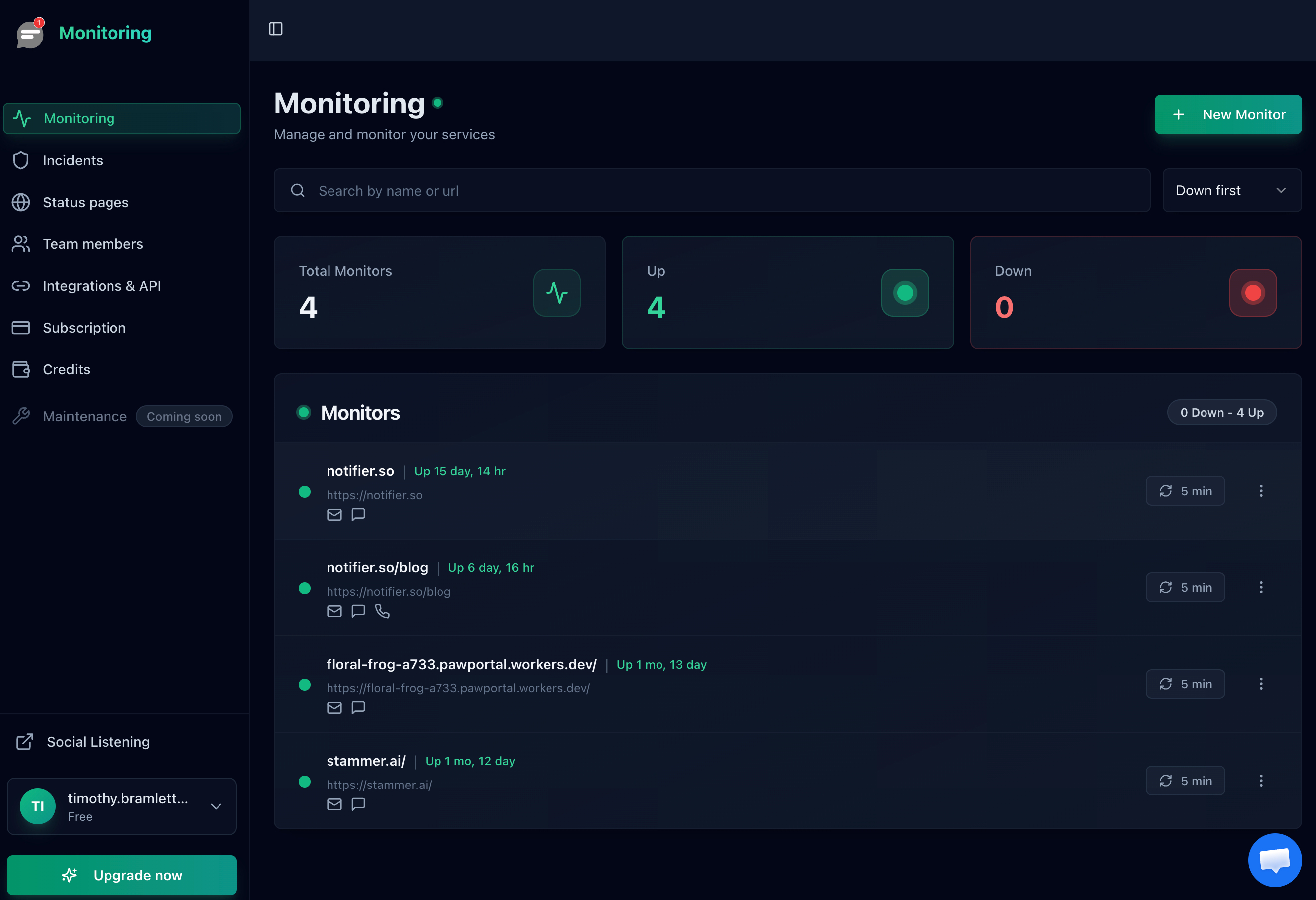
One monitor per hostname means a broken certificate on a single subdomain does not hide behind a healthy homepage.
Use Alerts That Actually Reach You
A TLS failure blocks 100% of traffic instantly. There is no partial degradation and no gradual warning. Email alone is not fast enough if it happens overnight. SMS and phone call alerts are available on every Notifier plan including free, so you get paged rather than emailed when HTTPS breaks entirely.
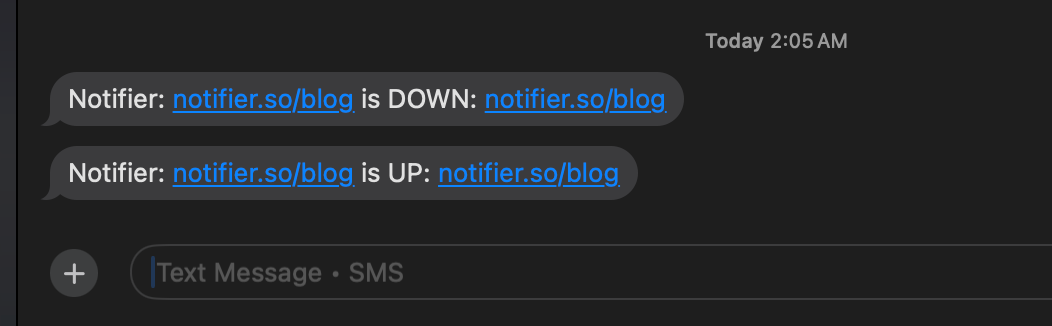
SMS alerts for both the outage and the recovery, so you know when HTTPS came back without checking manually.
Test After Every Certificate or Config Change
Most ERR_SSL_PROTOCOL_ERROR incidents start with a deploy, a certificate renewal, or a Cloudflare setting someone changed. Build one habit: after any of those, run openssl s_client against the affected hostname and load the site in an incognito window. Thirty seconds of verification beats finding out from a customer.
Which Monitoring Tools Catch TLS Handshake Failures?
Any external HTTP monitor will flag a failed handshake, because the check itself cannot complete. What actually differs between tools is whether SSL certificate monitoring is bundled or sold as an extra, how fast the alert reaches you, whether SMS and phone calls are included, and whether the free plan permits commercial use.
| Tool | Free Plan | SSL Monitoring | SMS/Phone Alerts | Paid Starts At |
|---|---|---|---|---|
| Notifier | 10 monitors, 5 min checks, commercial use OK | Free on every plan | Yes, all plans (credit based) | $4/mo |
| UptimeRobot | 50 monitors, non-commercial only | Separate monitor type | Credit based, credits do not renew | $8/mo |
| Better Stack | 10 monitors, 3 min checks | Included | Email and Slack only on free | $34/mo per responder |
| StatusCake | 10 monitors, 1 SSL monitor | Yes (1 free, 50 on paid) | Paid plans, credit based | $24.49/mo |
| Pingdom | No free plan | Limited | SMS credits included on paid | $15/mo |
Note on UptimeRobot's free plan
Since October 2024, UptimeRobot's free tier has been restricted to personal, non-commercial use. If you are monitoring a business site or a client site, you need a paid plan or a different tool.
For a wider look at what each free tier includes, see our comparison of the best free website monitoring tools.
Frequently Asked Questions
What does ERR_SSL_PROTOCOL_ERROR mean?
It means the TLS handshake between your browser and the server failed, so the secure connection was never established. The browser and server could not agree on a TLS version or cipher suite, or the server did not respond with valid TLS data at all. No page content is ever requested, which is why the page is completely blank apart from the error.
How do I fix ERR_SSL_PROTOCOL_ERROR in Chrome?
Work through four steps in order. Set your system clock to sync automatically. Turn off HTTPS or SSL scanning in your antivirus. Disable QUIC at chrome://flags/#enable-quic and relaunch. Clear your cache and test in incognito. If the site still fails in another browser and on another network, the server is misconfigured and only its owner can fix it.
Is ERR_SSL_PROTOCOL_ERROR my problem or the website's?
Test the site in a different browser and on a different network, such as your phone over mobile data. If it loads anywhere else, the problem is local to your machine or network, usually antivirus TLS inspection, a wrong clock, or a VPN. If it fails everywhere, the server is misconfigured and you should contact the site owner.
Can antivirus software cause ERR_SSL_PROTOCOL_ERROR?
Yes, and it is one of the most common causes. Avast, AVG, ESET, Kaspersky, and Bitdefender intercept HTTPS traffic to scan it, terminating the real TLS connection and re-encrypting it with their own certificate. When that layer fails, Chrome sees a broken handshake. Disable the HTTPS or encrypted connections scanning feature and test again, then add an exclusion for the site rather than leaving it off.
What is the difference between ERR_SSL_PROTOCOL_ERROR and NET::ERR_CERT_DATE_INVALID?
ERR_SSL_PROTOCOL_ERROR means the handshake never completed, so the browser typically never evaluated a certificate. NET::ERR_CERT_DATE_INVALID means the handshake succeeded and the browser then rejected the certificate because its validity dates do not cover today. The first is a protocol or configuration problem. The second is nearly always an expired certificate or a wrong system clock.
Does Cloudflare cause ERR_SSL_PROTOCOL_ERROR?
It can, in three ways. Universal SSL may still be provisioning after you add the domain, which can take up to 24 hours. The Minimum TLS Version may be set to 1.3, which locks out clients that only support 1.2. Or the encryption mode may be set to Off, which disables HTTPS at the edge. Check SSL/TLS, then Edge Certificates and Overview, in the Cloudflare dashboard.
Why does the error appear on one subdomain but not the main site?
The certificate probably does not cover that hostname. Cloudflare Universal SSL covers the apex domain and one level of subdomain, so api.example.com works but api.staging.example.com does not. On Apache or Nginx, a vhost that is missing its own SSL directives falls through to another block and serves the wrong certificate. Monitor each public hostname separately so this does not hide behind a healthy homepage.
How do I get alerted when HTTPS breaks on my site?
Use external monitoring that performs a real HTTPS request against your public URL. A failed TLS handshake makes the check fail, so it registers as an incident immediately. Notifier monitors uptime and SSL certificates free on up to 10 URLs, with email, SMS, and phone call alerts, and paid plans start at $4 per month for 1 minute checks.