At a Glance
- •ERR_CONNECTION_RESET means a TCP connection was opened and then killed part way through by a reset packet. Something interrupted a conversation that had already started, which is what separates it from ERR_CONNECTION_REFUSED, where the connection was never established at all.
- •The three fastest visitor-side fixes: turn off your VPN or proxy, disable HTTPS or SSL scanning in your antivirus, and test the site on a different network such as mobile data.
- •If the page loads on mobile data but not on Wi-Fi, suspect the network path rather than the site. A VPN with a wrong MTU, a corporate TLS inspection appliance, or an ISP filter resetting connections all produce this exact error.
- •If you own the site, the most common causes are an upstream process crashing mid response, an out of memory kill, a firewall rule that rejects with a TCP reset, a request body larger than your upload limit, and a keepalive timeout shorter than your load balancer idle timeout.
- •Notifier checks your site from outside your network and alerts you by email, SMS, phone, or Slack when connections start failing. Free for 10 monitors with SSL and DNS monitoring included, paid plans from $4/month.
ERR_CONNECTION_RESET is the browser error that most often makes people think their computer is broken. The page starts loading, the tab spins for a moment, and then everything collapses into "The connection was reset." Reload and it might work. Reload again and it fails. That inconsistency is not random, and it is the biggest clue you have. This guide explains what a reset actually is, how to fix it as a visitor, why VPNs and corporate networks trigger it so often, and what to check when the site being reset is your own.
What ERR_CONNECTION_RESET Actually Means
Every page load starts with a TCP handshake. Your browser sends a SYN packet, the server answers, and a connection is established. Only then does the browser negotiate TLS and send the actual HTTP request. ERR_CONNECTION_RESET means that somewhere after that connection was opened, one side sent a TCP RST packet, which is the network equivalent of hanging up mid sentence. The conversation had already started, and something ended it abruptly.
That timing is what makes this error different from its neighbors, and it narrows your search a lot:
- Reset: the connection was established, then torn down part way through. Often intermittent. The interruption can come from the server, from a firewall, from a VPN, or from anything in between. That is this guide.
- Refused: the connection was never established because nothing was listening on that port. Fails instantly and consistently. See our guide on fixing ERR_CONNECTION_REFUSED.
- Timed out: packets went out and nothing came back at all, so the browser gave up after roughly 30 seconds. See our guide on fixing ERR_CONNECTION_TIMED_OUT.
- Name not resolved: DNS never produced an IP address, so no connection was attempted. See fixing ERR_NAME_NOT_RESOLVED.
Each browser words it differently. Chrome and Edge show "This site can't be reached" with ERR_CONNECTION_RESET underneath. Firefox says "The connection was reset." Safari says "Safari can't open the page because the network connection was lost." On the command line, curl reports one of these:
curl: (56) Recv failure: Connection reset by peer
curl: (35) OpenSSL SSL_connect: Connection reset by peer
Error 56 means the reset arrived after the request was sent. Error 35 means it arrived during the TLS handshake, before any certificate was exchanged. If you see error 35, read the TLS sections below carefully, and also check our guide on fixing ERR_SSL_PROTOCOL_ERROR, since handshake failures often present as both errors depending on where they break.
Quick Fixes to Try First (Under 5 Minutes)
Work through these in order. They are ranked by how often they actually resolve the error, not by how technical they are.
1. Reload, then try a different network
Resets are frequently intermittent, so reload once before assuming anything is broken. If it fails again, load the same page on your phone with Wi-Fi turned off, using mobile data. This single test splits the problem in half. If the page loads on mobile data, the reset is coming from your local network, your router, your VPN, or your device. If it fails there too, the site's server or something directly in front of it is the source. Our guide on whether a site is down for everyone or just you covers this in more depth.
2. Turn off your VPN and clear proxy settings
VPNs are the single most common cause of resets on an otherwise healthy connection. Disconnect the VPN completely, do not just switch servers, and reload. Then confirm no proxy is configured:
# Windows: open proxy settings
Settings > Network & Internet > Proxy > turn off "Use a proxy server"

# Mac: check proxy settings
System Settings > Network > your connection > Details > Proxies > uncheck all
If the page loads with the VPN off, you have found the culprit. The VPN and MTU section below explains why this happens and how to fix it without giving up the VPN.
3. Disable antivirus HTTPS or SSL scanning
Security suites that inspect encrypted traffic sit in the middle of your TLS connections and re-sign them with their own certificate. When that inspection fails or hits a site using a configuration it does not understand, it drops the connection with a reset. Look for a setting named "HTTPS scanning," "Encrypted connections scanning," "SSL/TLS protocol filtering," or "Web shield" in Avast, AVG, ESET, Kaspersky, or Bitdefender. Turn it off temporarily and reload. If the page loads, add the site to the exclusion list and turn protection back on rather than leaving scanning disabled.
4. Try incognito, then disable extensions
Open a private window and load the page. Incognito runs without most extensions, so if it works there, an extension is interfering. Ad blockers, privacy tools, and any extension that proxies or rewrites requests can terminate connections. Disable them one at a time until the page loads.
5. Clear the cache and cookies for that site
A large or corrupted cookie can push a request header over the size limit a server or CDN will accept, and some servers respond to an oversized header by resetting rather than returning an error page. In Chrome, go to chrome://settings/clearBrowserData, select cached images and files plus cookies, and clear them. This is worth doing when one specific site resets while everything else works.
6. Restart your router
Unplug it for 30 seconds and plug it back in. Consumer routers hold a connection tracking table, and when it fills up, the router starts dropping and resetting established connections. This produces exactly the intermittent pattern you are seeing, and a power cycle clears it. If the problem returns every few days, the router is the prime suspect.
Fixes for Windows, Mac, and Mobile
If the quick fixes did not help, the next step is to reset your device's network stack. Corrupted Winsock entries, stale DNS records, and leftover network drivers all produce resets that follow you from network to network.
Windows
Open Command Prompt as an administrator and run these in order:
ipconfig /flushdns
netsh winsock reset
netsh int ip reset
ipconfig /release
ipconfig /renew
Restart your computer after netsh winsock reset so the change takes effect. Winsock is the layer where VPN clients, proxies, and security software install their hooks, and a leftover hook from software you uninstalled months ago is a genuine cause of persistent resets.
If resets continue on large pages or file downloads specifically, try turning off TCP auto tuning, which occasionally misbehaves with older routers and enterprise gear:
netsh int tcp set global autotuninglevel=disabled

# To undo this later
netsh int tcp set global autotuninglevel=normal
Mac
Open Terminal and flush the DNS cache, then confirm nothing is intercepting your traffic:
sudo dscacheutil -flushcache; sudo killall -HUP mDNSResponder

# Show which resolvers and proxies are actually in use
scutil --dns | head -20
scutil --proxy
If scutil --proxy shows a proxy you did not configure, a VPN client or a security tool left it behind. Also check for network filtering tools such as Little Snitch or corporate device management agents, which can terminate connections based on rules you never see.
Android and iOS
On mobile, toggle airplane mode on for 10 seconds and back off to force a fresh connection. If that does not clear it:
- Switch between Wi-Fi and mobile data: a reset on one network but not the other confirms the network path is at fault, not the site.
- Forget and rejoin the Wi-Fi network: this clears a stale DHCP lease and any cached network configuration.
- Check for VPN or filtering profiles: on iOS look under Settings > General > VPN & Device Management. On Android check Settings > Network & internet > VPN and Private DNS.
- Reset network settings: on iOS, Settings > General > Transfer or Reset iPhone > Reset > Reset Network Settings. On Android, Settings > System > Reset options > Reset Wi-Fi, mobile & Bluetooth.
Change your DNS server
Some ISPs run filtering at the resolver level and reset connections to sites they block or throttle. Switching to a public resolver takes that layer out of the path:
Cloudflare:  1.1.1.1  and  1.0.0.1
Google:      8.8.8.8  and  8.8.4.4
Quad9:       9.9.9.9  and  149.112.112.112
Why VPNs and Corporate Networks Cause Resets
If your reset only happens on one network, or only with a VPN connected, the cause is almost certainly one of the four below. These are worth understanding because no amount of clearing your browser cache will fix them.
MTU and MSS mismatches
Every network link has a maximum packet size, called the MTU. A normal Ethernet link uses 1500 bytes. A VPN wraps your traffic in an extra layer of headers, which leaves less room for your actual data, so the effective MTU drops to something like 1420. When a packet is too large and the "do not fragment" flag is set, the network is supposed to send back an ICMP message telling your machine to use smaller packets. Many firewalls block those ICMP messages, so nothing gets through and the connection eventually dies with a reset.
The signature of this problem is very specific: small pages load fine, and the failure starts as soon as a response gets large. You can test it by pinging with progressively smaller packet sizes and the do not fragment flag set:
# Windows: -f sets do not fragment, -l sets the payload size
ping -f -l 1472 example.com
ping -f -l 1400 example.com

# Mac and Linux
ping -D -s 1472 example.com
ping -D -s 1400 example.com
Add 28 bytes of header overhead to the largest payload that succeeds and you have your working MTU. If 1472 fails but 1400 succeeds, set your interface or VPN MTU to 1428 or lower. Most VPN clients expose this as an MTU setting, and lowering it to 1400 is a safe starting point.
TLS inspection appliances
Corporate networks, schools, and some public Wi-Fi run middleboxes that decrypt and re-encrypt HTTPS traffic to inspect it. When the appliance cannot handle a site's TLS configuration, or when the site uses certificate pinning, the appliance resets the connection instead of passing it through. The tell is that the reset happens on one network for a specific set of sites and never happens anywhere else. There is no client side fix here. The network administrator has to add an exception.
ISP filtering and SNI blocking
Some ISPs and national firewalls read the Server Name Indication field in the TLS handshake, which is sent in the clear, and inject a reset when the hostname matches a blocklist. This looks identical to a server side failure from the browser's point of view. The giveaway is that the site loads normally over a VPN or over mobile data on a different carrier, while resetting reliably on one connection.
Overloaded connection tracking
Routers and firewalls keep a table of every active connection. When that table fills, new and existing connections get evicted and reset. On home routers this shows up after weeks of uptime, especially with many devices or a busy torrent client, and a reboot fixes it. On Linux servers the same thing happens with the conntrack table, which you can check with cat /proc/sys/net/netfilter/nf_conntrack_count compared against nf_conntrack_max.
If You Own the Site and Visitors See This Error
A reset on your own site is harder to diagnose than an outright outage, because it is usually partial. Some requests succeed, some die, and your uptime looks fine on a dashboard that only checks your homepage once in a while. Work through these in order.
1. Reproduce it from outside and capture the failure
Start by confirming where in the connection the reset lands. These three commands separate a TLS handshake failure from a mid response failure:
# Does the request complete at all?
curl -Iv https://example.com

# Does the TLS handshake finish?
openssl s_client -connect example.com:443 -servername example.com

# Run it in a loop to catch an intermittent reset
for i in $(seq 1 30); do curl -s -o /dev/null -w "%{http_code} %{time_total}s\n" https://example.com; done
If the loop shows mostly 200 responses with occasional failures, you have an intermittent reset, which points at load, resource limits, or a rate limiting rule. If every request fails at the same point, it is a configuration problem.
2. Check for a process being killed mid response
When a backend worker dies while it is writing a response, the connection is reset rather than closed cleanly. The most common reason is the Linux out of memory killer:
# Look for OOM kills
dmesg -T | grep -i "killed process"
journalctl -k --since "1 hour ago" | grep -i oom

# Look for segfaults in your app or PHP-FPM
journalctl -u php8.2-fpm --since "1 hour ago"
grep -i "segfault\|worker process exited" /var/log/nginx/error.log
A worker exiting on signal 11 or being OOM killed means the reset is a symptom, not the disease. Fix the memory pressure or the crashing code and the resets disappear. This is also a frequent cause of 502 bad gateway errors, which is what you see when the proxy survives long enough to generate a page.
3. Check your upload and request size limits
If the reset only happens on form submissions or file uploads, your request is exceeding a size limit and the server is dropping the connection rather than reading the rest of the body. In Nginx:
# nginx.conf or the relevant server block
client_max_body_size 50m;
client_body_timeout 60s;
large_client_header_buffers 4 16k;
The large_client_header_buffers line matters more than people expect. Sites with many cookies, long single sign on tokens, or oversized referrer headers can exceed the default buffer, and the connection gets reset before your application ever sees the request. On Apache, the equivalents are LimitRequestBody and LimitRequestFieldSize. If PHP is involved, raise upload_max_filesize and post_max_size to match.
4. Align your keepalive timeout with your load balancer
This one causes a very specific and very confusing pattern: a small percentage of requests reset, seemingly at random, under normal load. It happens when your backend closes an idle keepalive connection at the same moment the load balancer decides to reuse it. The load balancer sends a request into a socket that is already closing and gets a reset back.
The fix is to make your backend's idle timeout longer than the load balancer's. An AWS Application Load Balancer defaults to 60 seconds, so your origin should sit above that:
# Nginx: keep idle connections open longer than the load balancer does
keepalive_timeout 75s;

# Apache
KeepAlive On
KeepAliveTimeout 75
5. Check firewall, WAF, and rate limiting rules
A firewall rule that rejects with a TCP reset produces this error by design. So does a rate limiter or an intrusion prevention rule that decides a visitor looks like a bot:
# Look for reject rules that send a TCP reset
sudo iptables -L -n -v | grep -i reject

# Check whether fail2ban has banned real visitors
sudo fail2ban-client status
sudo fail2ban-client status nginx-limit-req

# Check conntrack table pressure on a busy server
cat /proc/sys/net/netfilter/nf_conntrack_count
cat /proc/sys/net/netfilter/nf_conntrack_max
Overly aggressive fail2ban rules are a common cause of "the site works for me but a customer says it resets." The customer's office IP got banned by a shared connection triggering a rule. Check your ban list before you rebuild your server.
6. Check your TLS configuration
If the reset lands during the handshake, before any HTTP request is sent, the cause is usually a protocol or cipher mismatch. Test which TLS versions your server actually accepts:
openssl s_client -connect example.com:443 -servername example.com -tls1_2
openssl s_client -connect example.com:443 -servername example.com -tls1_3
A modern Nginx configuration should offer both TLS 1.2 and 1.3. If your server only offers TLS 1.3, older clients and some middleboxes will be reset out of the handshake. Our guide on fixing ERR_SSL_PROTOCOL_ERROR covers TLS configuration in detail, and SSL certificate monitoring covers keeping certificates from expiring in the first place.
7. Check Cloudflare or your CDN
Behind a CDN, a reset between the edge and your origin usually surfaces to visitors as a Cloudflare 520 error, which specifically means the origin returned an empty or invalid response. If you see 520s in your Cloudflare analytics alongside reports of connection resets, the reset is happening between Cloudflare and your server. Check your origin's firewall for rules that block Cloudflare IP ranges, and confirm your origin is not resetting connections under load.
Common Causes and Where the Fix Lives
Use this table to jump straight to the likely cause based on the pattern you are seeing.
| Cause | Clue | Where to Fix It |
|---|---|---|
| VPN MTU mismatch | Small pages load, large ones reset | Your VPN client |
| Antivirus HTTPS scanning | Works after disabling web protection | Your device |
| Browser extension | Works in incognito | Your device |
| Router connection table full | Fixed by a reboot, returns weekly | Your router |
| TLS inspection appliance | Only on the office or school network | Network admin |
| ISP filtering or SNI blocking | Works over a VPN, fails without one | Network path |
| Backend killed mid response | OOM kills or segfaults in the logs | The server |
| Request or header size limit | Only uploads or logged in users fail | The server |
| Keepalive shorter than the balancer | A small share of requests reset randomly | The server |
| Firewall reject or fail2ban ban | Some visitors always fail, others never do | The server |
The pattern worth internalizing: green rows fail for you alone, yellow rows fail for everyone on one network, and red rows fail for a subset of your visitors, which is why site owners so often hear about resets from customers instead of finding them first.
How to Catch Connection Resets Before Your Visitors Do
Resets are the hardest failure to notice on your own site, because they are rarely total. Your server is up, your logs contain successful requests, and your homepage loads perfectly when you check it. Meanwhile a share of visitors are getting connections killed on checkout, on upload, or on every request from one office. Nothing inside the machine reports this, because from the server's point of view the connection simply ended.
External monitoring closes that gap. With Notifier, setup takes about a minute. Add your URL, choose a check interval, and pick your alert channels.
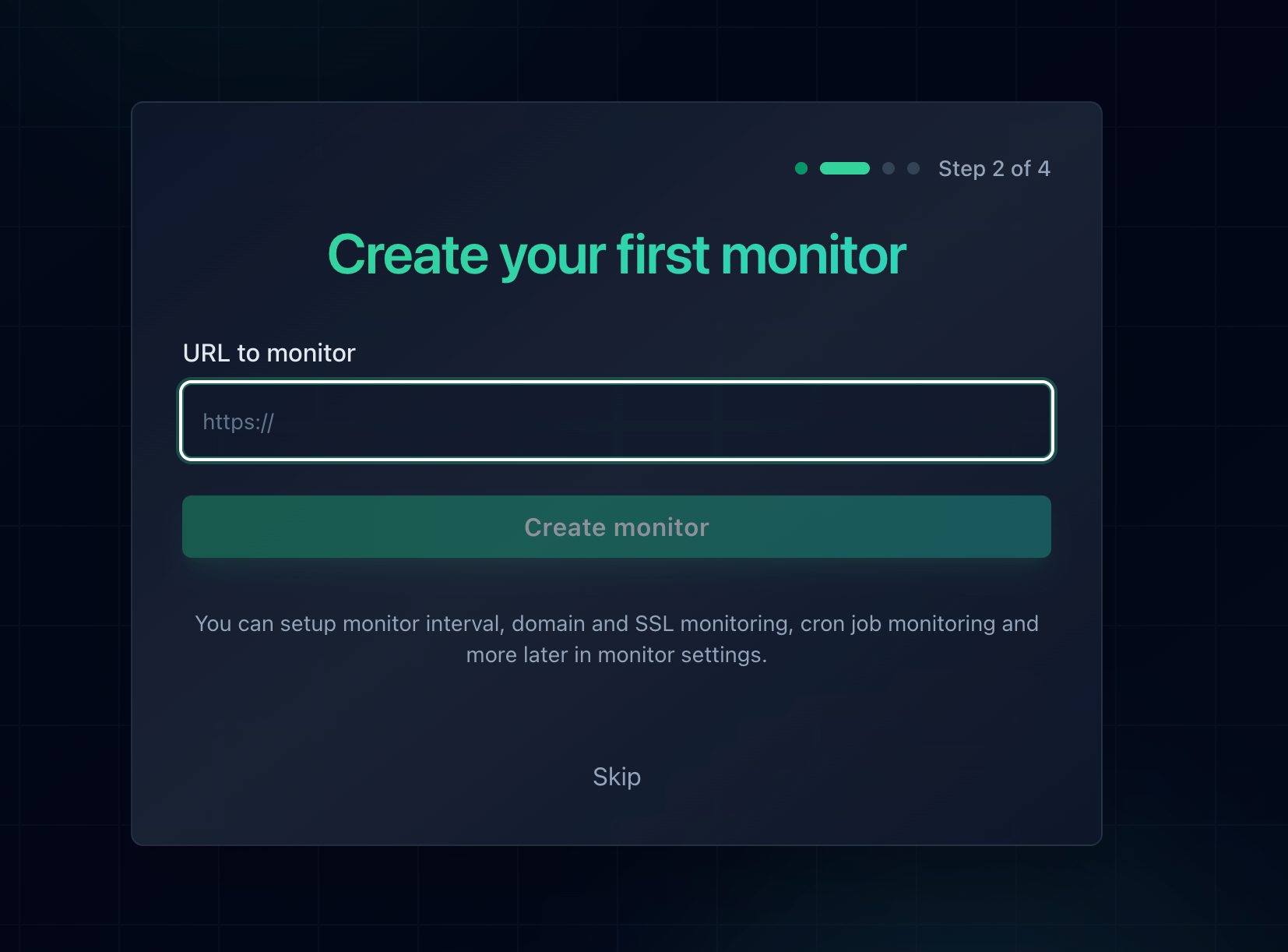
Adding a monitor in Notifier. Response time and SSL certificate tracking are included for every URL you add.
Because checks run from outside your infrastructure, they fail the same way a visitor's browser does. A worker crashing under memory pressure, a firewall rule that started rejecting traffic, or a TLS configuration change that broke the handshake all register as failed checks. Frequent checks matter here more than for most errors, since an intermittent reset can hide entirely between two widely spaced checks. Paid plans check every minute, and Team and Enterprise plans check every 30 seconds.
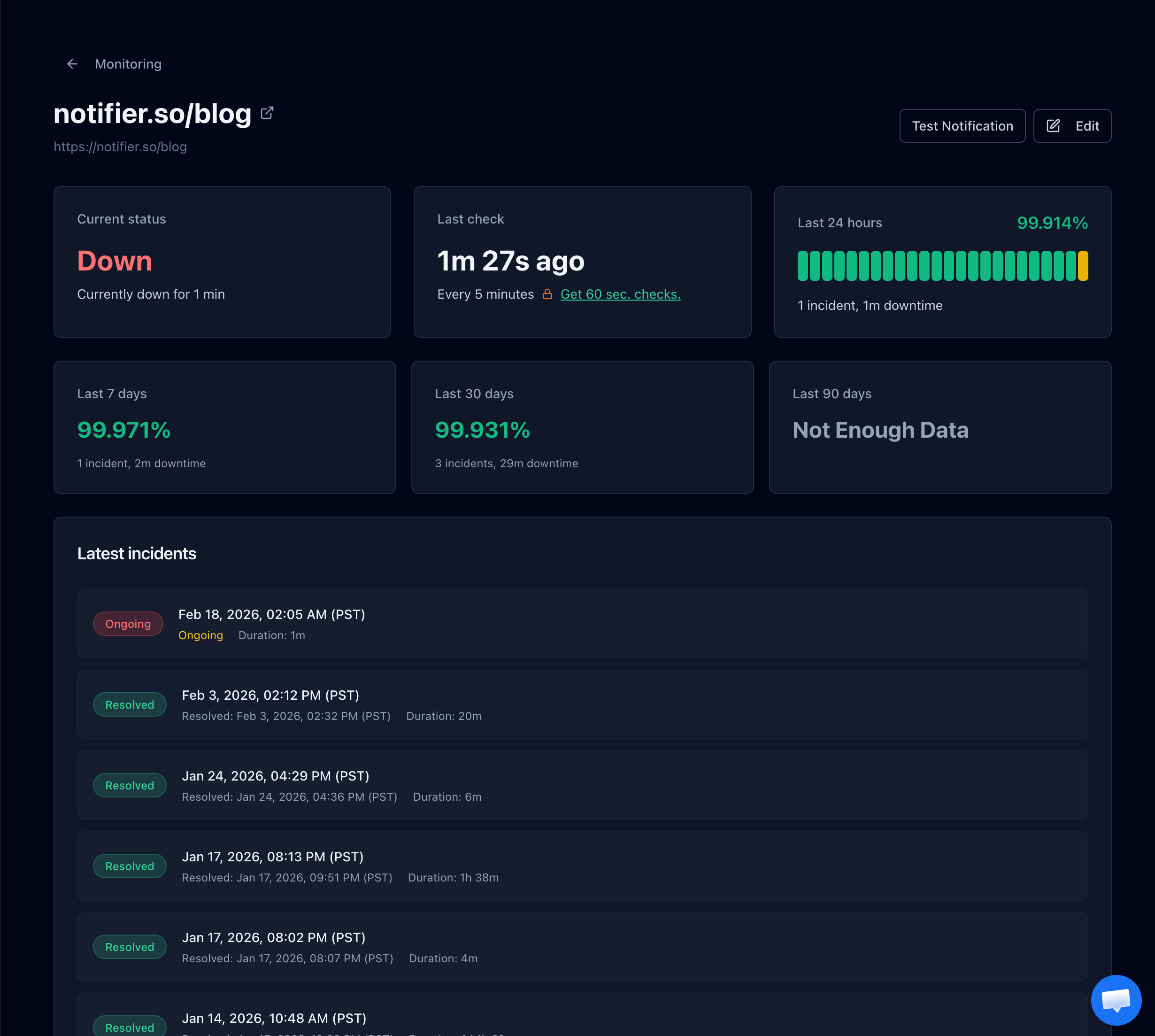
A Notifier monitor detail page showing status, uptime history, and the incident timeline, so you can line up resets against a deploy or a traffic spike.
What Notifier checks for you:
- Uptime: confirms your site completes a full request and response from outside your network, not just that a port is open.
- SSL certificates: alerts you before a certificate expires, free on every plan including the free tier.
- DNS records: a separate DNS monitor type watches your records so a bad entry does not quietly send visitors somewhere that resets them.
- Response time: tracks how long each check takes, which is how you spot the memory pressure and load problems that turn into resets.
One tip specific to this error: monitor the paths where resets actually hurt, not just your homepage. Upload endpoints, checkout, login, and any API your app depends on are where size limits and backend crashes bite first. Since a reset often affects one path while the rest of the site is fine, a single homepage monitor will happily report 100% uptime through the whole incident. Our website monitoring checklist covers what else is worth watching.
Alerts arrive by email, SMS, phone call, or Slack. The free plan covers 10 monitors and 5 status pages with 5 minute checks, and paid plans start at $4/month for 1 minute checks and custom domain status pages. No credit card is required to start. For a full walkthrough, see how to set up website monitoring, or if you are still diagnosing, how to check if a website is down.
Frequently Asked Questions
What is the difference between ERR_CONNECTION_RESET and ERR_CONNECTION_REFUSED?
A refusal happens before a connection exists. Your browser tries to open a connection and the other end rejects it immediately, usually because nothing is listening on that port. A reset happens after the connection was already established and then killed part way through. Refusals are instant and consistent, while resets are often intermittent and can be triggered by anything in the network path, including a VPN, a firewall, or the server crashing mid response.
Why does ERR_CONNECTION_RESET happen only on some websites?
When one site resets and everything else works, the usual causes are antivirus HTTPS scanning failing on that site's TLS configuration, a browser extension blocking the domain, oversized cookies for that site pushing your request past a header size limit, or network level filtering that targets that specific hostname. Start by loading the site in incognito, then clear cookies for that domain, then temporarily disable HTTPS scanning in your security software.
Can a VPN cause ERR_CONNECTION_RESET?
Yes, and it is one of the most common causes. VPNs add encapsulation headers that reduce the usable packet size, so if the network blocks the ICMP messages that normally negotiate a smaller size, large responses fail and the connection resets. The signature is that small pages load fine while large ones break. Lowering the VPN client's MTU setting to 1400 usually fixes it. Leftover proxy settings from a VPN client that was uninstalled cause the same error.
Why does the page load sometimes and reset other times?
Intermittent resets point at load or resource limits rather than configuration. On the server side, the common causes are a backend worker being killed by the out of memory killer while writing a response, a connection tracking table filling up, and a keepalive timeout that is shorter than the idle timeout on the load balancer in front of it. On the client side, a router whose connection table has filled after weeks of uptime produces the same pattern, and a reboot clears it.
How do I fix ERR_CONNECTION_RESET on Windows?
Open Command Prompt as an administrator and run ipconfig /flushdns, netsh winsock reset, and netsh int ip reset, then restart the computer. The Winsock reset matters most, because VPN clients, proxies, and security software install hooks at that layer and leave them behind when uninstalled. If resets only happen on large pages or downloads, also try netsh int tcp set global autotuninglevel=disabled.
Why do my visitors get connection resets when the site works fine for me?
Resets on a live site are usually partial, which is why they are easy to miss. Check whether a firewall rule or fail2ban has banned the visitor's IP range, whether your request and header size limits are rejecting logged in users with large cookies, and whether backend workers are being killed under memory pressure. Running curl in a loop against the affected URL will show you whether the failure is intermittent or tied to a specific request type.
How do I get alerted when my site starts resetting connections?
Use external uptime monitoring, since a reset leaves almost no trace inside your own server. Notifier checks your site from outside your network on a schedule and alerts you by email, SMS, phone call, or Slack when a check fails. Monitor your checkout, login, upload, and API paths, not just your homepage, because resets frequently hit one path while the rest of the site stays healthy. The free plan covers 10 monitors with SSL and DNS monitoring included, and paid plans start at $4/month for 1 minute checks.