At a Glance
- •NET::ERR_CERT_AUTHORITY_INVALID means the browser could not trace your certificate back to a certificate authority it trusts. The certificate itself may be perfectly valid and unexpired, but the chain of trust is broken, which is what separates it from NET::ERR_CERT_DATE_INVALID.
- •If you see it on every HTTPS site, the cause is on your device: antivirus HTTPS scanning, a corporate or school network inspecting traffic, or an operating system that is too old to have current root certificates.
- •If you see it on one site only, that site is serving a self-signed certificate, an internal company certificate, or a chain that is missing its intermediate certificate.
- •The single most common site owner cause is pointing Nginx or Apache at cert.pem instead of fullchain.pem, which serves the leaf certificate without the intermediate. It often still loads in desktop Chrome while failing on Android, Safari, curl, and payment webhooks.
- •Notifier includes SSL certificate monitoring free on every plan, including the free tier of 10 monitors, and alerts you 30 days before expiry by email, SMS, phone, or Slack. Paid plans start at $4/month.
You try to open a site and Chrome throws up a full page warning: "Your connection is not private," with NET::ERR_CERT_AUTHORITY_INVALID printed underneath. The certificate is not expired and the site is not necessarily down. The browser simply cannot prove who issued the certificate.
This guide covers every fix, ordered by how often it actually solves the problem. If you are trying to visit a site, start with the visitor fixes. If visitors are reporting this on your own site, jump straight to the diagnosis section, because one command will tell you exactly which of the four possible causes you have.
What NET::ERR_CERT_AUTHORITY_INVALID Actually Means
Every HTTPS certificate is part of a chain. Your site's certificate (the "leaf") is signed by an intermediate certificate, which is signed by a root certificate. That root lives in a trust store shipped with your browser or operating system. When you load a page, the browser walks that chain upward. If it reaches a root it recognizes, the padlock appears. If the walk stops before it gets there, you get NET::ERR_CERT_AUTHORITY_INVALID.
This is a trust failure, not a validity failure. That distinction matters, because it rules out a whole category of fixes. The certificate can be brand new, correctly issued, and perfectly in date, and you will still see this error if the chain is incomplete or the signer is unknown.
There are only four ways it happens:
- The server is not sending the intermediate certificate. The most common cause on real sites. The leaf certificate arrives alone, so the browser has nothing to link it to a root.
- The certificate is self-signed. Nobody vouched for it except itself. Common on development servers, NAS boxes, routers, and printers.
- The signer is a private certificate authority. Corporate networks, antivirus HTTPS scanning, and internal company CAs all sign traffic with roots that public browsers were never told to trust.
- The root is genuinely not trusted by that browser. Either the root was distrusted by the browser vendor, or the device is too old to have received it.
How Each Browser Words It
The same underlying failure produces different text depending on what you are using, which makes searching for the exact error string confusing:
| Client | Message |
|---|---|
| Chrome / Edge / Brave | "Your connection is not private" with NET::ERR_CERT_AUTHORITY_INVALID |
| Firefox | "Warning: Potential Security Risk Ahead" with SEC_ERROR_UNKNOWN_ISSUER or MOZILLA_PKIX_ERROR_SELF_SIGNED_CERT |
| Safari | "This Connection Is Not Private" with "Safari can't verify the identity of the website" |
| curl | SSL certificate problem: unable to get local issuer certificate |
| Android apps / Java | Trust anchor for certification path not found |
How It Differs From the Other Certificate Errors
| Error | What Failed |
|---|---|
| NET::ERR_CERT_AUTHORITY_INVALID | The chain could not be traced back to a trusted root |
| NET::ERR_CERT_DATE_INVALID | The chain is trusted, but today's date is outside the certificate's validity window |
| NET::ERR_CERT_COMMON_NAME_INVALID | The certificate is trusted and in date, but it was issued for a different hostname |
| ERR_SSL_PROTOCOL_ERROR | The TLS handshake failed before any certificate was even evaluated |
Quick Fixes if You Are Just Trying to Visit a Site
Start here: does it happen on one site or on every site?
Open two or three other HTTPS sites you know are healthy. If they load fine, the problem belongs to that one site and you cannot fix it from your side. If every HTTPS site throws the same warning, something on your device or network is intercepting traffic, and the fixes below will solve it.
1. Turn Off Antivirus HTTPS Scanning
This is the number one cause of the error appearing across every site. Avast, AVG, ESET, Kaspersky, and Bitdefender inspect encrypted traffic by sitting in the middle and re-signing every certificate with their own root. When that root fails to install correctly, gets corrupted, or is left behind after an uninstall, every single HTTPS page becomes untrusted.
Open your antivirus settings and look for "HTTPS scanning," "SSL/TLS filtering," "Encrypted connections scanning," or "Web shield." Switch it off and reload the page. If the padlock comes back, you found it. Re-enable the feature afterwards and, if the error returns, reinstall the antivirus so it regenerates its root certificate cleanly.
2. Check Whether You Are on a Corporate, School, or Public Network
Company and campus networks routinely run TLS inspection appliances that work exactly like antivirus scanning. On a managed laptop the required root is pushed out by IT and everything works. On a personal device joined to the same Wi-Fi, nothing works. Test the same page on mobile data. If it loads there, the network is the cause and only your IT team can install the root you are missing.
Hotel and airport captive portals cause a variation of this. Before you log in, they hijack requests and serve their own certificate. Visit a plain HTTP address such as http://neverssl.com to force the login page to appear, sign in, then retry.
3. Update Your Operating System and Browser
Root certificates change over time. New authorities get added, old ones expire, and some get distrusted. A device that has not received updates in years is missing roots that modern sites depend on. This is why Windows 7 machines, Android 7 phones, and old smart TVs suddenly start failing on sites that everyone else can reach.
The best known example is the DST Root CA X3 expiry on 30 September 2021, which broke Let's Encrypt certificates for millions of older Android devices and OpenSSL 1.0.2 clients overnight. The certificates were fine. The devices simply had no trusted path to them. Installing OS updates, or a newer browser that ships its own trust store, is the only real fix.
4. Try Incognito and Disable Extensions
Some VPN, proxy, and "security" extensions install their own certificates or reroute requests. An incognito window disables most extensions by default, which makes it a fast test. If the page loads in incognito, re-enable your extensions one at a time until the error comes back.
5. Disconnect Your VPN and Clear Leftover Proxy Settings
A VPN that terminates TLS, or a proxy setting left behind after you uninstalled one, produces this error on every site. On Windows, go to Settings, Network & Internet, Proxy, and turn off anything you did not deliberately configure. On Mac, check System Settings, Network, your active connection, Details, Proxies. On Linux and Mac you can also check for stray environment variables:
env | grep -i proxy
scutil --proxy        # Mac only
6. Clear the Browser's SSL and Host Cache
Chrome and Edge cache certificate and DNS state. If a site recently fixed its chain, your browser can keep failing on stale data. Paste this into the address bar:
chrome://net-internals/#dns
Click "Clear host cache," then switch to "Sockets" in the sidebar and click "Flush socket pools." Restart the browser. On Windows you can also clear the system SSL state: press Windows + R, run inetcpl.cpl, open the Content tab, and click "Clear SSL state."
7. Check Your System Clock
A badly wrong clock usually produces NET::ERR_CERT_DATE_INVALID instead, but a clock set years into the future can push a root certificate past its own expiry date, which surfaces as an authority error. It takes ten seconds to rule out. Make sure automatic time sync is enabled on Windows, Mac, Android, or iOS, and on Linux run sudo timedatectl set-ntp true.
Think carefully before clicking through the warning.
Chrome hides a bypass behind "Advanced," and typing thisisunsafe on the warning page skips it entirely. Both are fine on your own development server. On a public site they are not. An untrusted certificate is exactly what a network attacker intercepting your traffic would present, so anything you type after bypassing the warning, including passwords and card details, could be going straight to them.
Diagnose the Chain in One Command
If you own the site, stop guessing. This command shows exactly what your server sends and exactly why validation failed:
openssl s_client -connect yoursite.com:443 -servername yoursite.com -showcerts < /dev/nullScroll to the bottom of the output and read the "Verify return code" line. It names your problem precisely:
| Verify return code | Meaning | Fix |
|---|---|---|
| 0 (ok) | The chain validates fine from this machine | Problem is on the visitor's device or network |
| 21 (unable to verify the first certificate) | Missing intermediate certificate | Serve the full chain (see below) |
| 20 (unable to get local issuer certificate) | Issuer is unknown to this machine | Missing intermediate, or a private CA |
| 18 (self signed certificate) | The certificate signed itself | Issue a real certificate |
| 19 (self signed certificate in certificate chain) | A private root is in the chain | Corporate CA, Cloudflare Origin cert, or MITM proxy |
Count How Many Certificates Your Server Sends
A correct public chain sends at least two certificates: your leaf plus one or more intermediates. If this prints 1, you have found your bug.
openssl s_client -connect yoursite.com:443 -servername yoursite.com -showcerts < /dev/null 2>/dev/null | grep -c "BEGIN CERTIFICATE"See Who Issued the Certificate
echo | openssl s_client -connect yoursite.com:443 -servername yoursite.com 2>/dev/null \
  | openssl x509 -noout -subject -issuer -dates
If subject and issuer are identical, the certificate is self-signed. If the issuer says something like "Kaspersky Anti-Virus Personal Root" or your company name, traffic is being intercepted rather than reaching your server. If it names a real authority such as Let's Encrypt, the certificate is fine and the chain is the problem.
Confirm With curl
curl uses the system trust store with no AIA fetching and no cached intermediates, so it fails on a broken chain that desktop Chrome might quietly repair. That makes it a better test than your own browser:
curl -I https://yoursite.com
curl: (60) SSL certificate problem: unable to get local issuer certificate confirms a chain problem that real clients are hitting. For a visual second opinion, run the hostname through SSL Labs at ssllabs.com/ssltest, which flags "Chain issues: Incomplete" explicitly.
If You Own the Site: Causes Ranked by Frequency
| Cause | Frequency | Fix Time |
|---|---|---|
| Server configured with cert.pem instead of fullchain.pem | Very common | Under 5 minutes |
| Self-signed certificate left on a production server | Common | 10 to 30 minutes |
| Cloudflare Origin certificate exposed directly to visitors | Common | Under 5 minutes |
| Load balancer or CDN node serving an older chain than the origin | Less common | 5 to 30 minutes |
| Certificate files pasted in the wrong order | Less common | Under 10 minutes |
| Certificate authority distrusted by a browser vendor | Rare | Reissue with a different CA |
Why "it works on my machine" is so common with this error
Desktop Chrome and Firefox can often paper over a missing intermediate. They cache intermediates they have seen before, and they can fetch a missing one from the URL embedded in the certificate. Android WebViews, older Safari versions, curl, Java clients, and most payment and webhook integrations do none of that. The result is a site that looks perfect to the developer who deployed it while a meaningful slice of real visitors, and every server to server callback, gets blocked. Always test with curl or SSL Labs, never with the browser you just deployed from.
Distrusted Certificate Authorities
Occasionally a browser vendor stops trusting an entire authority. Google announced in 2024 that Chrome would not trust Entrust TLS certificates issued after 11 November 2024, and Mozilla applied a similar cutoff for certificates issued after 30 November 2024. Site owners who renewed with the affected authority saw NET::ERR_CERT_AUTHORITY_INVALID even though their certificate was newly issued and completely valid.
There is no server side fix for this. The only option is to reissue the certificate through a different authority. If your chain validates with openssl but Chrome still refuses it, check whether the issuer named in the certificate has been distrusted.
Fixing the Chain in Nginx and Apache
Nginx: Use fullchain.pem, Not cert.pem
Nginx has no concept of a separate chain file. Whatever you point ssl_certificate at is exactly what gets sent to the browser, so that file must contain the leaf and the intermediates together. certbot writes both files into the same directory, and picking the wrong one is the single most common cause of this error:
server {
    listen 443 ssl;
    server_name yoursite.com;

    # Correct: leaf plus intermediates
    ssl_certificate     /etc/letsencrypt/live/yoursite.com/fullchain.pem;
    ssl_certificate_key /etc/letsencrypt/live/yoursite.com/privkey.pem;

    # Wrong: leaf only, causes NET::ERR_CERT_AUTHORITY_INVALID
    # ssl_certificate   /etc/letsencrypt/live/yoursite.com/cert.pem;
}
Test and reload:
sudo nginx -t
sudo systemctl reload nginx
If your certificate came from a commercial authority as separate files, build the chain yourself. Order matters: leaf first, then each intermediate, working upward. Never append the root.
cat yoursite.crt intermediate.crt > /etc/ssl/certs/yoursite-fullchain.crtApache
Apache 2.4.8 and newer reads the whole chain from SSLCertificateFile, exactly like Nginx:
<VirtualHost *:443>
    ServerName yoursite.com
    SSLEngine on

    # Apache 2.4.8+: fullchain contains leaf and intermediates
    SSLCertificateFile    /etc/letsencrypt/live/yoursite.com/fullchain.pem
    SSLCertificateKeyFile /etc/letsencrypt/live/yoursite.com/privkey.pem
</VirtualHost>
On Apache 2.2 and early 2.4 builds, the intermediates go in a separate directive instead. If your config still uses it, keep the leaf on its own in SSLCertificateFile:
SSLCertificateFile      /etc/ssl/certs/yoursite.crt
SSLCertificateChainFile /etc/ssl/certs/intermediate.crt
Then test and reload:
sudo apachectl configtest
sudo systemctl reload apache2      # Ubuntu / Debian
sudo systemctl reload httpd        # RHEL / CentOS / Fedora
Verify Before You Tell Anyone It Is Fixed
Reloading the config is not proof. Re-run the count from the diagnosis section and confirm you now see two or more certificates, then confirm the verify return code is 0. Your own browser is the least reliable witness here, because it may have cached the intermediate during your first visit.
Cloudflare and Managed Hosts
The Cloudflare Origin Certificate Trap
Cloudflare Origin CA certificates are free, last up to 15 years, and are extremely convenient. They are also not trusted by any browser. They exist purely to encrypt the hop between Cloudflare and your server, and they are only ever validated by Cloudflare itself.
The moment traffic reaches that server without passing through Cloudflare, visitors see NET::ERR_CERT_AUTHORITY_INVALID. That happens when a DNS record is switched from proxied (orange cloud) to DNS only (grey cloud), when a subdomain was never proxied in the first place, or when someone connects to the raw IP address. The fix is either to re-enable the Cloudflare proxy on that record, or to install a publicly trusted certificate such as a free Let's Encrypt one on the origin.
Cloudflare Edge Certificates
If the record is proxied and visitors still see the error, check SSL/TLS then Edge Certificates in the Cloudflare dashboard. Universal SSL should show "Active." If it shows "Pending Validation," the certificate has not been issued yet and Cloudflare is serving something visitors cannot trust. Confirm the domain is fully active on Cloudflare and that any CAA records on the domain permit Cloudflare's authorities to issue.
Managed Hosts and Site Builders
On WP Engine, Kinsta, Cloudways, Netlify, Vercel, Shopify, Wix, and Squarespace you do not control the certificate chain, so a missing intermediate is almost never the cause. On these platforms the error nearly always means the certificate has not finished provisioning for a newly connected custom domain. Confirm your DNS points at the platform, wait for provisioning to complete, and if it stalls for more than an hour, open a support ticket. Related setup notes are in our WordPress monitoring guide and Squarespace monitoring guide.
Self-Signed Certificates, localhost, and Internal Tools
If you are hitting this on localhost, a staging box, a router admin page, a NAS, or an internal dashboard, the certificate is self-signed and the error is working exactly as designed. No public authority vouched for it, because none was ever asked to.
The Right Fix for Local Development: mkcert
mkcert creates a local certificate authority, installs it into your system and browser trust stores, and issues certificates from it. Local HTTPS then works with a real padlock and no warnings:
# Install (Mac)
brew install mkcert nss

# Create and install the local CA, once per machine
mkcert -install

# Issue a certificate for your dev hostnames
mkcert localhost 127.0.0.1 ::1 dev.yoursite.test
Point your dev server at the generated .pem files and the warning disappears. Because the CA only exists on your machine, nothing you issue is trusted anywhere else, which is exactly what you want.
Internal Servers You Cannot Reissue
For a printer, router, or appliance with a baked in self-signed certificate, add its certificate to your own trust store. On Windows, open the certificate from the browser's warning page and import it into "Trusted Root Certification Authorities." On Mac, drag the exported certificate into Keychain Access under System and set it to "Always Trust." Only ever do this for devices you physically control on a network you trust.
One Android caveat that catches people out: since Android 7, apps ignore user-installed certificate authorities by default. A root you added in Settings will work in Chrome but still fail inside apps, unless the app ships a network security configuration that opts into user certificates.
Never Do This on Production
Disabling verification in your HTTP client (curl -k, verify=False in Python requests, rejectUnauthorized: false in Node) makes the error vanish and makes the connection worthless. You keep the encryption and throw away the identity check, which is the part that stops someone impersonating the server. If a script needs to talk to an internal CA, pass that CA explicitly instead:
# Trust a specific internal CA rather than disabling verification
curl --cacert /path/to/internal-ca.pem https://internal.company.local
Catching Certificate Problems Before Visitors Do
Certificate errors are uniquely damaging because they are not a slow page or a broken image. They are a full screen red warning telling every visitor your site may be dangerous, shown before a single byte of your content loads. If HSTS is enabled, visitors cannot even fall back to HTTP. For a business site, the practical effect is identical to being completely offline.
Worse, this particular error hides from the person most likely to notice. The developer who deployed the chain has the intermediate cached and sees a perfect padlock. The customer on an Android phone sees a security warning and leaves. Nobody files a bug, because from the inside everything looks fine.
Two Habits That Prevent Almost All of These
- Verify every certificate deploy from outside your browser. After any certificate change, run the openssl chain count and a plain
curl -I. Both take seconds and both catch a missing intermediate that your browser will happily hide from you. - Monitor expiry continuously, not on a calendar reminder. Most authority errors are introduced during a renewal, which is also when a certificate is most likely to be deployed incorrectly. Knowing a renewal is due 30 days out means you renew on a calm Tuesday afternoon, not at 2am after customers start complaining.
Setting Up SSL Monitoring
Notifier includes SSL certificate monitoring free on every plan, including the free tier. Add a monitor for your HTTPS URL and expiry tracking is enabled automatically, with an alert 30 days before the certificate lapses. Because checks run from outside your network, they reflect what a visitor gets rather than what your own machine has cached.
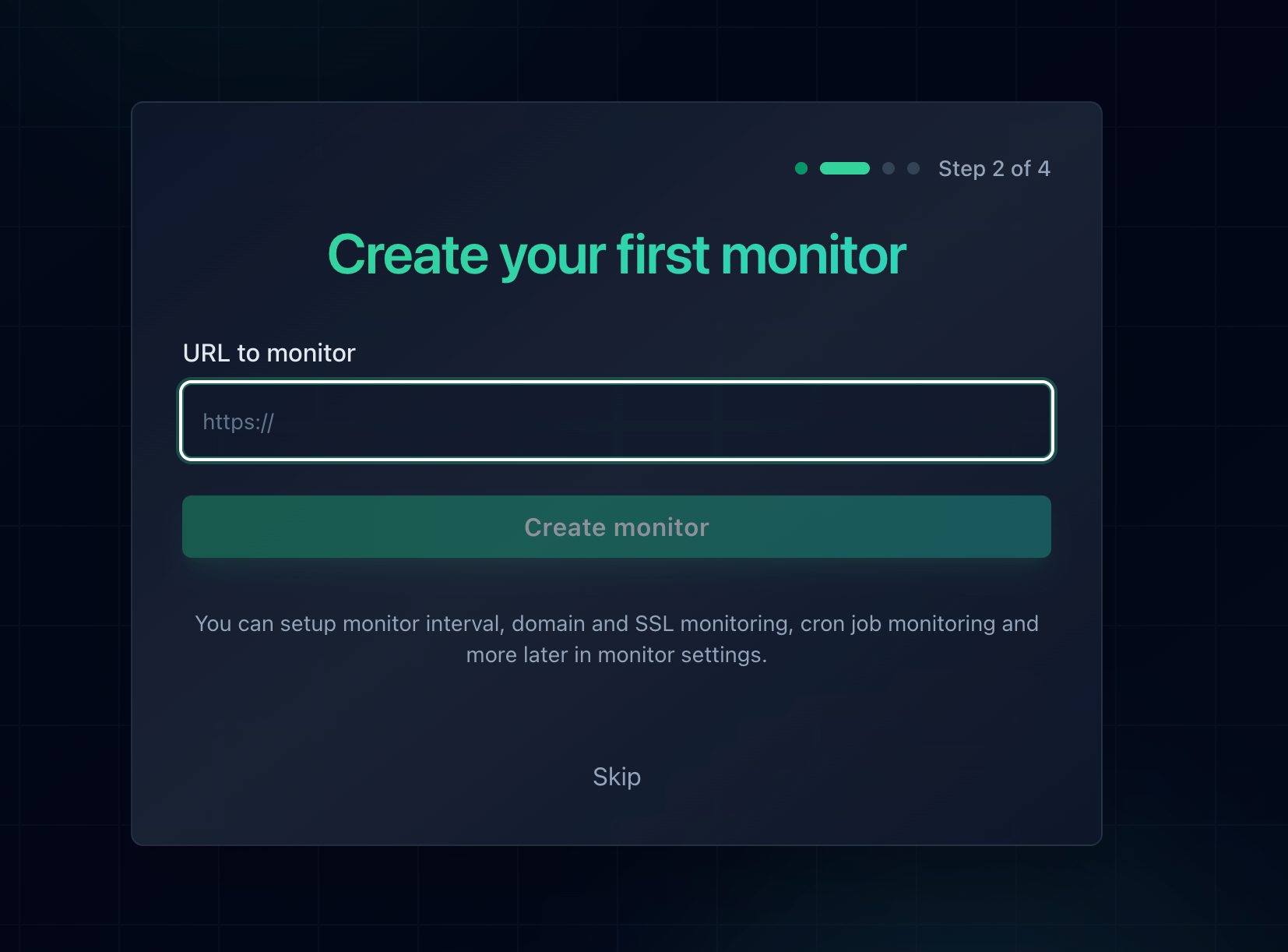
Adding a monitor in Notifier. SSL certificate monitoring is included automatically for every HTTPS URL, on every plan including Free.
Alerts reach you by email, SMS, phone call, or Slack, so a certificate problem does not sit unread in an inbox over a weekend. The free plan covers 10 monitors and 5 status pages with 5 minute checks. Paid plans start at $4/month for 20 monitors and 1 minute checks, and DNS monitoring is included on every plan alongside SSL.
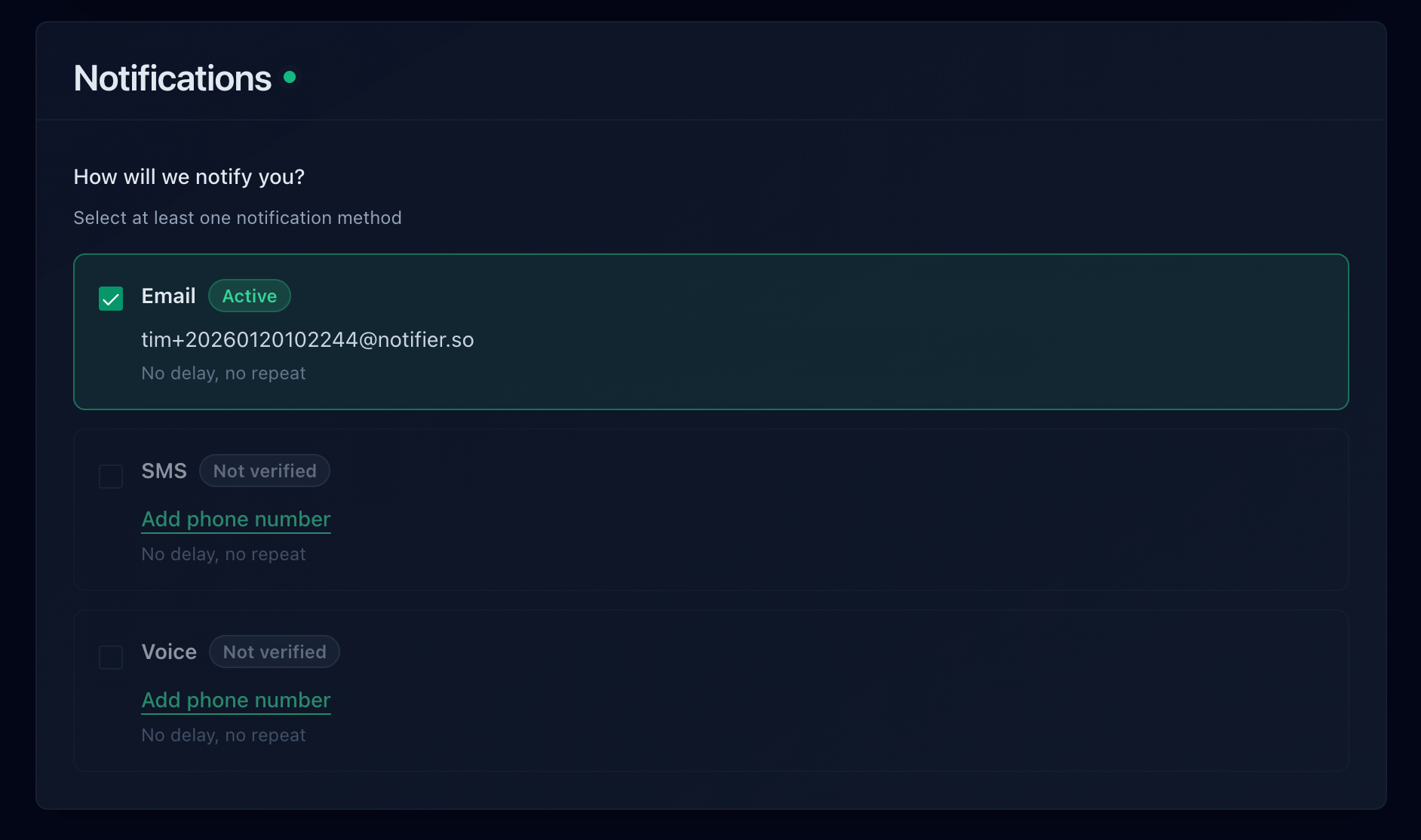
Alert channels in Notifier: email, SMS, phone call, and Slack, available on every plan including Free.
For the full picture on certificate lifecycles, the shift toward much shorter validity periods, and how to build renewal into your process, read our SSL certificate monitoring guide. If you are not yet monitoring at all, our website monitoring setup guide walks through it in five minutes, and how to check if a website is down covers the manual checks worth knowing.
Frequently Asked Questions
Why do I get NET::ERR_CERT_AUTHORITY_INVALID on every website?
Because something between you and the internet is re-signing every certificate with a root your browser does not trust. The three usual suspects are antivirus HTTPS scanning (Avast, AVG, ESET, Kaspersky, Bitdefender), a corporate or school network running TLS inspection, and an operating system too old to have current root certificates. Disable antivirus HTTPS scanning first, then test the same page on mobile data to rule out the network, then install pending OS updates.
What is the difference between NET::ERR_CERT_AUTHORITY_INVALID and NET::ERR_CERT_DATE_INVALID?
ERR_CERT_AUTHORITY_INVALID is a trust failure: the browser could not trace the certificate back to a certificate authority it recognizes, usually because an intermediate certificate is missing or the certificate is self-signed. ERR_CERT_DATE_INVALID is a validity failure: the chain is trusted, but today's date falls outside the certificate's window, which almost always means it expired. Different causes, different fixes.
My site loads fine in Chrome but visitors report this error. How is that possible?
Your server is almost certainly not sending the intermediate certificate. Desktop Chrome and Firefox can work around that by using an intermediate they cached earlier or by fetching the missing one, so the site looks perfect to you. Android WebViews, older Safari, curl, Java clients, and webhook callers cannot. Test with curl -I https://yoursite.com or SSL Labs instead of your browser, then point Nginx or Apache at fullchain.pem rather than cert.pem.
Is it safe to click "Proceed anyway" or type thisisunsafe?
Only on servers you own and control, such as a local development environment or a staging box with a self-signed certificate. On a public site, an untrusted certificate is indistinguishable from an attacker intercepting your connection. Bypassing means anything you submit afterwards, including passwords and payment details, could be read by whoever presented that certificate. On a banking, shopping, or login page, close the tab instead.
I installed the certificate and reloaded the server, but the error persists. What now?
Check three things in order. First, confirm the server is actually sending a full chain by counting certificates with openssl; if it returns 1, the config still points at the leaf-only file. Second, check whether a CDN or load balancer terminates TLS ahead of your origin, in which case the certificate has to be updated there too. Third, clear your own browser's SSL state at chrome://net-internals/#dns, since a cached failure can outlive the fix.
Why does my Cloudflare Origin certificate cause this error?
Cloudflare Origin CA certificates are not publicly trusted. They only secure the connection between Cloudflare and your server, and only Cloudflare validates them. If a DNS record is set to DNS only (grey cloud) instead of proxied, or a visitor reaches your origin IP directly, the browser sees a certificate signed by an authority it has never heard of. Either re-enable the Cloudflare proxy on that record, or install a publicly trusted certificate such as a free Let's Encrypt one on the origin.
Does Notifier charge extra for SSL monitoring?
No. SSL certificate monitoring is included on every Notifier plan, including the free tier of 10 monitors, and so is DNS monitoring. Every HTTPS URL you add is checked for certificate expiry automatically and you get an alert 30 days before it lapses, delivered by email, SMS, phone call, or Slack. Paid plans start at $4/month if you want faster checks, more monitors, and custom domain status pages.