At a Glance
- •An uptime SLA defines a measurable availability target (e.g., 99.9%), how downtime is measured, what is excluded, and what remedies apply when the target is missed.
- •The most common SLA target is 99.9% uptime, which allows about 43 minutes of downtime per month. Choose a target slightly below your actual measured uptime to leave margin for unexpected incidents.
- •Always use third-party external monitoring (not self-reported server metrics) to measure SLA compliance. Self-reported uptime is not credible because a down server cannot report that it is down.
- •Exclude scheduled maintenance, force majeure, and customer-caused issues from downtime calculations. Define clear limits on maintenance hours and require advance notice.
- •Notifier provides external monitoring with 30-second checks, public status pages, and uptime history for SLA reporting. Free for up to 10 monitors, paid plans from $4/month.
An uptime SLA (Service Level Agreement) is a written commitment to keep a website or service available for a specified percentage of time. Without one, there's no shared definition of "acceptable uptime," no measurement standard, and no accountability when things go wrong.
This guide explains what an uptime SLA should include, provides a ready-to-use template you can adapt for your own agreements, and shows how to measure and enforce uptime commitments with monitoring.
What Is an Uptime SLA?
An uptime SLA is a formal agreement between a service provider and a customer that defines:
- The uptime target: A percentage (e.g., 99.9%) representing how much time the service must be available during a given period.
- How uptime is measured: The monitoring method, check frequency, and what counts as "downtime."
- What happens when the target is missed: Service credits, refunds, or other remedies.
- What's excluded: Scheduled maintenance, force majeure, customer-caused issues.
The SLA turns a vague promise of "we keep things running" into a measurable commitment. It protects both sides: the customer knows what to expect, and the provider has clear boundaries on their obligations.
Who Needs an Uptime SLA?
Not every website needs a formal SLA. But if any of these apply to you, an uptime agreement adds real value:
SaaS companies
Enterprise customers expect an SLA before signing. Your SLA is part of the contract and directly affects deal size. A 99.9% SLA with clear credit terms is standard for most B2B SaaS products.
Web agencies
Including an uptime SLA in your agency retainer sets expectations and justifies your maintenance fee. It also protects you: without defined exclusions, clients might blame you for downtime caused by their hosting provider.
Hosting and infrastructure providers
Hosting companies live and die by their SLAs. Customers compare 99.9% vs 99.99% guarantees when choosing providers. The SLA is a competitive differentiator and a legal commitment.
E-commerce platforms
If your platform hosts merchant storefronts, merchants expect uptime guarantees. Downtime directly costs them sales, so the SLA defines how you compensate them when your platform fails.
Key Terms Every Uptime SLA Should Include
A well-written SLA is specific enough to be enforceable but flexible enough to account for real-world operations. Include these sections:
1. Service Availability Target
The headline number. Express it as a percentage over a calendar month. Common targets and what they mean in practice:
| Uptime Target | Allowed Downtime/Month | Typical Use |
|---|---|---|
| 99.0% | 7 hours 18 minutes | Internal tools, non-critical services |
| 99.5% | 3 hours 39 minutes | Small business websites, blogs |
| 99.9% | 43 minutes 28 seconds | SaaS products, e-commerce |
| 99.95% | 21 minutes 44 seconds | Business-critical applications |
| 99.99% | 4 minutes 21 seconds | Financial services, healthcare, infrastructure |
For more detail on what each target means, see our guide to good uptime percentages.
2. Measurement Method
Define exactly how uptime is measured. Ambiguity here leads to disputes. Specify:
- Monitoring tool: Third-party external monitoring (not self-reported server metrics)
- Check interval: How often the service is checked (e.g., every 1 minute)
- Check location: Where the checks originate from (important for regional availability)
- Downtime definition: What constitutes a failure (e.g., HTTP status code outside 200 to 299, response time exceeding 10 seconds)
3. Exclusions
Define what doesn't count as downtime. Without exclusions, you're liable for things outside your control:
- Scheduled maintenance: Pre-announced maintenance windows (define notice period, e.g., 48 hours)
- Force majeure: Natural disasters, widespread internet outages, government actions
- Customer actions: Downtime caused by the customer's DNS changes, code deployments, or misconfigurations
- Third-party dependencies: Outages in upstream providers (AWS, Cloudflare, etc.) if not under your control
4. Reporting
Specify how and when uptime reports are delivered. Monthly is standard. Include: uptime percentage, total downtime minutes, number of incidents, and incident details (start time, end time, root cause).
5. Remedies (Service Credits)
Define what happens when you miss the target. Service credits (a percentage off the next invoice) are the industry standard. Cash refunds are rare and typically only offered at the enterprise level.
Uptime SLA Template (Copy and Adapt)
Below is a ready-to-use SLA template. Replace the bracketed placeholders with your own values. This template is designed for SaaS companies and agencies but can be adapted for hosting providers or any service with uptime commitments.
Service Level Agreement: Uptime and Availability
1. Service Availability Commitment
[Provider Name] commits to maintaining [Service Name] availability of [99.9]% per calendar month, measured from the first day to the last day of each month ("Monthly Uptime Percentage").
2. Definitions
"Downtime" means any period during which the Service returns HTTP status codes outside the 200 to 499 range or fails to respond within [10] seconds, as measured by [Provider Name]'s designated third-party monitoring service checking at intervals of no less than [1] minute(s).
"Monthly Uptime Percentage" is calculated as: ((Total minutes in month minus Downtime minutes) divided by Total minutes in month) multiplied by 100.
3. Exclusions
The following are excluded from Downtime calculations:
- Scheduled maintenance announced at least [48] hours in advance via [email/status page], not exceeding [4] hours per calendar month
- Emergency maintenance required to address security vulnerabilities or data integrity risks
- Downtime caused by Customer's actions, equipment, software, or third-party services not under Provider's control
- Force majeure events including natural disasters, acts of war, government actions, or widespread internet infrastructure failures
- DNS propagation delays resulting from changes initiated by Customer
4. Service Credits
If the Monthly Uptime Percentage falls below the committed level, Customer is eligible for service credits as follows:
| Monthly Uptime Percentage | Service Credit |
|---|---|
| [99.0%] to [99.9%) | [10]% of monthly fee |
| [95.0%] to [99.0%) | [25]% of monthly fee |
| Below [95.0%] | [50]% of monthly fee |
Service credits are applied to the next billing cycle. Credits may not exceed [100]% of the monthly fee for the affected month. Customer must request credits within [30] days of the end of the affected month.
5. Monitoring and Reporting
Uptime is monitored using [monitoring tool name], an independent third-party monitoring service, checking from [number] geographic locations at [1]-minute intervals. Monthly uptime reports are available via [method: status page URL, email, or dashboard]. Customer may request detailed incident reports within [30] days of any downtime event.
6. Maintenance Windows
Scheduled maintenance will be performed during [day/time window, e.g., "Tuesdays between 02:00 and 06:00 UTC"] when possible. All scheduled maintenance will be announced at least [48] hours in advance via [notification method]. Emergency maintenance may be performed without advance notice when necessary to protect data integrity or security.
7. Incident Communication
During any unplanned downtime, [Provider Name] will post updates to the public status page at [status page URL] within [15] minutes of detection. Updates will continue at least every [30] minutes until the incident is resolved. A post-incident report will be published within [48] hours of resolution for any incident lasting more than [15] minutes.
Important: This template is a starting point, not legal advice
Have your legal team review and adapt this template before including it in customer contracts. SLA terms have financial implications and should be tailored to your specific service, risk tolerance, and customer base.
How to Choose the Right Uptime Target
The uptime percentage you commit to should reflect what you can actually deliver, not what sounds impressive in a sales pitch. Promising 99.99% when your infrastructure supports 99.9% creates liability without adding value.
Start With Your Actual Uptime
Before writing an SLA, measure your actual uptime for at least 3 months using external monitoring. If your site averages 99.95% uptime, committing to 99.9% gives you a comfortable margin. Committing to 99.99% means one bad incident could trigger credits.
Factor In Your Infrastructure
Your SLA can only be as good as your weakest link. Single-server hosting realistically supports 99.5% to 99.9%. Multi-region cloud deployments with failover can support 99.95% to 99.99%. Be honest about your architecture when setting targets.
Consider Your Customer Segment
Enterprise customers paying $10,000+/month expect 99.9% or higher with real financial credits. Small business customers on a $50/month plan are unlikely to dispute a few minutes of downtime. Match your SLA strictness to your customer tier and pricing.
How to Measure Uptime for SLA Compliance
An SLA without measurement is unenforceable. You need a monitoring system that provides objective, verifiable uptime data. Here's what matters:
Use Third-Party External Monitoring
Self-reported uptime metrics from your own server logs are not credible for SLA purposes. If your server is down, it can't report that it's down. Use an independent external monitoring service that checks from outside your infrastructure.
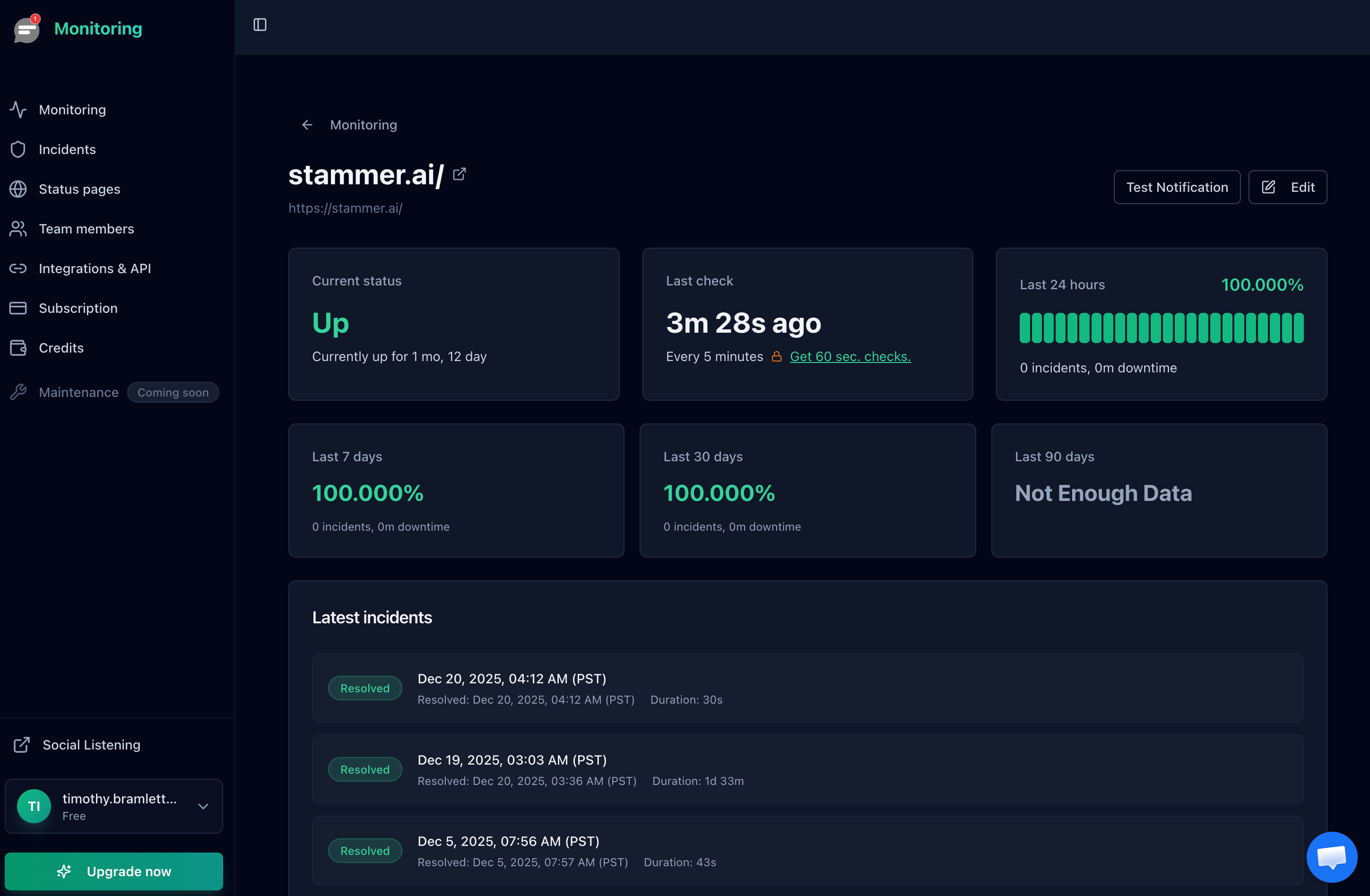
External monitoring provides verifiable uptime data that both parties can trust for SLA compliance.
Check Frequently
A 5-minute check interval means a 4-minute outage might not be detected. For SLA monitoring, use 1-minute or 30-second intervals. The tighter the interval, the more accurate your uptime calculation. With Notifier, Team and Enterprise plans check every 30 seconds.
Provide a Public Status Page
A public status page gives customers real-time visibility into your uptime and incident history. It serves as an objective record that both sides can reference when discussing SLA compliance. It also reduces support tickets during incidents because customers can check the status page instead of contacting you.
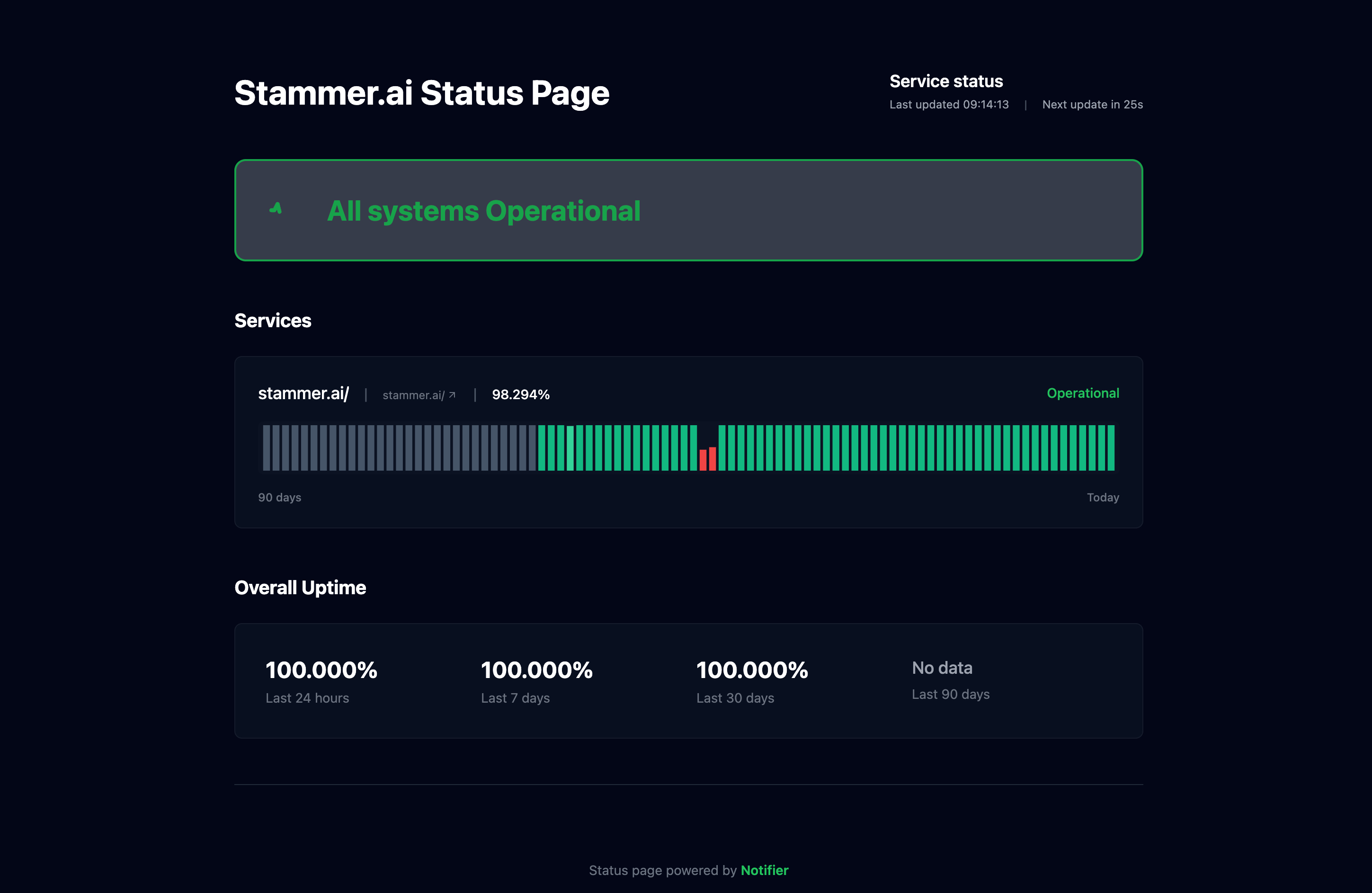
A public status page provides transparent, verifiable uptime data for SLA reporting.
Enforcing Your SLA: Credits, Claims, and Communication
Writing the SLA is the easy part. Enforcing it consistently builds trust with customers and keeps your team accountable.
Proactive vs. Reactive Credits
Most SLAs require customers to request credits within a window (typically 30 days). This is the reactive model. A more customer-friendly approach is proactive credits: automatically apply credits when the SLA is breached, without requiring the customer to file a claim. Proactive credits build trust and differentiate your service.
Post-Incident Reports
When a downtime event occurs, publish a post-incident report (also called a post-mortem or incident review) within 48 hours. Include: what happened, the timeline, root cause, impact, and what you're doing to prevent it from happening again. This demonstrates accountability and shows customers you take the SLA seriously.
Set Up Automated Alerting
You can't enforce an SLA if you don't know about outages in real time. Set up multi-channel alerts (email, SMS, Slack) so your team knows about downtime within seconds, not hours. The faster you detect and resolve an incident, the less likely you are to breach your SLA target.

A monitoring dashboard gives you a centralized view of all your services and their current uptime status.
Frequently Asked Questions
What uptime percentage should I put in my SLA?
Measure your actual uptime for at least 3 months first. Then commit to a target slightly below your actual performance. If you consistently hit 99.95%, offer 99.9%. This gives you a margin for unexpected incidents while still offering a competitive guarantee. Most SaaS products commit to 99.9%.
Should scheduled maintenance count against my SLA?
No. Standard practice is to exclude pre-announced scheduled maintenance from downtime calculations. But define clear limits: require advance notice (typically 48 hours), cap maintenance hours per month (e.g., 4 hours), and specify preferred maintenance windows (e.g., weekends, off-peak hours).
What are typical service credit percentages?
A common structure is 10% credit for minor breaches (99.0% to 99.9%), 25% for moderate breaches (95.0% to 99.0%), and 50% for major breaches (below 95.0%). Credits are usually capped at 100% of the monthly fee. Cash refunds are rare outside enterprise agreements.
Can I use my own monitoring to measure SLA compliance?
Technically yes, but it weakens the SLA's credibility. Customers may not trust self-reported metrics. Using an independent third-party monitoring service gives both parties an objective source of truth. Name the monitoring tool in your SLA and share access to the status page or reporting dashboard.
Do I need different SLAs for different customer tiers?
Yes, if your customers pay different amounts and have different expectations. Enterprise customers paying $5,000+/month typically expect 99.9% or higher with meaningful credits. Self-serve customers on a $20/month plan may not need more than a "commercially reasonable efforts" clause. Tiered SLAs let you match commitment to revenue.
How do I communicate SLA breaches to customers?
Be proactive and transparent. During the incident, post real-time updates to your status page. After resolution, send a post-incident report to affected customers within 48 hours. If credits are owed, either apply them automatically or notify customers of the credit process. Hiding or downplaying breaches erodes trust faster than the incident itself.
