At a Glance
- •An incident response plan documents exactly what to do, who to contact, and how to communicate when your website goes down. Write it before an outage happens, not during one.
- •Every incident has four phases: detection (automated monitoring alerts), communication (status page updates and internal notifications), resolution (diagnose and fix), and postmortem (document and prevent recurrence).
- •The detection phase should be fully automated. External monitoring with multi-channel alerts (Slack, email, SMS) catches outages within seconds so your team can respond immediately.
- •Always roll back first if a recent deployment is the suspected cause. Restore service first, then debug the failed deployment in a staging environment.
- •Notifier provides external monitoring with 30-second checks and email, SMS, phone call, and Slack alerts on every plan, including the free tier.
When your website goes down at 2 AM, the worst time to figure out what to do is right then. An incident response plan is a documented playbook that tells your team exactly what to do, who to contact, and how to communicate during a downtime event. You write it once, and it saves you from making panicked decisions under pressure every time something breaks.
This guide walks through the four phases of incident response, provides a ready-to-use template you can adapt for your team, and covers the monitoring setup that makes the detection phase automatic.
Why You Need an Incident Response Plan Before an Outage Happens
Every team thinks they'll handle an outage well until it happens. Then reality sets in:
Without a plan
Someone notices the site is down (maybe a customer complaint, maybe 30 minutes after it happened). They message the team Slack channel. Nobody knows who's responsible. Two engineers start debugging the same thing independently. Nobody updates the status page. The CEO asks for an update and nobody has one. Customers flood support with "is it just me?" tickets.
With a plan
Monitoring detects the outage within 30 seconds. The on-call engineer gets an SMS. They follow the diagnostic checklist. The status page is updated within 5 minutes. The team lead is notified if the incident exceeds 15 minutes. Customers check the status page instead of filing support tickets. After resolution, a postmortem is published within 48 hours.
The difference isn't technical skill. It's preparation. A plan turns a chaotic scramble into a repeatable process.
The Four Phases of Incident Response
Every incident follows the same lifecycle, regardless of what caused it:
| Phase | Goal | Time Target |
|---|---|---|
| 1. Detection | Know something is wrong before your users tell you | Under 2 minutes |
| 2. Communication | Notify the right people internally and update customers externally | Within 5 minutes of detection |
| 3. Resolution | Diagnose the root cause and restore service | Varies (minimize MTTR) |
| 4. Postmortem | Document what happened and prevent recurrence | Within 48 hours |
Most teams focus on phase 3 (fixing the problem) and skip or rush phases 2 and 4. But communication during an incident and learning from it afterward are what separate teams that keep having the same outage from teams that get better over time.
Incident Response Plan Template (Copy and Adapt)
This template is designed for small to mid-size teams (2 to 20 people) managing a web application or SaaS product. Replace the bracketed placeholders with your own values.
Incident Response Plan: [Company/Product Name]
Last updated: [Date] | Owner: [Name/Role] | Review frequency: Quarterly
1. Roles and Contacts
| Role | Person | Contact | Responsibility |
|---|---|---|---|
| On-call engineer | [Name] | [Phone/Slack] | First responder, initial diagnosis, escalation |
| Incident lead | [Name] | [Phone/Slack] | Coordinates response, owns communication |
| Engineering lead | [Name] | [Phone/Slack] | Escalation for complex technical issues |
| Communications | [Name] | [Phone/Slack] | Status page updates, customer emails |
2. Severity Levels
| Level | Definition | Response Time | Escalation |
|---|---|---|---|
| Critical (P1) | Full site down, data loss risk, security breach | Immediate | SMS/phone to on-call + engineering lead |
| Major (P2) | Core feature broken, significant performance degradation | Within 15 min | Slack to on-call + incident channel |
| Minor (P3) | Non-critical feature affected, workaround available | Within 1 hour | Slack to incident channel |
3. Detection Checklist
- Automated monitoring alerts (email, SMS, Slack) for HTTP status, SSL, DNS
- Application error rate spike (error tracking tool)
- Customer reports via support channels
- Social media mentions of outage
4. First Response (0 to 5 minutes)
- Acknowledge the alert (confirm you are responding)
- Open an incident channel in Slack:
#incident-YYYY-MM-DD - Assess severity (P1/P2/P3) based on impact
- Update status page to "Investigating"
- If P1: escalate immediately via phone/SMS to engineering lead
5. Diagnosis (5 to 30 minutes)
- Check monitoring dashboard for affected services
- Check recent deployments (was anything shipped in the last 2 hours?)
- Check hosting provider status page (AWS, Cloudflare, etc.)
- Check error logs and application metrics
- Check DNS resolution and SSL certificate status
- If deployment related: roll back immediately, investigate later
6. Communication Cadence
- Status page update within 5 minutes of detection
- Internal Slack update every 15 minutes during active incident
- Status page update every 30 minutes until resolved
- Customer email if incident exceeds [60] minutes
- Final "resolved" update on status page when service is restored
7. Resolution and Verification
- Implement fix or rollback
- Verify service is restored via monitoring dashboard
- Confirm from multiple locations if possible
- Monitor for 15 minutes after fix to ensure stability
- Update status page to "Resolved" with summary
- Close incident Slack channel (archive, don't delete)
8. Postmortem (Within 48 hours)
- Write postmortem document (see template below)
- Share with team for review
- Create action items to prevent recurrence
- Publish customer-facing summary if incident exceeded [30] minutes
- Review and update this response plan if gaps were discovered
Tip: Print this and pin it
During a real incident, you won't have time to search for a document. Print the roles table and first response checklist and pin them where your team can see them. Or save them as a pinned message in your team Slack channel.
Detection: How to Know About Outages Before Your Users Do
The detection phase is the only phase you can fully automate. Everything else requires human judgment. The goal is to shrink the gap between "something broke" and "we know something broke" to under 2 minutes.
Set Up External Monitoring
External monitoring checks your website from outside your infrastructure and alerts you when it detects a problem. At minimum, monitor:
- Homepage and key pages: HTTP status code checks every 30 seconds to 1 minute
- SSL certificate: SSL monitoring catches expiring certificates before they cause browser warnings
- DNS records: DNS monitoring detects resolution failures and unauthorized changes
- API endpoints: If your product has an API, monitor critical endpoints separately

A monitoring dashboard gives you a single view of all your services and their current status.
Configure Multi-Channel Alerts
A single email notification is not reliable enough for incident detection. Set up layered alerts:
- Slack: Immediate notification to your incident channel for all severity levels
- Email: Backup notification to the on-call engineer and incident lead
- SMS/Phone: For P1 incidents, an SMS or phone call alert ensures someone responds even if they're away from their desk
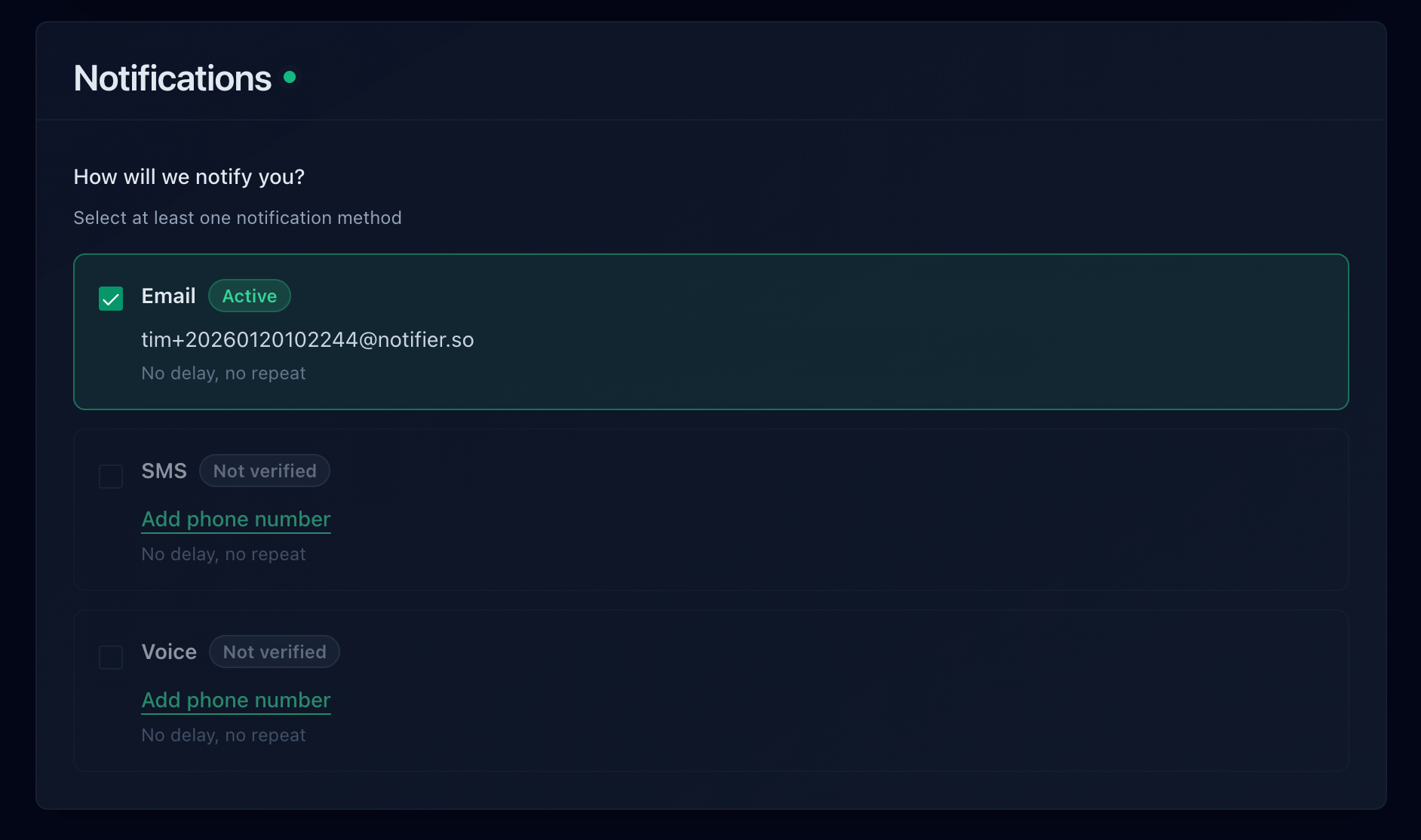
With Notifier, you can set up email, SMS, phone call, and Slack alerts on every plan, including the free tier.
Communication: What to Say and When
During an incident, silence is worse than bad news. Your customers and your team need regular updates even if the update is "we're still investigating." Here are templates for each stage:
Status Page: Investigating
Status: Investigating
We are investigating reports of [service/feature] being unavailable. Our team is actively looking into the issue and we will provide an update within 30 minutes.
[Timestamp]
Status Page: Identified
Status: Identified
We have identified the cause of the [service] disruption. [Brief description, e.g., "A database connection issue is preventing page loads."] Our team is implementing a fix. We expect service to be restored within [estimated time].
[Timestamp]
Status Page: Resolved
Status: Resolved
[Service] has been restored and is operating normally. The incident lasted approximately [duration]. We will publish a detailed postmortem within 48 hours. We apologize for the disruption.
[Timestamp]
A public status page is the best channel for these updates. Customers can check it anytime without contacting support, and it provides a permanent record of the incident timeline.
Resolution: A Diagnostic Checklist
When your monitoring alert fires, run through this checklist in order. Most outages fall into one of these categories:
-
Was anything deployed recently?
Check your deployment log for the last 2 hours. If yes, roll back immediately and investigate later. Rolling back is faster than debugging in production.
-
Is the hosting provider having an issue?
Check your hosting provider's status page (AWS, Google Cloud, DigitalOcean, Cloudflare). If the provider is down, there's nothing to fix on your end. Update your status page and wait.
-
Is it a DNS or SSL issue?
Run
dig yourdomain.comto check DNS resolution. Check SSL certificate expiration. These are quick checks that rule out or confirm common failures. -
Is the server responding at all?
Try to SSH into the server. If you can't connect, the instance may need a reboot or the security group may have changed. If you can connect, check CPU, memory, and disk usage.
-
Is the database accessible?
Database connection failures are one of the most common causes of website outages. Check if the database service is running, if connection limits are exhausted, or if disk space is full.
-
Check application error logs.
Look at the last 50 lines of your application's error log for fatal errors, stack traces, or permission denied messages.
Writing a Postmortem
A postmortem (also called an incident review) documents what happened, why it happened, and what you're doing to prevent it from happening again. Write it within 48 hours while details are fresh. Here's a template:
Postmortem: [Incident Title]
Summary
[One paragraph: what happened, duration, impact. Example: "On March 15, 2026, our website was unavailable for approximately 45 minutes between 14:15 and 15:00 UTC. The outage affected all users and was caused by a database connection pool exhaustion triggered by a traffic spike."]
Timeline
- 14:12 UTC: [Traffic spike begins]
- 14:15 UTC: [Monitoring alert fires, status: Down]
- 14:17 UTC: [On-call engineer acknowledges alert]
- 14:20 UTC: [Status page updated to "Investigating"]
- 14:35 UTC: [Root cause identified: database connection limit]
- 14:45 UTC: [Fix deployed: connection pool limit increased]
- 15:00 UTC: [Service fully restored, monitoring confirms]
Root Cause
[Detailed explanation. What specifically broke and why? Be specific, not "the server crashed."]
Impact
- Duration: [45 minutes]
- Users affected: [All / percentage / specific region]
- Revenue impact: [If applicable]
- SLA impact: [Monthly uptime dropped from X% to Y%]
What Went Well
- [Monitoring detected the issue within 3 minutes]
- [Status page was updated promptly]
- [Rollback procedure worked as expected]
What Could Be Improved
- [Database connection limits were not monitored]
- [No automatic scaling for traffic spikes]
- [Escalation took too long]
Action Items
- [Add database connection pool monitoring] — Owner: [Name] — Due: [Date]
- [Implement auto-scaling for web tier] — Owner: [Name] — Due: [Date]
- [Update incident response plan with database runbook] — Owner: [Name] — Due: [Date]
The most important section is Action Items. A postmortem without action items is just documentation of failure. Action items with owners and deadlines are what actually prevent the same incident from happening again.
Frequently Asked Questions
How often should I update the incident response plan?
Review it quarterly and after every significant incident. Contact information changes, team members rotate, and you learn new things from each outage. A plan that hasn't been updated in a year is almost as bad as no plan at all.
Do I need an incident response plan for a small team?
Yes. Small teams benefit even more because there's less redundancy. If your solo developer is asleep and the site goes down, who gets the alert? A one-page plan with roles, contacts, and a basic checklist is enough for a team of 2 to 5 people.
Should I publish postmortems publicly?
For significant incidents (15+ minutes of downtime), yes. Public postmortems build trust because they show transparency and accountability. You don't need to share internal details, but a summary of what happened, how long it lasted, and what you're doing to prevent it is valuable for customers.
What's the most important monitoring setup for incident detection?
External HTTP monitoring with multi-channel alerts. At minimum, check your homepage and one critical page every 1 minute, with alerts going to Slack and email. Add SMS or phone alerts for after-hours coverage. This catches the majority of outages within seconds. Notifier offers this on every plan including the free tier.
Should I roll back first or debug first?
Roll back first if a recent deployment is the suspected cause. The priority is restoring service, not understanding the bug. Roll back, confirm the site is working, then investigate the failed deployment in a staging environment. Debugging in production while users are affected extends the outage unnecessarily.
