A website won't load. Maybe it's your favorite service, maybe it's your own site. The first question is always the same: is it down for everyone or just me?
This guide shows you how to check if a website is down in under 30 seconds using free site down checker tools, explains why a site can be down for you but not others (and vice versa), and covers what to do in either scenario. If you own a website, it also shows you how to set up monitoring so you never have to manually check again.
Is It Down or Just Me? How to Check in 30 Seconds
If you just need a quick answer to "is it down for me or everyone," do this:
- 1. Check Status Radar: Go to Notifier Status Radar to see if a major website or service is currently down globally. It tracks the most popular websites in real time from locations worldwide.
- 2. Use our ping test: Enter any URL into our free ping test to check whether a specific site responds.
- 3. Try a different network: Open the site on your phone using mobile data (not Wi-Fi). If it loads on mobile data but not your Wi-Fi, the problem is your network, not the website.
That covers 90% of cases. If you want to understand why a website would be down just for you, or what to do if you own the site, keep reading.
Free Site Down Checker Tools
These tools check a website from external servers around the world. If their servers can reach the site but you can't, the problem is on your end. If their servers also can't reach it, the site is genuinely down for everyone.
| Tool | What It Does | Best For |
|---|---|---|
| Notifier Status Radar | Tracks uptime of major popular websites globally in real time | Checking if a major service (Google, AWS, Stripe, etc.) is down |
| Notifier Ping Test | Pings any URL and shows response time and status | Quick check on any website or server |
| downforeveryoneorjustme.com | Simple up/down check from a single external server | Fast "is it down for me or everyone" check |
| isitdownrightnow.com | Checks status and shows response time and recent history | Seeing if a site has been having ongoing issues |
| DownDetector | Crowd-sourced outage reports and graphs | Major services where users are reporting problems |
Check From the Command Line
If you're comfortable with a terminal, you can check directly without any third party tool:
# Quick check if a site responds (shows HTTP status code):
curl -I -s -o /dev/null -w "%{http_code}" https://example.com

# Ping to check basic connectivity:
ping -c 4 example.com

# Trace the network path to see where it fails:
traceroute example.com

# Check DNS resolution:
nslookup example.com
dig example.com
Notifier's dashboard gives you a real time view of all your monitored websites.
Why Would a Website Be Down Just for Me?
You checked with a tool and the site is apparently up. But you still can't load it. This happens more often than you'd think, and there are several reasons why a site can be down for you but not others.
DNS Cache Pointing to the Wrong Place
When you visit a website, your computer remembers the IP address (this is DNS caching). If the website recently moved to a new server, your computer might still be trying to connect to the old one. Other people whose DNS cache has already updated will see the site fine while you get a timeout or error.
Your ISP's DNS Server Is Down
Your Internet Service Provider runs its own DNS servers. If those servers are having problems, you won't be able to resolve website addresses, even though the websites themselves are fine. People on other ISPs (or using Google DNS / Cloudflare DNS) won't be affected.
CDN Regional Failure
Most large websites use a CDN (Content Delivery Network) like Cloudflare, AWS CloudFront, or Akamai. CDNs have servers all over the world. If the server closest to you is having issues, you'll see an error, but someone in a different region connects to a different CDN server and sees the site perfectly fine.
Your VPN or Proxy Is Interfering
VPNs route your traffic through different servers and can introduce their own connection problems. Some websites also actively block VPN IP addresses. If you're using a VPN, try disconnecting it to see if the site loads.
IP or Geo-Blocking
Some websites block traffic from specific countries, IP ranges, or even individual IP addresses. This can happen if the site's firewall flagged your IP as suspicious, if the site doesn't serve your region, or if your IP was part of a range that got blocked due to abuse by others.
Browser or Device Issue
Corrupted browser cache, a conflicting browser extension, or overly aggressive antivirus software can prevent specific sites from loading. If the site works in a different browser or on a different device, the problem is local.
Why a Website Goes Down for Everyone
If the tools confirm the site is down globally, the problem is on the server side. Here are the most common causes of a website going down for everyone.
| Cause | What Happens | Typical Duration |
|---|---|---|
| Server crash | The web server or application stopped running | Minutes to hours (depends on monitoring) |
| Traffic overload | More visitors than the server can handle, returns 503 errors | Minutes (until traffic subsides or server scales) |
| Bad code deploy | A bug in new code causes 500 errors | Until the deploy is rolled back |
| DNS failure | The domain can't be resolved to an IP address at all | Minutes to hours (DNS propagation required) |
| Expired domain | The domain registration lapsed and DNS stops resolving | Hours to days (renewal + DNS propagation) |
| Expired SSL certificate | Browsers block access with a security warning instead of loading the site | Until the certificate is renewed |
| DDoS attack | Massive malicious traffic overwhelms the server | Hours (until mitigated) |
| Hosting provider outage | The hosting infrastructure itself is down (AWS, GCP, etc.) | Minutes to hours |
| Planned maintenance | Server deliberately taken offline for updates | Usually minutes, announced in advance |
If you're a visitor to someone else's site, all you can do is wait. The site owner needs to fix the problem. If you own the site, the sections below will help you diagnose and fix it.

With monitoring set up, you receive an alert the moment your site goes down instead of discovering it manually.
How to Fix It If the Website Is Down Just for You
The tools say the site is up, but you still can't access it. Work through these steps in order.
1. Flush Your DNS Cache
This clears your computer's stored DNS records so it fetches fresh ones:
# macOS:
sudo dscacheutil -flushcache; sudo killall -HUP mDNSResponder

# Windows (run as Administrator):
ipconfig /flushdns

# Linux:
sudo systemd-resolve --flush-caches
2. Switch DNS Servers
If your ISP's DNS is the problem, switching to a public DNS provider can fix it immediately:
- Google DNS:
8.8.8.8and8.8.4.4 - Cloudflare DNS:
1.1.1.1and1.0.0.1 - Quad9 DNS:
9.9.9.9and149.112.112.112
You can change your DNS in your operating system's network settings, or on your router to apply it to all devices on your network.
3. Disable VPN and Proxy
If you're using a VPN, turn it off and try again. If the site loads without the VPN, the issue is either the VPN's routing, the VPN server's IP being blocked, or a CDN edge issue at the VPN's exit location.
4. Try a Different Browser or Incognito Mode
Open the site in incognito/private mode or a completely different browser. This rules out browser extensions, cached error pages, and corrupt cookies. If it works in incognito, clear your regular browser's cache and cookies for that site.
5. Try a Different Network
Switch from Wi-Fi to mobile data, or try a different Wi-Fi network. This is the definitive test. If the site loads on a different network, the issue is with your ISP, router, or local network configuration.
How to Fix It If You Own the Site
If your website is down for everyone and you're the site owner, here's your action plan.
1. Check Your Server
SSH into your server and check if the web server process is running:
# Check Nginx:
sudo systemctl status nginx

# Check Apache:
sudo systemctl status apache2

# Check your application process:
sudo systemctl status your-app-service

# Check server resources:
htop
2. Check Error Logs
The error logs tell you exactly what went wrong:
sudo tail -50 /var/log/nginx/error.log
sudo tail -50 /var/log/apache2/error.log
For specific error types, see our detailed guides:
- How to fix 500 Internal Server Error
- How to fix 502 Bad Gateway Error
- How to fix 503 Service Unavailable Error
3. Check DNS and Domain Status
# Check if DNS is resolving:
dig yourdomain.com

# Check domain expiration:
whois yourdomain.com | grep -i "expir"
If your domain expired, renew it immediately. DNS will take time to propagate after renewal. You can also use our free domain expiry checker to verify.
4. Check Your Hosting Provider's Status
If your server itself is unreachable (you can't even SSH in), the issue might be with your hosting provider. Check their status page:
- AWS: status.aws.amazon.com
- Google Cloud: status.cloud.google.com
- DigitalOcean: status.digitalocean.com
- Cloudflare: cloudflarestatus.com
If your hosting provider is experiencing an outage, there's nothing you can do except wait. This is why some teams use multi-region or multi-provider setups for critical applications.

Notifier's monitor detail view shows current status, uptime statistics, and full incident history.
SSL Certificate Issues That Make a Site Appear Down
An expired or misconfigured SSL certificate can make your website look completely down. Instead of loading the page, visitors see a browser security warning ("Your connection is not private") that most people won't click through. For all practical purposes, the site is down.
Common SSL issues that trigger this:
- Expired certificate: Let's Encrypt certificates expire every 90 days. If auto-renewal fails silently, your site goes dark without any server error.
- Domain mismatch: The certificate was issued for
www.example.combut the user accessedexample.com(or vice versa). - Incomplete certificate chain: The server is missing an intermediate certificate, which causes failures on some browsers and devices but not others.
You can check your certificate status from the command line:
# Check SSL certificate expiration date:
echo | openssl s_client -connect example.com:443 2>/dev/null | openssl x509 -noout -dates
Catch SSL issues before they cause downtime
Notifier includes free SSL certificate monitoring on all plans, including the free tier. It tracks your certificate expiration dates and alerts you before they expire, so an SSL renewal failure never turns into unexpected downtime.
Stop Manually Checking: Set Up Website Monitoring
Every time you Google "is it down for everyone or just me," you're doing reactive troubleshooting. You noticed a problem, so now you're trying to figure out what happened. But what about the times you don't notice?
Manual checking has serious problems:
- It's slow. By the time you realize something is wrong, open a browser, find a checker tool, and type in the URL, minutes have passed. Your users already know.
- It only works when you're looking. What about nights, weekends, and vacations? If your site goes down at 2 AM, nobody checks until morning.
- It doesn't catch intermittent issues. A site that goes down for 5 minutes every few hours won't be caught by occasional manual checks.
- It tells you "what" but not "when." A tool tells you the site is down right now. Monitoring tells you the site went down at 3:47 PM and has been down for 12 minutes.
Uptime monitoring solves all of this. A monitoring service checks your site automatically, every minute, from multiple locations around the world. The moment it detects a problem, it sends you an alert via email, SMS, or phone call.
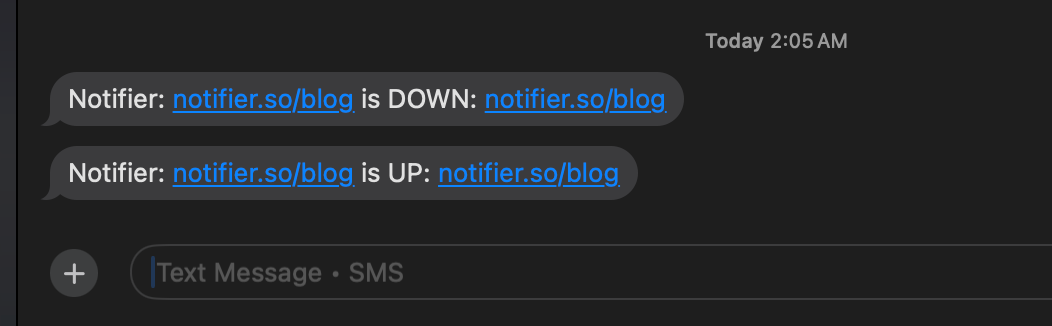
Notifier sends SMS alerts when your site goes down and again when it recovers.
Set up monitoring in 30 seconds
Notifier checks your site and sends you an alert the instant it goes down. No more Googling "is it down for everyone or just me." The free plan includes 10 monitors with 5 minute checks, email alerts, SSL certificate monitoring, and 5 public status pages. Paid plans start at $4/month for 1 minute checks with SMS and phone call alerts.
You can also use Status Radar to keep an eye on the major services your business depends on (AWS, Stripe, Cloudflare, etc.) without setting up individual monitors for each one.
Frequently Asked Questions
Is it down for everyone or just me?
The fastest way to answer this is to check the site from an external service. Use Status Radar for major websites, or enter any URL into our free ping test. If the external check succeeds but you can't load the site, it's down just for you. If the external check also fails, it's down for everyone.
Why would a website be down just for me?
The most common reason is DNS. Your computer cached an old IP address for the site, or your ISP's DNS server is having issues. Other causes include CDN regional failures (the server closest to you is down), VPN interference, IP blocking, or your ISP routing traffic through a congested path. Flush your DNS cache and try a different DNS server like Google (8.8.8.8) or Cloudflare (1.1.1.1) to fix most cases.
How do I check if my website is down?
If you own the site, use a combination of external checks and uptime monitoring. External checkers like our ping test tell you whether the site responds right now. Monitoring tools check continuously (every 1 to 5 minutes) and alert you via email, SMS, or Slack the moment something fails. For a quick command line check, run curl -I yourdomain.com.
Can a website be down in one country but up in another?
Absolutely. This is called a regional outage and it's more common than people realize. Causes include a CDN edge server failing in a specific region, a DNS provider having issues in certain locations, the website deliberately geo-blocking certain countries, or an ISP routing problem that only affects users in a specific area. Tools that check from multiple global locations can help confirm regional outages.
How long does a website outage usually last?
It varies widely. A server restart takes seconds. A traffic spike might cause issues for a few minutes. A bad code deploy lasts until someone rolls it back (minutes to hours, depending on whether the team has monitoring). DNS propagation issues can last up to 48 hours in extreme cases. Hosting provider outages typically resolve within an hour. The biggest factor in outage duration is how quickly the team notices the problem, which is why uptime monitoring matters.
Is there a way to get notified when a website goes down?
Yes. Uptime monitoring tools do exactly this. You add the URL you want to monitor, and the tool checks it every 1 to 5 minutes from servers around the world. When it detects downtime, it alerts you via email, SMS, Slack, or phone call. This works for both your own sites and third party services you depend on.
What does it mean when a site is down for maintenance?
It means the site owner intentionally took the site offline to perform updates, apply patches, or make infrastructure changes. Maintenance downtime is usually planned and communicated in advance through a status page or email. Unlike unexpected outages, maintenance windows are controlled and temporary. Most monitoring tools let you schedule maintenance windows so they don't trigger false alerts.
Why do "is it down" tools sometimes give different answers?
Because they check from different locations and at different times. A site might be down from one tool's server location (say, US East Coast) but up from another's (Europe). Some tools also cache results for a few seconds, so you might see a "still up" result right after a site goes down. For the most reliable result, check from multiple tools and try to access the site yourself from different networks.
