At a Glance
- •DNS_PROBE_FINISHED_NXDOMAIN is Chrome's way of saying it could not find an IP address for that domain. Either the domain does not exist, has expired, or your DNS resolver failed to reach the authoritative servers.
- •The fastest visitor-side fixes: flush the Chrome DNS cache at chrome://net-internals/#dns, flush the operating system DNS cache, switch to Cloudflare 1.1.1.1 or Google 8.8.8.8, or restart your router.
- •If you own the site and visitors see this error, check these in order: domain registration status, DNS records at the registrar, nameserver propagation, and CDN DNS configuration.
- •Expired domains are the most common business-impacting cause. A domain silently expiring makes your site disappear worldwide, and most registrars do not resend renewal reminders aggressively.
- •Notifier monitors DNS resolution, uptime, SSL certificates, and domain expiration free for up to 10 domains. Paid plans start at $4/month for 1-minute checks and SMS or phone alerts.
DNS_PROBE_FINISHED_NXDOMAIN is Chrome's way of saying it tried to look up a domain name, asked every DNS server it could reach, and none of them knew the answer. You see the error. The site does not load. Nothing on your screen tells you why.
This guide covers what the error actually means, the fastest visitor side fixes for Chrome, Windows, Mac, Android, and iOS, and what to do if you own the site and visitors are reporting it. Every step is a copy and paste command or a short menu walk through.
What DNS_PROBE_FINISHED_NXDOMAIN Actually Means
Every website on the internet lives at an IP address, something like 104.21.3.55. The Domain Name System (DNS) is the phone book that translates domain names like notifier.so into those IP addresses.
When you type a URL into Chrome, your computer asks a DNS resolver (usually your ISP, 1.1.1.1, or 8.8.8.8) for the matching IP address. The resolver walks up the DNS chain until it reaches the authoritative nameservers for that domain and returns the answer. Chrome then connects to the IP address.
NXDOMAIN is the official DNS response code for "this domain does not exist." When Chrome shows DNS_PROBE_FINISHED_NXDOMAIN, it means the resolver finished its probe and came back with NXDOMAIN. No IP address exists for the name you typed.
The short version:
Chrome asked, "what is the IP for this domain?" DNS answered, "there is no IP because the domain has no DNS record." Something along the path is broken: the domain, the DNS records, your resolver, or your local cache.
Common Causes of DNS_PROBE_FINISHED_NXDOMAIN
The error looks the same regardless of cause, but knowing the likely culprits helps you fix it faster. Here are the most common reasons, roughly in order of frequency:
| Cause | Who Is Affected | Fix Location |
|---|---|---|
| Typo in the URL | Just you | Retype the URL |
| Stale local DNS cache | Just you | Flush your cache |
| Router cached a bad response | Your household or office | Restart router |
| ISP DNS resolver failure | Your ISP's users | Change DNS to 1.1.1.1 |
| VPN or proxy intercepting DNS | You and VPN users | Disable VPN temporarily |
| Domain expired | Everyone globally | Owner must renew |
| DNS records deleted or misconfigured | Everyone globally | Owner must fix at registrar |
| Nameservers not yet propagated | Some regions | Wait up to 48 hours |
| hosts file override | Just your machine | Edit hosts file |
A good first test: open the URL on your phone using cellular data (not Wi-Fi). If it loads, the problem is local. If it still fails, the domain itself has a problem.
Fix in Chrome (All Operating Systems)
Chrome keeps its own internal DNS cache separate from your operating system. When a lookup fails, that failure is cached for several minutes. Clearing the Chrome cache is the single fastest fix and it takes three seconds.
1. Clear Chrome's Internal DNS Cache
Paste this into the Chrome address bar:
chrome://net-internals/#dns
Click Clear host cache. Then open a new tab in chrome://net-internals/#sockets and click Flush socket pools. Try the site again.
2. Try Incognito Mode
Open the URL in an incognito window (Ctrl + Shift + N on Windows, Cmd + Shift + N on Mac). Incognito uses a fresh session with no cached DNS. If the site loads in incognito but not in your normal window, the issue is cached state in your main profile.
3. Disable Chrome Extensions
Some privacy extensions (especially DNS over HTTPS overrides and ad blockers that use custom DNS) can cause NXDOMAIN errors when they fail. Open chrome://extensions and disable every extension. If the site loads, re-enable extensions one by one to find the culprit.
4. Reset Chrome's Network Settings
Go to Settings > Reset settings > Restore settings to their original defaults. This does not delete your bookmarks or passwords. It resets search engine, startup page, pinned tabs, extensions, and cookies. This is a nuclear option but it fixes cases where Chrome is the problem.
Fix on Windows
Flush the Windows DNS Cache
Open Command Prompt as Administrator (Start menu, type "cmd", right click, Run as administrator). Run these commands:
ipconfig /flushdns
ipconfig /registerdns
ipconfig /release
ipconfig /renew
netsh winsock reset
Reboot after running netsh winsock reset. These commands clear the local DNS cache, re-register with DHCP, and reset the Winsock network stack. In that order, they fix around 80% of DNS_PROBE_FINISHED_NXDOMAIN errors on Windows.
Change Your DNS Servers
If your ISP's DNS is the problem, switching to a public resolver fixes it immediately. Cloudflare (1.1.1.1) and Google (8.8.8.8) are both fast and reliable.
- 1. Open Settings > Network & internet > Wi-Fi (or Ethernet)
- 2. Click your connection, then Edit DNS server assignment
- 3. Change it from Automatic to Manual, enable IPv4
- 4. Preferred DNS:
1.1.1.1 - 5. Alternate DNS:
1.0.0.1 - 6. Save and try the site again
Check Your hosts File
The Windows hosts file can override DNS. If a bad entry is there, every DNS lookup for that domain fails. Open C:\Windows\System32\drivers\etc\hosts in Notepad (run Notepad as Administrator). Remove any lines referencing the domain you are trying to reach and save.
Fix on Mac
Flush the Mac DNS Cache
Open Terminal (Applications > Utilities > Terminal) and run:
sudo dscacheutil -flushcache
sudo killall -HUP mDNSResponder
You will be prompted for your admin password. Both commands are needed: the first clears the lookup cache, the second restarts the macOS DNS responder daemon. You will not see any confirmation text. That is normal.
Change Your DNS Servers on macOS
- 1. Open System Settings > Network
- 2. Click your active connection (Wi-Fi or Ethernet), then Details
- 3. Go to the DNS tab
- 4. Click the + button and add
1.1.1.1 - 5. Click + again and add
1.0.0.1 - 6. Click OK, then Apply
Check /etc/hosts on Mac
Same idea as Windows. Developer tools sometimes add entries that block real DNS lookups:
sudo nano /etc/hosts
Remove any lines that reference the failing domain. Save with Ctrl + O, exit with Ctrl + X.
Fix on Mobile (Android and iOS)
Android
Android's DNS behavior varies by version, but these steps work on most modern builds:
- 1. Open the Chrome app, tap the three dot menu, choose History > Clear browsing data, select Cached images and files, and tap Clear data.
- 2. Toggle Airplane Mode on for 10 seconds, then off. This forces the network stack to rebuild from scratch.
- 3. Go to Settings > Network & internet > Private DNS. Set it to Private DNS provider hostname and enter
1dot1dot1dot1.cloudflare-dns.com. - 4. Try the site again. If it still fails, switch to mobile data to rule out the Wi-Fi.
iOS (iPhone and iPad)
- 1. Close Chrome or Safari completely (swipe up and flick the app away).
- 2. Toggle Airplane Mode on and off.
- 3. Go to Settings > Wi-Fi, tap the (i) next to your network, tap Configure DNS, switch to Manual, and add
1.1.1.1and1.0.0.1. - 4. If still failing, install the free 1.1.1.1 app from the App Store. It sets up system wide DNS over HTTPS with one tap.
If You Own the Site and Visitors Are Getting This Error
This is the scenario that actually costs money. Your customers cannot reach your site, they assume you are out of business, and you lose revenue with every refresh. Check these four things in order.
1. Is the Domain Expired?
This is the single most common cause of "everyone gets NXDOMAIN on my site." When a domain expires, the registrar pulls the nameservers, and your site vanishes from DNS globally within minutes. Check who.is or run this command in your terminal:
whois yourdomain.com | grep -i "expir"If the expiration date is in the past or within the next 30 days, log in to your registrar and renew immediately. Most registrars provide a 30 to 60 day redemption period after expiration, during which you can recover the domain (usually with a fee). After redemption, the domain goes to auction or public re-registration.
Domain expiration is one of the most painful outages because there is usually no warning until customers start complaining. Our domain expiration monitoring guide covers how to never let this happen again.
2. Are the DNS Records Correct at Your Registrar?
Someone on your team may have deleted or modified the A, AAAA, or CNAME records. Log in to your registrar or DNS provider (Cloudflare, Namecheap, GoDaddy, AWS Route 53, etc.) and verify:
- A record for the root domain pointing to your server's IPv4 address
- AAAA record if you have IPv6
- CNAME for
wwwpointing to the root domain (or a platform URL likeyoursite.netlify.app) - MX records for email, if you rely on this domain for email
You can query your own DNS from a third party resolver to see what the rest of the internet sees:
dig @1.1.1.1 yourdomain.com A
dig @8.8.8.8 yourdomain.com A
dig @1.1.1.1 yourdomain.com NS
If any of these return NXDOMAIN or no answer, the fix is at your DNS provider.
3. Have Nameservers Recently Changed?
If you moved hosts or DNS providers, the new nameservers may not have propagated globally. Propagation typically takes a few minutes to 48 hours. During this window, some visitors see the new site, some see the old site, and some see NXDOMAIN if the transition was not handled cleanly.
Check propagation at whatsmydns.net. If some regions are still returning NXDOMAIN and others are returning your real IP, it is a propagation issue. Wait it out.
4. Is Your CDN or Proxy Misconfigured?
If you use Cloudflare, Fastly, or another proxy, a misconfigured rule can cause the proxy to return NXDOMAIN or no response. On Cloudflare, check that the orange cloud icon is toggled on for the DNS records you expect to be proxied, and that there are no Workers or Page Rules silently blocking traffic.
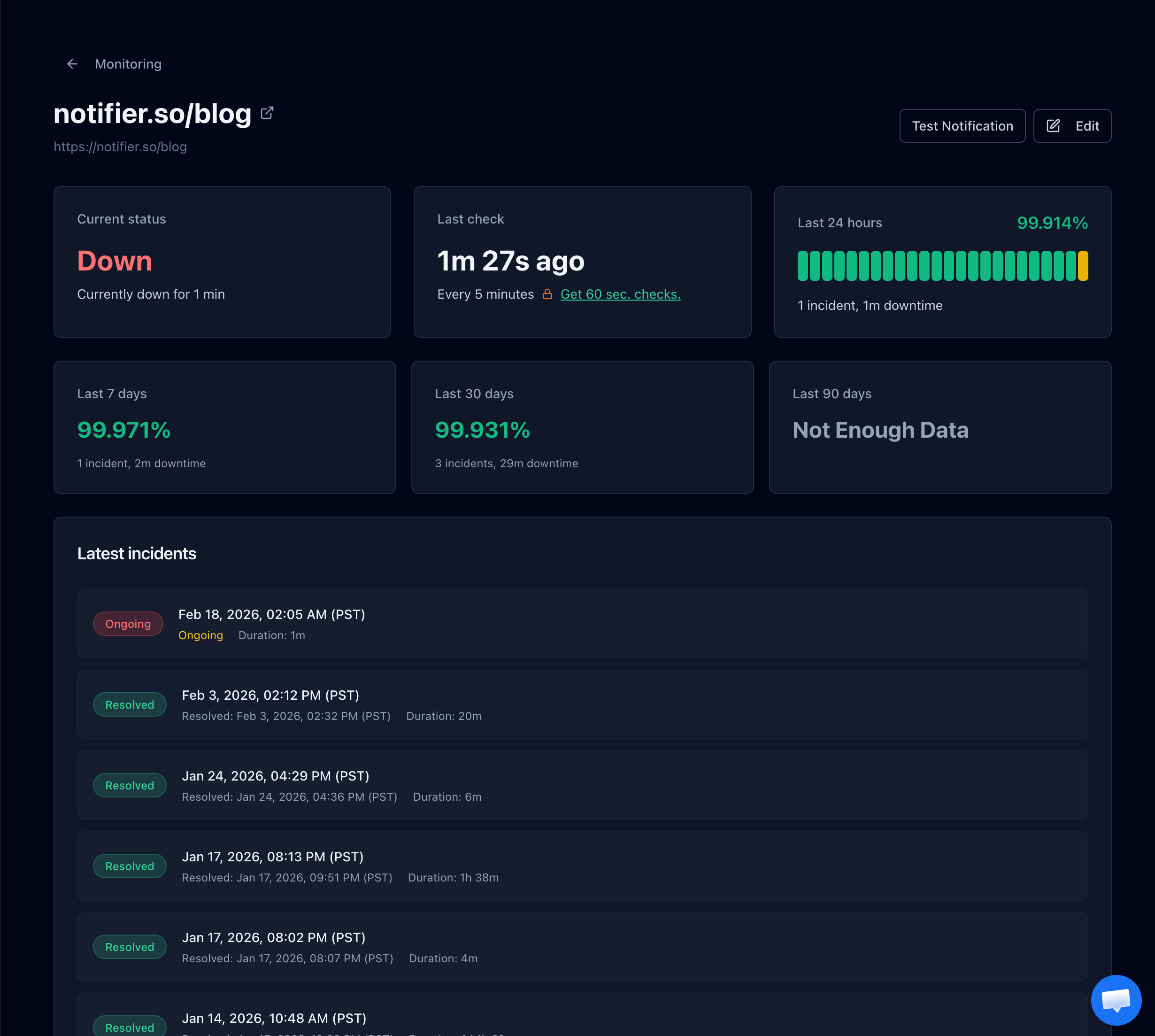
Notifier shows the exact moment your site went down and the incident duration.
Prevention: Monitoring So You Know Before Customers Do
Visitors do not send you a polite email when they get DNS_PROBE_FINISHED_NXDOMAIN. They leave, they switch to a competitor, and they forget. By the time someone gets through to you on chat, you have already lost hours of traffic.
External monitoring catches DNS failures within seconds. A good uptime monitor runs from outside your network, attempts to resolve your domain, and alerts you the instant DNS stops responding. Notifier monitors HTTP uptime, response time, DNS resolution, SSL certificates, and domain expiration on every plan including free.

Adding a monitor in Notifier. DNS resolution is checked automatically on every HTTP check.
What to Monitor to Avoid NXDOMAIN Outages
- HTTP uptime: Catches every case where visitors cannot reach your site, including NXDOMAIN errors returned at the DNS layer.
- DNS resolution time: A spike in DNS resolution time is an early warning that your DNS provider is struggling.
- SSL certificate expiration: Expired certificates do not cause NXDOMAIN directly, but they cause visitor facing errors that look very similar. SSL monitoring is included free on every Notifier plan.
- Domain expiration: The only way to prevent the single most costly form of NXDOMAIN. See our domain expiration monitoring guide.
SMS and Phone Call Alerts for DNS Failures
Email alerts are too slow when your entire domain is unreachable. If the NXDOMAIN is caused by something on your end, you want to be paged immediately, not an hour later. Notifier includes SMS and phone call alerts on every plan including free.
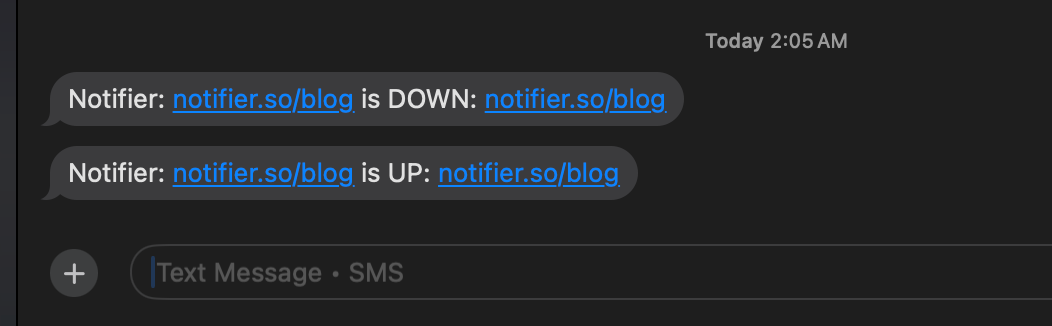
SMS alerts from Notifier showing both the downtime and recovery messages.
Which Monitoring Tools Catch DNS Failures?
Any tool that does external HTTP monitoring will detect NXDOMAIN because the request fails before a connection is even attempted. What differs is whether the tool surfaces the DNS failure clearly, how fast alerts arrive, and whether domain expiration is tracked.
| Tool | Free Plan | DNS Monitoring | Domain Expiry Tracking | Paid Starts At |
|---|---|---|---|---|
| Notifier | 10 monitors, commercial use OK | Yes, all plans | Free tool available | $4/mo |
| UptimeRobot | 50 monitors, non-commercial only | Paid plans only | Paid plans only | $7/mo |
| Better Stack | 10 monitors, 3 min checks | Yes | Yes | ~$24/mo |
| Pingdom | No free plan | Yes | Not included | ~$15/mo |
| StatusCake | 10 monitors, 5 min checks | Yes on paid | Yes on paid | ~$24/mo |
Note on UptimeRobot's free plan
Since December 2024, UptimeRobot's free tier is restricted to non-commercial use. If you are monitoring a business or client website, you need a paid plan or a different tool.
Notifier also offers a free domain expiry checker that does not require an account. Drop in any domain and see exactly when it expires.
Frequently Asked Questions
Is DNS_PROBE_FINISHED_NXDOMAIN a Chrome only error?
The specific string is Chrome and Chromium based browsers (Chrome, Edge, Brave, Opera). The underlying problem is not. Firefox shows "Hmm. We're having trouble finding that site," and Safari shows "Safari can't find the server." All three mean the same thing: DNS returned NXDOMAIN. Fixes that work for Chrome work for the other browsers too.
Why does the error happen on only one site?
Almost always because your local machine has cached a previous NXDOMAIN response. Flushing the Chrome DNS cache at chrome://net-internals/#dns clears it. If the error persists after a cache flush, the domain itself has a DNS problem (expired, misconfigured, or in the middle of a nameserver change).
Can a VPN cause DNS_PROBE_FINISHED_NXDOMAIN?
Yes. VPNs override your DNS settings and route lookups through their own resolvers. If the VPN's DNS server is slow, down, or blocking the domain, you get NXDOMAIN even though the real DNS is fine. Disable the VPN, flush your DNS cache, and try again. If the site loads without the VPN, the VPN provider's DNS is the problem.
How long does DNS propagation take after I fix the records?
Usually 5 to 30 minutes for most visitors. Up to 48 hours in the worst case. The time depends on the TTL (time to live) on your DNS records. Lower TTL values propagate faster. If you are planning a migration, drop your TTL to 300 seconds a day in advance so the change rolls out quickly.
Is it safer to use 1.1.1.1 or 8.8.8.8?
Both are safe and reliable. Cloudflare (1.1.1.1) markets itself on privacy and commits to not logging queries beyond 24 hours. Google (8.8.8.8) is slightly more widely supported on corporate networks. For most users, either is faster than their ISP's default and neither will cause NXDOMAIN errors on legitimate domains.
My domain works on desktop but not on mobile. What gives?
Your mobile device likely has a stale DNS cache or is using a different resolver. Toggle Airplane Mode on and off to force a refresh, then retry. On Android, check Private DNS settings under Settings > Network & internet. On iOS, try a different Wi-Fi network or switch to cellular. If it works on cellular but not Wi-Fi, your router cached a bad DNS response. Restart the router.
If I renew an expired domain, how fast does it come back?
Usually within 1 to 4 hours of renewal, the domain's nameservers are restored at the registry and DNS lookups begin returning your records again. Full global propagation can take up to 24 hours. Clear your local DNS cache immediately after renewal so you can confirm the fix on your own machine without waiting.
How do I get alerted the instant my domain goes NXDOMAIN?
Set up external uptime monitoring. Any HTTP check will fail when DNS returns NXDOMAIN because the tool cannot resolve the domain at all. Notifier runs checks every 30 seconds on Team and Enterprise plans, every 1 minute on the Solo plan at $4 per month, and every 5 minutes free on up to 10 URLs. SMS and phone call alerts are included on every plan.
