You see "99.9% uptime guarantee" plastered across every hosting provider's website. It sounds impressive. But what does 99.9 uptime actually mean? And more importantly, is it good enough for your business?
The difference between 99.9% and 99.99% uptime might seem trivial. It's just 0.09%, right? In practice, that small difference translates to hours of additional downtime per year. Use the availability calculator below to see exactly what your uptime SLA allows, then read on to understand what these numbers mean for your business.
SLA Uptime Availability Calculator
Enter your SLA percentage to see exactly how much downtime it allows:
An SLA of 99.9% uptime allows the following downtime:
| Daily | 1m 26s |
| Weekly | 10m 5s |
| Monthly | 43m 50s |
| Quarterly | 2h 11m 29s |
| Yearly | 8h 45m 57s |
What Uptime Percentage Actually Means
Uptime percentage (also called uptime availability) is a simple calculation: the amount of time your service is operational divided by the total time in a given period, multiplied by 100.
Uptime % = ((Total Time - Downtime) / Total Time) × 100

Example: If your site was down for 8.76 hours in a year:
Uptime = ((8760 - 8.76) / 8760) × 100 = 99.9%
A year has 8,760 hours (365 × 24). Even a seemingly high uptime like 99% means your service could be down for over 87 hours per year. That's more than three full days of downtime.
This is why the industry talks about "the nines." Each additional nine represents an order of magnitude improvement in reliability. Understanding what is 99.9 uptime versus what is 99.99 uptime can save your team from setting the wrong expectations.
The Nines Explained: 99.9% vs 99.99% vs 99.999% Uptime
Here's what each uptime level actually means in terms of allowed downtime:
| Uptime | Name | Downtime/Year | Downtime/Month | Downtime/Day |
|---|---|---|---|---|
| 99% | Two nines | 3.65 days | 7.3 hours | 14.4 minutes |
| 99.9% | Three nines (3 9s) | 8.76 hours | 43.8 minutes | 1.44 minutes |
| 99.95% | Three and a half nines | 4.38 hours | 21.9 minutes | 43.2 seconds |
| 99.99% | Four nines | 52.6 minutes | 4.38 minutes | 8.6 seconds |
| 99.999% | Five nines | 5.26 minutes | 26.3 seconds | <1 second |
There's a useful mnemonic for remembering these numbers: five nines equals approximately five minutes of downtime per year. From there, multiply by 10 for each nine you remove. Four nines is about 50 minutes, three nines is about 500 minutes (8.3 hours). So how much downtime is 99.999 uptime? Just 5.26 minutes per year.
Notice how the jump from 99.9% to 99.99% represents a 10x improvement in reliability. Going from 99.99% to 99.999% is another 10x improvement. Each additional nine requires exponentially more engineering effort, infrastructure investment, and operational discipline to achieve.
Cloud Provider SLA Uptime Percentages (AWS, Azure, Google Cloud)
Even the largest cloud providers with billions of dollars in infrastructure don't promise 100% uptime. Here's what the major cloud providers promise in their SLAs, useful for anyone comparing uptime SLAs across hosting platforms:
Amazon Web Services (AWS) Uptime Percentage
- EC2 (Compute): 99.99% for instances deployed across multiple Availability Zones
- S3 (Storage): 99.9% availability
- RDS (Databases): 99.95% for Multi-AZ deployments
- Amazon Aurora: 99.99% monthly uptime percentage for Multi-AZ clusters
- DynamoDB: 99.99% for standard tables, 99.999% for global tables
Microsoft Azure
- Virtual Machines: 99.9% to 99.99% depending on configuration
- Azure Storage: 99.99% for read access
- Azure SQL Database: 99.99% availability
Google Cloud Platform (GCP)
- Compute Engine: 99.99% for instances in multiple zones
- Cloud Storage: 99.9% availability
- Cloud SQL: 99.95% for high availability configurations
SaaS and Third Party Services
Cloud infrastructure isn't the only place you'll encounter uptime SLAs. SaaS products and third party services your application depends on also publish their own SLA commitments:
- Datadog: 99.9% monthly uptime percentage for their monitoring platform
- Stripe: 99.99% uptime for the API
- Twilio: 99.95% uptime for their API
When your application depends on multiple services, your effective uptime is the product of all their uptimes. If you use three services each at 99.9%, your combined theoretical uptime is 99.9% × 99.9% × 99.9% = 99.7%, not 99.9%.
Notice a pattern? Three to four nines is the standard even for the biggest providers. If AWS, Google, and Microsoft are targeting 99.99% (and often achieving only 99.9% for certain services), that should calibrate your expectations for what's realistic.
Also worth noting: these SLAs typically only offer service credits when they're violated, usually 10% to 100% of your monthly bill. They compensate for the inconvenience, not the actual business impact of downtime.
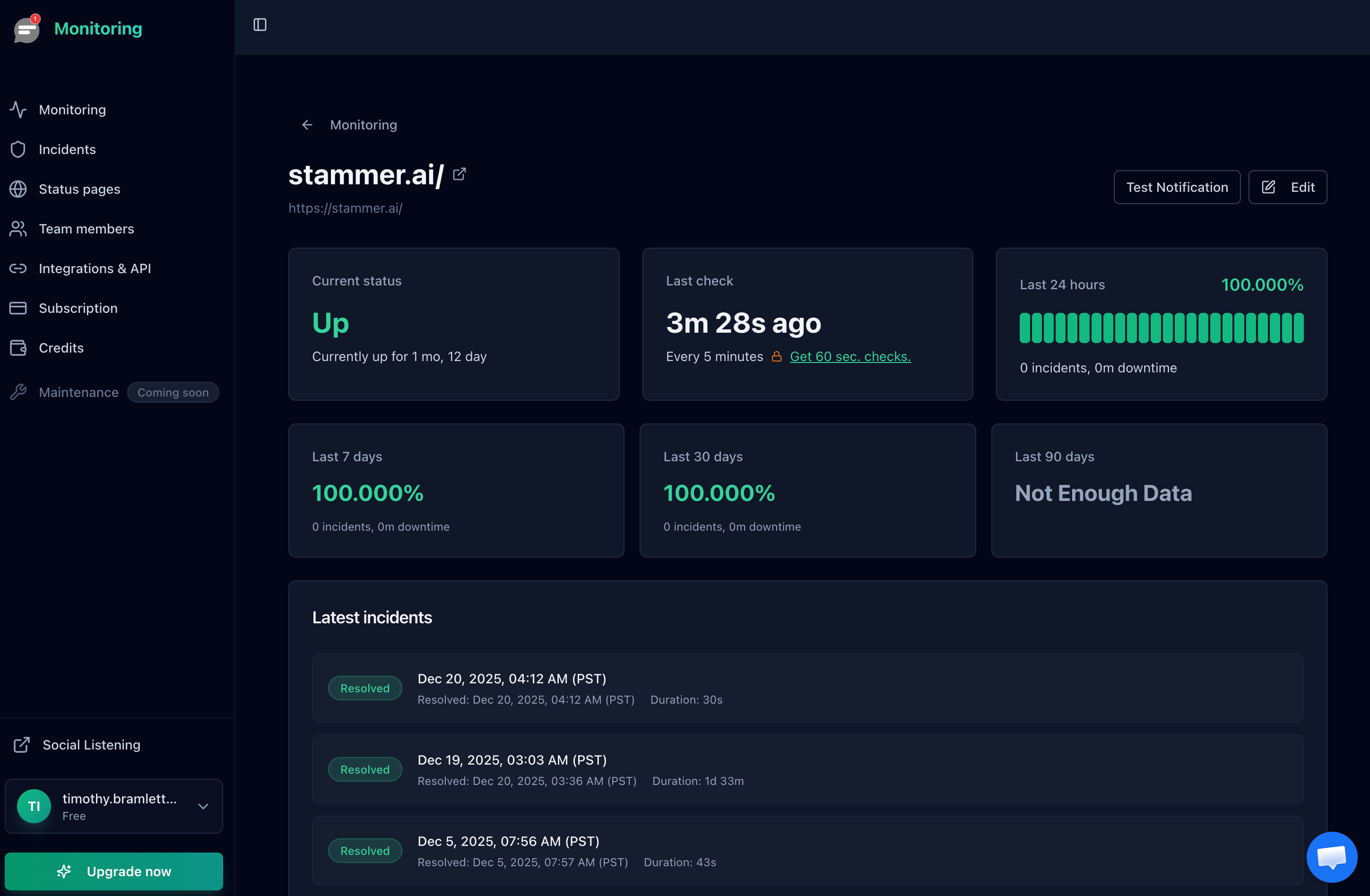
Notifier tracks your actual uptime percentage and response time over time, so you can verify your provider's SLA claims.
The Cost of Getting It Wrong
Why does any of this matter? Because downtime costs money. Recent research puts the average cost at:
- Small businesses: $137 to $427 per minute of downtime
- Mid-size companies: $5,000 to $16,000 per minute
- Large enterprises: $14,000+ per minute (some report $23,000+)
Let's put that in context with uptime percentages:
| Uptime | Downtime/Year | Cost at $200/min | Cost at $5,000/min |
|---|---|---|---|
| 99% | 5,256 min | $1,051,200 | $26,280,000 |
| 99.9% | 526 min | $105,200 | $2,630,000 |
| 99.99% | 53 min | $10,600 | $265,000 |
For a small business at $200/minute, the difference between 99% and 99.9% uptime is nearly a million dollars per year. For larger operations, the gap becomes even more significant.
Beyond direct revenue loss, downtime affects customer trust, SEO rankings, and brand reputation. These costs are harder to quantify but often exceed the immediate financial impact.
What's a Realistic Uptime SLA for Your Business?
Not every business needs five nines. Pursuing excessive reliability creates unnecessary costs and complexity. Here's a practical framework:
Personal Projects and Hobby Sites: 99%
If you're running a personal blog or side project, 99% uptime (two nines) is acceptable. That's about 15 minutes of downtime per day or 3.6 days per year. Most cheap shared hosting falls into this category.
Small Business Websites: 99.9% Uptime
For most small business websites, 99.9% is the standard target. This allows about 44 minutes of downtime per month. Decent VPS hosting, basic redundancy, and proper monitoring will get you here. This is what most hosting providers promise in their SLAs, including business internet providers advertising 99.9% SLA uptime.
SaaS and E-commerce: 99.9% to 99.99%
If your business depends on your website being up (SaaS products, online stores, payment networks requiring 99.99% uptime), aim for at least 99.9% and work toward 99.99%. This requires multiple availability zones, load balancing, database replication, and comprehensive monitoring.
Mission-Critical Services: 99.99%+
Healthcare systems, financial services, and emergency response platforms need 99.99% or higher. Achieving 99.999% uptime connectivity requires significant investment: multiple data centers, global distribution, active/active failover, dedicated on-call teams, and sophisticated incident management.
A survey of IT professionals found that 99.95% is the average acceptable uptime. That's about four hours of downtime per year. For most businesses, this is a reasonable target to work toward.
How to Achieve Higher Uptime Availability
Improving uptime isn't just about better hardware. It's about building systems that handle failure gracefully.
1. Choose Reliable Hosting
Your hosting provider sets the baseline. Cloud providers like AWS, Google Cloud, and Azure offer higher reliability than budget shared hosting. Read the SLA carefully and look for third-party uptime reports.
2. Add Redundancy
Don't put all your eggs in one basket. Deploy across multiple availability zones. Use database replication. Have backup servers ready to take over if the primary fails.
3. Use a CDN
A Content Delivery Network caches your content across servers worldwide. Even if your origin server goes down briefly, the CDN can continue serving cached content. This buys you time to fix problems.
4. Monitor Everything
You can't fix what you don't know is broken. External monitoring services check your site from multiple locations and alert you immediately when problems occur. The faster you know about downtime, the faster you can respond, and the closer you get to your SLA target.

Notifier's dashboard provides real time uptime status for all your monitored websites.
With Notifier's free plan, you can monitor 10 URLs with 5 minute checks, plus free SSL certificate monitoring on all plans. Paid plans offer 30 second checks for faster detection.
5. Monitor SSL Certificates
An expired SSL certificate makes your site effectively down. Browsers will block visitors with a security warning, and most users won't click through. With Let's Encrypt certificates expiring every 90 days, a failed auto-renewal can take your site offline without any server error. Notifier includes free SSL certificate monitoring on all plans, alerting you before your certificate expires.
6. Schedule Maintenance Wisely
Planned maintenance counts as downtime (unless your SLA explicitly excludes it). Schedule updates during low-traffic periods. Use rolling deployments that don't require taking the entire service offline.

Instant downtime alerts mean faster response times, which directly improves your uptime percentage.
Frequently Asked Questions
What is 99.9% uptime?
99.9% uptime (also called "three nines" or "3 9s availability") means your service can be down for a maximum of 8 hours and 46 minutes per year, or about 43.8 minutes per month. It's the industry standard for most business websites and the minimum you should expect from a quality hosting provider.
What is 99.99% uptime?
99.99% uptime ("four nines") allows only 52.6 minutes of downtime per year, or about 4.38 minutes per month. This is the target for SaaS products, payment networks, and e-commerce platforms where every minute of downtime directly costs money. Achieving four nines requires multi-zone deployments, load balancing, and comprehensive monitoring.
How much downtime is 99.999% uptime?
99.999% uptime ("five nines") allows just 5.26 minutes of total downtime per year, or less than 1 second per day. This level of 99.999% uptime connectivity is achieved by services like AWS DynamoDB Global Tables and payment processing networks. It requires massive infrastructure investment and is overkill for most applications.
What uptime does AWS guarantee?
AWS uptime percentages vary by service. EC2 offers 99.99% for multi-AZ deployments. Amazon Aurora SLA guarantees 99.99% monthly uptime percentage for Multi-AZ clusters. S3 offers 99.9%. DynamoDB standard tables are 99.99%, while global tables offer 99.999%. These are SLA commitments, not guarantees. Actual uptime may be higher, but compensation only kicks in when the SLA is breached.
How do I calculate SLA uptime?
Divide the total time your service was available by the total time in the measurement period, then multiply by 100. For example, if your site was down for 4.38 hours in a year (8,760 hours): ((8760 - 4.38) / 8760) × 100 = 99.95%. Use the calculator above to quickly convert any SLA percentage to allowed downtime.
What SLA uptime percentage should my business target?
For most business websites, 99.9% is the right starting target. SaaS and e-commerce should aim for 99.95% to 99.99%. Mission-critical services (healthcare, finance, payment networks) need 99.99% or higher. Each additional nine costs significantly more to achieve, so match your target to your actual business risk, not a vanity number.
Where can I compare uptime SLAs across hosting platforms?
Each cloud provider publishes their SLAs on their website. For a quick comparison: AWS EC2 offers 99.99% (multi-AZ), Azure VMs offer 99.9% to 99.99%, and Google Compute Engine offers 99.99% (multi-zone). The comparison table above breaks this down by service. To verify actual uptime (not just SLA promises), use an external monitoring tool that tracks uptime independently.
Does planned maintenance count against uptime SLAs?
It depends on the provider. Some SLAs explicitly exclude scheduled maintenance from uptime calculations. Others count all downtime regardless of cause. Always read the fine print. Even if your provider excludes maintenance from SLA calculations, your users still experience downtime during maintenance windows.
The Bottom Line
A "good" uptime percentage depends entirely on your business needs.
- 99.9% (three nines) is the industry standard for most websites and the minimum you should accept from any serious hosting provider
- 99.99% (four nines) is a reasonable target for businesses where downtime directly costs money
- 99.999% (five nines) is overkill for most organizations and requires significant investment to achieve
Don't chase five nines because it sounds impressive. Set a realistic target based on what downtime actually costs your business, invest appropriately in redundancy and monitoring, and focus on detecting and resolving issues quickly when they occur.
The first step is knowing where you stand. Start monitoring your uptime today with free SSL certificate monitoring included and you'll have real data to work with instead of guesses.
